IBM Apptio

Apptio

A place for Apptio product users to learn, connect, share and grow together.


#Aspera
#Apptio
#Automation
#FinOps
#Apptio
#ITAutomation
 View Only
Expand all | Collapse all

YTD detail issue

  • 1.  YTD detail issue

    Posted 08/28/15 02:47 PM

    We have encountered this issue when creating detail YTD reports and I was wondering if others have also encountered this issue, and wanted to know if we were doing something wrong.  When we are in a particular month, let's say JULY 2015, and looking at PC costs by employee within the organization. The raw data has all employees, their PC inventory # and the current depreciation amount of that PC (it is a monthly file that gets produced each month end). So a manager can filter by their cost center and get their total PC charges for the current Month, and the employee detail that makes up the charges. The current month detail always matches the total charges.  The YTD total however does not match the YTD detail.  When I dig into it, this is due to an employee that existed in the beginning of the year, had PC charges JAN-APR but no longer has a charge in JULY.  So when your in the month of JULY 2015  the YTD detail only shows YTD detail for the people on the July raw file, even though the former employees did have charges in JAN-APR and the YTD KPI has those charges included (as it should).  How do I get the detail to match the YTD total?


    Thanks


    Kevin Eichas


    #CostingStandard(CT-Foundation)


  • 2.  Re: YTD detail issue

    Posted 08/31/15 02:01 AM

    Kevin,


    This is a common question - many times along the lines of "How do I show row of data that existed in previous months, but don't now". Apptio accounts for this with this via publishing fields into a perspective with "Show all rows in a time based query" checked.


    I have placed instructions (and screenshots below) - hope this helps.


    In the below example I want to be able to see all Accounts - regardless of if they are active in the current month.


    1. Open a report (or create a sandbox report if you don't have one).

    2. Insert a table

    3. Drag the field you want to see all values for into the Rows section (NOTE: If you already have a field with this value in it you can do the below steps from that table).

    4. Right Click the field and click Publish

    5. Select the Grouping (Perspective) you want to save the field in

    6. Select the check box titled "Show all rows in time-based query"

    7. Click Publish

    8. Modify you table by removing the original field and selecting the field from the perspective


    You can quickly check if this worked by right clicking on your data table and selecting Show Full Data Path.

    When the full data path loads look for the phrase "!ALL_ROWS"


    An important note: For YTD functions to work correctly the field you are reporting on must be included in the identifier of the object you are reporting on or not change if evaluated in the context of the identifier.


    For example - in your PC data above, if only the serial number was included in the object identifier, but the employee name changed across time your YTD functions on the Employee Name may be calculated incorrectly.


    Hope this helps you - if you have further questions apptiosupport will be glad to help you (or connect you with your CSM).


    #CostingStandard(CT-Foundation)


  • 3.  Re: YTD detail issue

    Posted 08/31/15 01:44 PM

    Thanks Craig for the response back.  Does the dataset have to be a full year file?  It currently is just a monthly file that gets uploaded each month, without any type of append.  The solution posted above did not solve the problem. If employee A had cost in January, but left the company in February, the March - fwd YTD detail does not have employee A anymore.


    -Kevin


    #CostingStandard(CT-Foundation)


  • 4.  Re: YTD detail issue

    Posted 08/31/15 02:53 PM

    Kevin,


    No it does not have to be full year - if you publish the employee name to a perspective with show all row across a time based query selected, all employees regardless of if they are in the current month (as long as they had a cost) should show.


    If this is not working as expected please reach out to Apptio Support and they can look at the exact report and requirements.


    #CostingStandard(CT-Foundation)


  • 5.  Re: YTD detail issue

    Posted 08/31/15 03:06 PM

    Thanks Craig, Will log issue with Support, as you can see from the screenshot the fields were published and the data path shows "!ALL_ROWS".  However when you extract the data to excel the employees that fell off the list no longer show up in the YTD detail report even though they have YTD cost.


    #CostingStandard(CT-Foundation)


  • 6.  Re: YTD detail issue

    Posted 09/08/15 04:50 PM

    If this is still not working, please check to make sure all columns listed in the report table's Grouping (i.e. everything that's BOLD in the Columns quadrant of the AHQ settings) must be published to a perspective and have "Show all rows" checked.


    #CostingStandard(CT-Foundation)


  • 7.  Re: YTD detail issue

    Posted 09/01/15 02:58 PM

    As I continue to dig into the outage I found another use case that causes the detail to give incorrect information.  Employee A was in Cost Center 1234 for the first 3 month of the year, then moves to Cost Center 5678.  In the month of July, when looking into the PC costs, Cost Center 5678's mgr sees Employee A's monthly cost but, YTD cost is = 0 and it should be Apr+May+Jun+Jul. Also Cost Center 1234's mgr does not even see Employee A at all in the detail even though  they had costs in Jan & FEB & MAR.


    #CostingStandard(CT-Foundation)


  • 8.  Re: YTD detail issue

    Posted 03/04/19 10:31 AM

    @Craig Morrill Thanks for this walk-through! Not sure if Apptio does any kind of internal support cross-training but you may want to consider publishing this across support resources somehow. I've had this question/issue pending with Support for a bit (as have some others from what my hunting around on Connect tells me) and the response we've been getting is 'just take the changed data point off of the report ta-da!' 


    #CostingStandard(CT-Foundation)


  • 9.  Re: YTD detail issue

    Posted 03/04/19 02:35 PM

    @Stephanie Geltrude thanks for the feedback on your support experience. I'll make sure this knowledge is shared within Apptio Support too.


    #CostingStandard(CT-Foundation)


  • 10.  Re: YTD detail issue

    Posted 10/22/15 11:47 AM

    Kevin . . . it is not just you and does seem very fundamental.


    Firstly, needless to say, there are completely made up, fictional, figures (so I don't break anything confidential), but the proportion by which Apptio gets things wrong is real


    In the table below, each individual month's 'RevEx' is 100% correct.  As such, the YTD figure should just be the addition of each month's figure's until the current month selected.  So, March RevEx YTD should be 25,928,322 + 26,444,482.5+34,035,291.75 = 86,408,096.25.  But that is not the answer Apptio gives.

    YTD Not Working.png

    Again. this will be due to items dropping out of the master dataset month on month.  In the case of these financials, it may be because of cost centre restatement or in the case of servers, it may be due to a server being decom'd.


    As per Kevin, I have done the 'show all rows in time-based query' and this hasn't helped


    Equally, it should be pointed out that this occurs in all aggregations of time, not just YTD.  In the case of 'Annual Cost', I have had a particular storage device having a monthly cost of £5000 (say) but an Annual Cost of 0!  This is because the storage device was decom'd and so isn't a unit in the last month's dataset being calculated.


    What is the solution?


    #CostingStandard(CT-Foundation)


  • 11.  Re: YTD detail issue

    Posted 10/22/15 12:29 PM

    Thank Neil, glad to know I am not crazy.  As I continue to dive into this, I think perhaps this is a flaw in the design or architecture of Apptio. All financial systems that I am aware of, post results to some kind of table/cube.  Those results can be viewed/displayed to report any variations of the data that exist using the available data fields/elements, but no real-time calculations of the underlying data are taking place. Because of this, users can aggregate the data, and such but all users who perform the same actions will always report the same totals (in your example Mar YTD RevEx YTD is & should always report $86.4MM)  Apptio however does not carry up/post financial results within the model, so it in fact is doing real-time calculations or on the fly calcs, which probably saves db space and processing times.  This however has results in in-accurate results for any month which you are not in per apptio timeline.  So if you are in March 2015, the results for March calculate correctly, but if you were to pull Q1 or YTD while in the month of Mar, no guarantee that January, and February results would be correct. 


    #CostingStandard(CT-Foundation)


  • 12.  Re: YTD detail issue
    Best Answer

    Posted 10/22/15 07:21 PM

    I have come to a workaround which gets the exact results for YTD, but it isn't, shall we say, elegant.


    I hit on it when considering the table I posted in my previous reply above.  As I said there, the RevEx by month came out exactly correct but the RevEx YTD didn't.  Now, I created that table by putting RevEx and RevEx YTD in the 'Values' bit of the Ad Hoc Query Configuration and a Month Range in the 'Columns' bit of AHQ Config.


    In retrospect, what hit on me was not that RevEx YTD came out wrong, but that the RevEx came out right for each month!  The reason that was surprising was that if the Month-based 'Time' element in the columns calculated in the same way as the Value Field Modifier in the Value field (i.e. look at past and future month costs of just the unit identifiers of the current month) then surely even the RevEx from other months that current one would also come out wrong (as suggested by your above reply, Kevin).  In other words, both RevEx and RevEx YTD would be wrong but consistent: RevEx would be wrong but RevEx YTD would be a consistent and accurate addition of those wrong monthly RevEx figures.


    The fact that using the Month-based Time features in the column came out right, means that the calculation must proceed in a completely different way.  It must look at those time period/s specified and work out the cost for the unit identifiers of that time period, and display it.  That then comes out for the right value per month and obviously, I could set up a formula in an editable table to add those together.


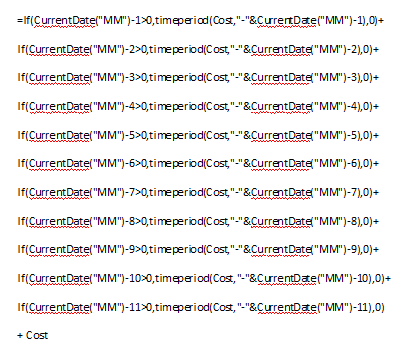
    And if I can do that in a table, why not in a formula?  I imagined the 'TimePeriod' function would do the same.  So, I tried (In Sept 2015): =TimePeriod(RevEx,-8)+TimePeriod(RevEx-7)+TimePeriod(RevEx,-6)+TimePeriod(RevEx,-5)+Time Period(RevEx,-4)+TimePeriod(RevEx,-3)+TimePeriod(RevEx,-2)+TimePeriod(RevEx,-1)+RevEx


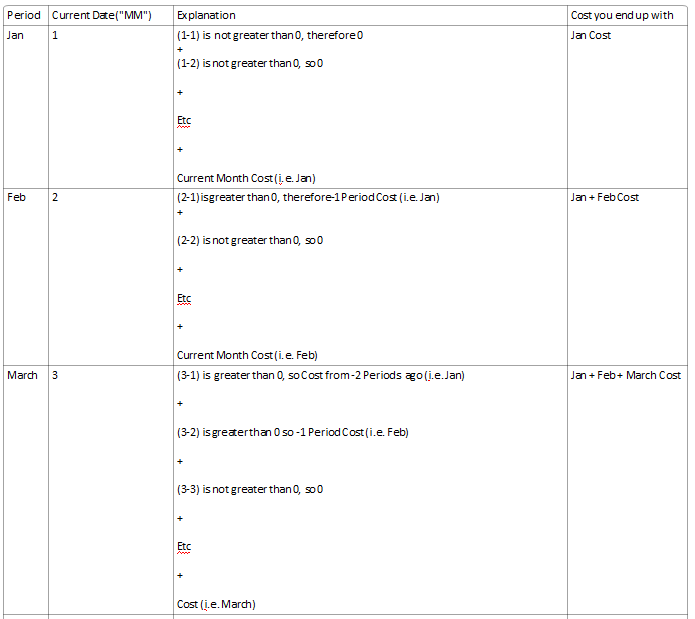
    And, Ta Dah!  It worked.  The issue is that this is a very specific formula just for September, so had to build this grotesquely long formula so that it would work in whatever month you happened to be in:
    YTD Formula.png

    Which basically works as follows:


    YTD Explanation.png


    Again, this comes out with exactly the right answer. Of course, in the time period function you can have whatever metric you like to be YTD: Cost, RevEx, Storage Allocated, CPU Hours etc


    So, in future, rather than used =YearToDate(Metric), going to have to use a big old formula.  It works, but is annoying.


    What I suggest Apptio do is change the behaviour of the =YearToDate(Metric) formula to mimic what I am doing above so we can use that again (and for all the time aggregation functions)


    That is, currently the time aggregation functions:

    • Look at each unit identifier in the current month in turn
    • For that unit identifier, aggregated results of metric from all time periods
    • Does the same for all other unit identifier in the current month
    • Sums the results, and that is your (often incorrect) answer (, if the unit identifiers have changed)


    Instead, what needs to happen is:

    • For each relevant month, calculate the metric values for each unit identifier from that month
    • Afterwards, it can then aggregate the results for the same unit identifiers that exist in multiple months
    • But, would still count a one-month result (say) for a unit identifier that only appeared in one month (say), in the grand total
    • The resultant total would give the right result.


    Neil


    #CostingStandard(CT-Foundation)


  • 13.  Re: YTD detail issue

    Posted 09/12/17 08:23 PM

    Neil, thanks for this detailed write up. Your proposed change to Apptio is essentially what already happens when a published metric has the "all rows" option selected. This option will force the system to build a list of identifier values for the entire fiscal year instead of only the current month.


    The earlier reply from Craig Morrill details how to take advantage of this option in a custom report.


    #CostingStandard(CT-Foundation)


  • 14.  Re: YTD detail issue

    Posted 09/12/17 08:02 PM

    Ever any real resolution from Apptio here?  I'm struggling with the same issue. 


    #CostingStandard(CT-Foundation)


  • 15.  Re: YTD detail issue

    Posted 09/12/17 08:20 PM

    Hi Doug, please take a look at the initial reply from Craig Morrill on Aug 31, 2015. This explains the correct process for building a report that uses aggregate time periods like YTD. 


    #CostingStandard(CT-Foundation)