@Jenny Franklin, I have also used ReplaceRegEx() just once, but in this case, it would seem you could do it as follows, @Doug Copeland:
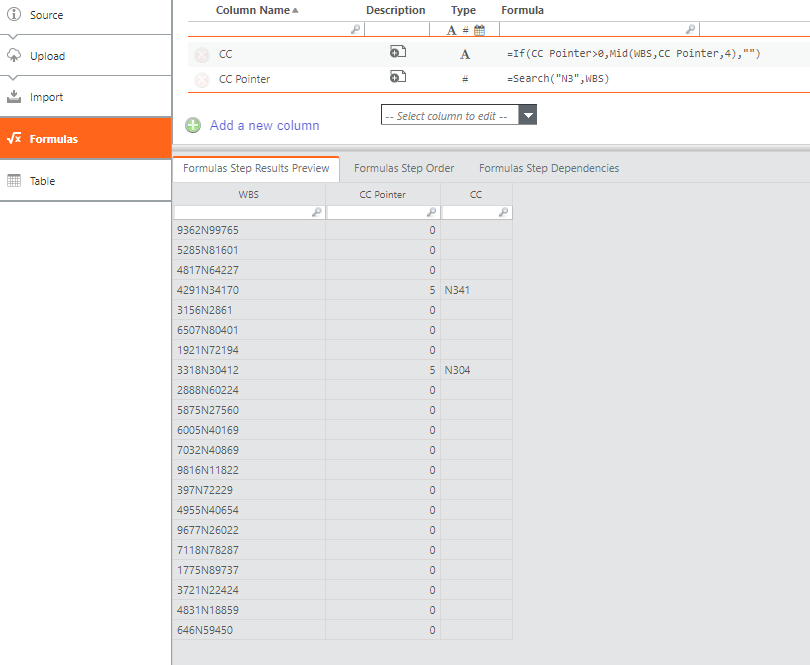
You could do it with a single formula, but the set of two sounds cleaner:
CC Pointer (#) =Search("N3",WBS)
CC (A) =If(CC Pointer>0,Mid(WBS,CC Pointer,4),"")
I generated random data, with an N thrown somewhere into the string, and the logic seems to hold. If it finds "N3" anywhere in WBS, it will take the next 2 characters.
OK, it doesn't check whether there are enough characters afterwards, but if you need that logic, I guess you can figure it out yourself, depending on your naming conventions 😛😎
I hope this helps.
------------------------------
Regards, Guillermo
------------------------------
Original Message:
Sent: 02-01-2023 15:42
From: Doug Copeland
Subject: The right function to search and return specific characters
I'm trying to figure out how to pull specific data from an existing fiend in CT. I have an existing field (WBS Description) that has varying number of text characters in the field. Embedded in the text (in some cases) is a Cost Center code. I want the new field to be labeled "Cost Center" and I want it to scan the WBs Description filed and if it finds "N3" anywhere in the field I want it to return 4 characters starting with the "N3". So for example, it would return N352, N364, N312 (assuming it found "N3" in the WBS Description field). Thanks in advance for any help.
Doug
@Chris Davidson
@Julia Anderson
#CostingStandard(CT-Foundation)