Hello @Rebecca Brent. You pose two interesting points:
1) Why creating "Lookup Helper" columns in our data
2) Using TableMatch() instead
My 2 cts. on both accounts:
1) We find ancillary columns extremely helpful. Some examples: in the data we might have budget and actuals line items, and we want Lookup() calls to get only what we're looking for. E.g. if we have Application Name=APP1 and Model Type=Actuals, we would define Application and Model Type=Application Name&&Model Type. We find this much better than doing two Lookup() calls and then discriminating with If()s.
2) TableMatch() is tricky on two accounts: first, it's a heavy-hitter function. As per what we might call the Peter Parker Principle-"With great power comes great responsibility"-use this function with care.
You ask how it works: from a calling table you address the reference table, e.g. DBMS=TableMatch("DBMS Tablematch",DBMS). We can only specify the reference table and the one we want to retrieve data from.
So far, so good. The CT engine tries to match EVERY COLUMN in the reference table to one in the calling table. Both columns must have the same name. From the prior example:
In the Reference table table we have:
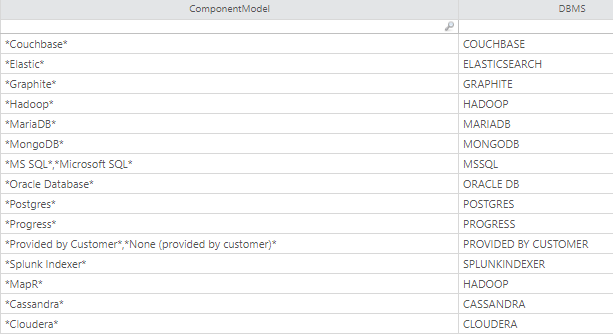
For this to work, in the calling table we need to have a column called "ComponentModel", and TableMatch() will try to map its value with the contents of the reference table.
The big difference with a regular Lookup() is that we can specify wildcard characters, or have comma-separated lists of values.
It gets more interesting with multiple columns. In the following example, TableMatch() will try to match columns 1 & 2, and return column 3.
If eirther column is empty, the function will ignore it. We would have to have a lot of nexted If()s to achieve the same.

It's easy to make mistakes, and I still misspell column names every now & then.
Also, coming back to it being a
heavy-hitter, Apptio recommends having TableMatch() in its own Formula step, away from any other functions such as SumIf() or LookupEx().