IBM Apptio

Apptio

A place for Apptio product users to learn, connect, share and grow together.


#Aspera
#Apptio
#Automation
#FinOps
#Apptio
#ITAutomation
 View Only
  • 1.  [+] STUMPER: Trace multiple model rows at once

    Posted 05/20/16 10:36 AM

    STUMPER: Pre-solved Q&A to sharpen your TBM and Apptio skills.

    Solution posted in 7 days if nobody submits a correct answer.

    See title for rating: [+] Easy   [++] Moderate   [+++] Challenging


    My Cost model contains a Tickets object with incident-level detail of my organization's IT help desk:
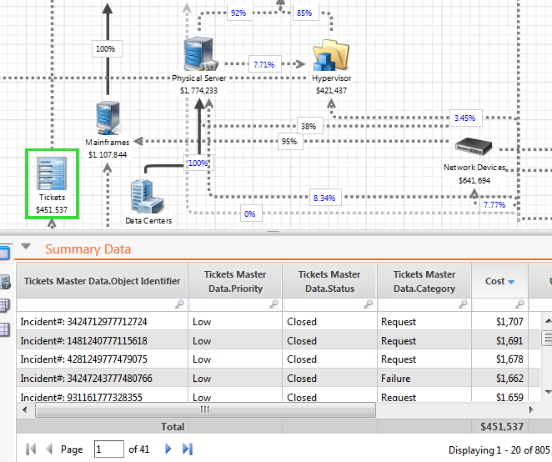
    multiple_ticketSummaryData.PNG


    I know how to trace a single incident's cost flow up and down in the model: I can right-click one of the incident numbers seen above in the Object Identifier column, then Trace that incident.


    See the Priority column, though? It has values such as Low, Medium, High, Critical.


    I wish it was possible for me to trace all of the critical-priority incidents at once in this Cost model.


    Is there a way to trace multiple rows at once (if they share the same column value, such as "critical")?


    #CostingStandard(CT-Foundation)


  • 2.  Re: [+] STUMPER: Trace multiple model rows at once
    Best Answer

    Posted 05/20/16 11:04 AM

    Hi Christopher,


    You can indeed!

    I haven't made a new project to show this and I won't be able to include screenshots with our own data so I'll have to describe it. But what I did was get my summary data table looking like yours, then searched in the Priority field for the value I wanted to see (e.g. critical) then right clicked just as you would for an individual ticket, but this time the option that came up was 'Trace Critical' instead of 'Trace Incident...' so once you select Trace Critical, it will show you all of the values that have the Priority of critical


    Regards,

    Oli


    #CostingStandard(CT-Foundation)


  • 3.  Re: [+] STUMPER: Trace multiple model rows at once

    Posted 05/20/16 12:59 PM

    Your suggestion worked, thank you:

    criticalTickets.PNG


    With the trace still active as seen above, I'm now able to select any other object in the Cost model to see how this $324 flows.

    For instance, I selected Business Units object and was able to determine that all but one of my BUs had critical-level tickets this month (and the combined per-BU cost related to these critical tickets).


    #CostingStandard(CT-Foundation)