IBM Apptio

Apptio

A place for Apptio product users to learn, connect, share and grow together.


#Aspera
#Apptio
#Automation
#FinOps
#Apptio
#ITAutomation
 View Only
  • 1.  [+] STUMPER: Seeing {Various} in data table

    Posted 02/09/15 04:38 PM

    STUMPER: Pre-solved Q&A to sharpen your TBM and Apptio skills.

    Solution posted in 7 days if nobody submits a correct answer.

    See title for rating: [+] Easy   [++] Moderate   [+++] Challenging


    I've been using Apptio long enough to know what {Various} means when I see it in a table.

    It appears when the result of a data operation or formula spans more than one unique cell value.


    Rather than squeeze all the result values into a single table cell, Apptio represents these multiple cell values with {Various}.


    On with my question, then:


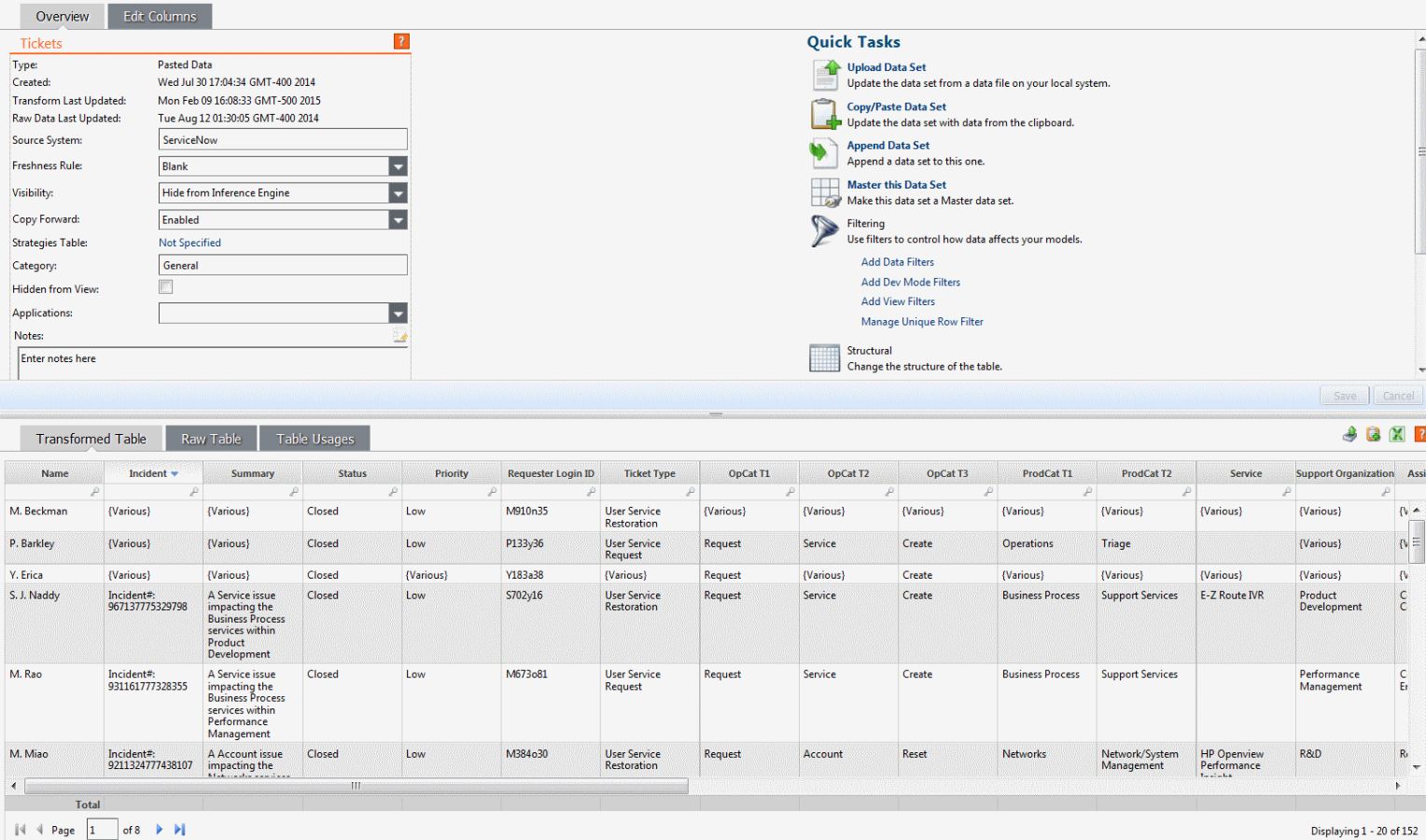
    In my Cost metric model, I have a Tickets object which I want to back with this copy-and-pasted table of IT help desk tickets (click to enlarge):
    tickets_overview.png


    The Tickets object in the Cost model uses the Incident column as its object identifier, which seems like a good choice.

    One problem, though: I'm seeing {Various} in the Incident column, in 3 out of the 152 table rows.


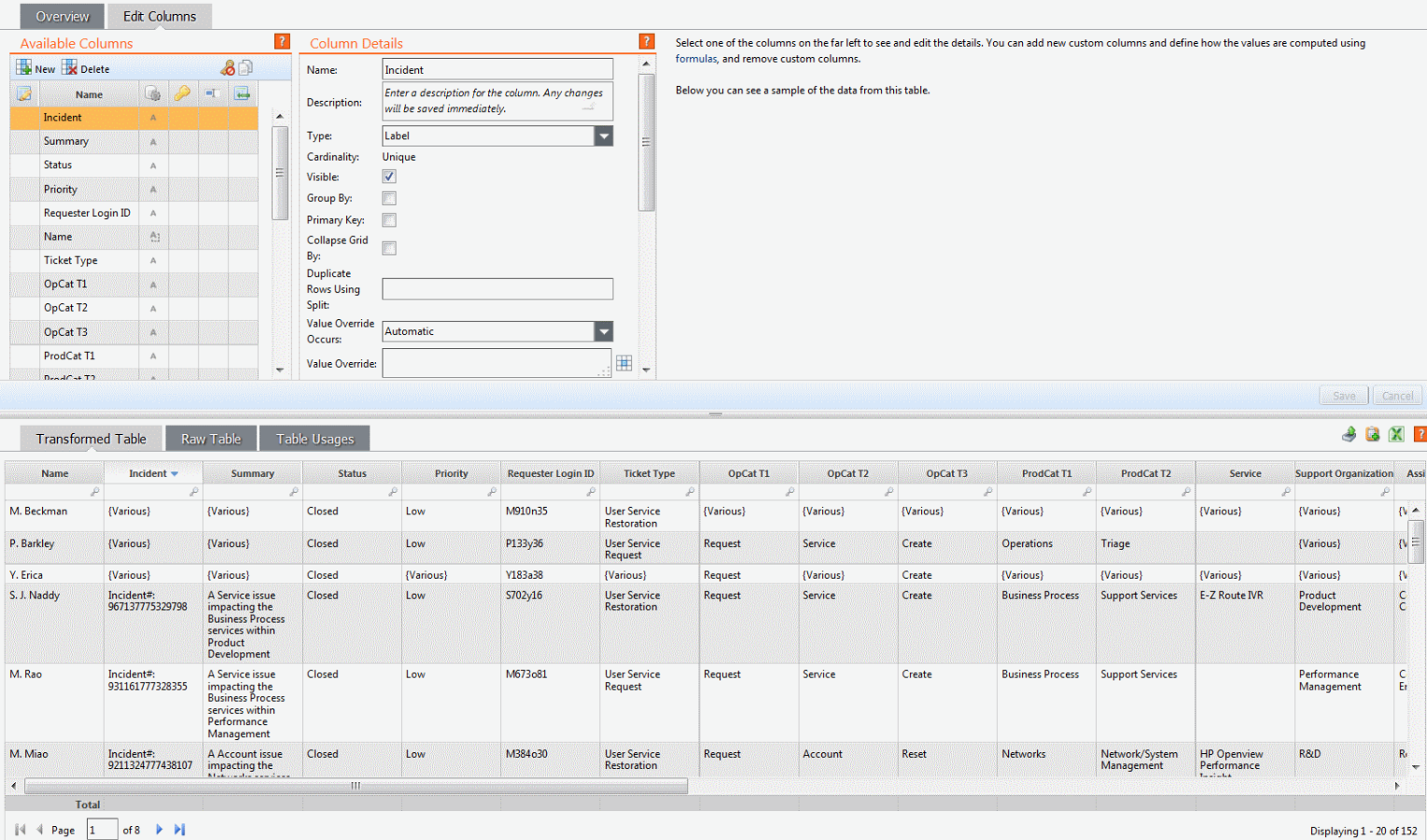
    I clicked Edit Columns to see the value formula for the Incident column:
    tickets_column.png


    ..but I don't see any value override formula which might explain the appearance of {Various}.


    What steps can I try to get rid of the {Various} I see in the Incident column?


    #CostingStandard(CT-Foundation)


  • 2.  Re: [+] STUMPER: Seeing {Various} in data table
    Best Answer

    Posted 02/09/15 04:47 PM

    Currently the data set is grouped on Name only. Check the group by box on the incident column and the {Various} will be removed.


    #CostingStandard(CT-Foundation)


  • 3.  Re: [+] STUMPER: Seeing {Various} in data table

    Posted 02/09/15 04:55 PM

    Correct--you have eagle eyes.


    Someone checked the Group By box for the Name column, causing the table to pivot by the Name values.


    You noticed that the Name column icon was different from the others in the Edit Columns section.

    Its icon includes a dotted square, indicated the table is grouping on this column.


    I selected the Name column, unchecked its Group By box, and saved the change.

    Now the {Various} values are all gone from the table.


    #CostingStandard(CT-Foundation)


  • 4.  Re: [+] STUMPER: Seeing {Various} in data table

    Posted 02/12/15 12:18 PM


  • 5.  Re: [+] STUMPER: Seeing {Various} in data table

    Posted 01/10/20 02:34 PM

    Here is an interesting article to check out regarding various. 


    @Jenny Franklin 


    #CostingStandard(CT-Foundation)