IBM Apptio

Apptio

A place for Apptio product users to learn, connect, share and grow together.


#Aspera
#Apptio
#Automation
 View Only
  • 1.  [++] STUMPER: Optimize a Lookup formula

    Posted Tue March 01, 2016 12:34 PM

    STUMPER: Pre-solved Q&A to sharpen your TBM and Apptio skills.

    Solution posted in 7 days if nobody submits a correct answer.

    See title for rating: [+] Easy   [++] Moderate   [+++] Challenging


    I am lucky enough to have highly detailed time tracking data covering all major IT projects.

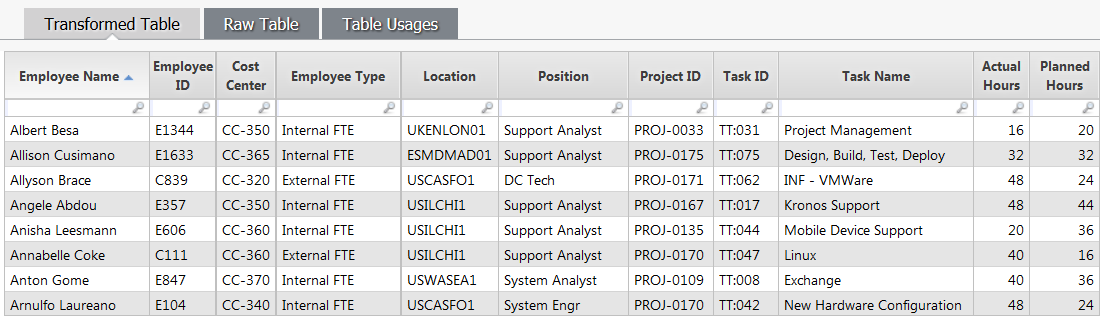
    Here's a peek at my Time Tracking Stage table, and it's large: around 450,000 rows per month:
    timeTrackingData2.PNG


    The Employee ID values aren't part of the original data. I map these in by looking up the Employee Name in my labor data. But if there is no valid entry in the labor data, I want to fallback to a default Employee ID value of "E0000" instead.


    Here is the column formula involved:

    Employee ID = If(Lookup(Employee Name, Labor Roster, Labor Name, EID) != "", Lookup(Employee Name, Labor Roster, Labor Name, EID), "E0000")


    My Labor Roster data table is also relatively large: 40,000 rows per month.


    I've noticed this transform table seems to take a bit of time to calculate.


    Why is it taking so long, and is there anything I can do to speed things up?


    #CostingStandard(CT-Foundation)


  • 2.  Re: [++] STUMPER: Optimize a Lookup formula
    Best Answer

    Posted Wed March 02, 2016 06:48 AM

    The calculations may be taking a while as it has to go back and forth quite a lot between data sets, or just because of how large these data sets are.


    To solve the first issue of going back and forth, I would do the If(Lookup) in a couple of steps. So the first one would be pretty much the same, however I would do an Emp Lookup column (and hide it later) with the value =Lookup(Employee Name, Labor Roster, Labor Name, EID). Then I would use a column to give E0000 for the blanks that have been returned, so a column called Blank Emp ID (as an idea) =If(Emp Lookup ="", "E0000"). Then finally, a column that you will keep, called Employee ID and the formula =Emp Lookup&Blank Emp ID to get the values that are correct, and the values of E0000 in the same column without having to do a long if with two lookups that will hopefully improve the speed of calculations.


    This may just be a long winded way to get to the same point, and may also take a while to calculate but I prefer to keep all functions separate to reduce the possibilities of a mistype as it's really easy to see where you went wrong.


    Oli


    #CostingStandard(CT-Foundation)


  • 3.  Re: [++] STUMPER: Optimize a Lookup formula

    Posted Wed March 02, 2016 10:22 AM

    Your idea succeeded, and it reduced my data table's calculation time.


    The worst-case situation was 450,000 x 40,000 x 2 = 36 billion data-compare operations, understandably taking a while to calculate.


    Thanks to your method of reducing the logic from two to one Lookup() functions, now we're down to just 18 billion, a significant calculation reduction.


    Now I'm going to try to figure out a way to reduce the row counts of the two related tables (Time Tracking Stage and Labor Roster) which will help even more. For instance, my company doesn't have 40,000 employees, so maybe I can transform the Labor Roster and then group the new transform table by its EID (employee ID) column. Then I can target the new transform with the Lookup() function.


    I tried this change just now: Sure enough, my new Labor Roster Grouped transform table has only 2,000 rows.


    Now the Lookup() function's worst-case performance is 450,000 x 2,000 = 900 million data-compare operations.

    This is still a lot, but it's only 2.5% as many operations as what I started out with--a big improvement!


    #CostingStandard(CT-Foundation)