IBM Apptio

Apptio

A place for Apptio product users to learn, connect, share and grow together.


#Aspera
#Apptio
#Automation
 View Only
  • 1.  [+] STUMPER: Malfunctioning HTML report component

    Posted Wed January 28, 2015 11:11 AM

    STUMPER: Pre-solved Q&A to sharpen your TBM and Apptio skills.

    Solution posted in 7 days if nobody submits a correct answer.

    See title for rating: [+] Easy   [++] Moderate   [+++] Challenging


    I'm working on an application cost overview report.

    Here's what I've got so far (click to enlarge):html_component.png


    The green highlighted box shows my selected HTML component, which I added by clicking Insert > HTML from the Ribbon.

    It's a message to indicate whether this month's costs are above or below budget.


    If you look closely at the HTML component's function area just below the Ribbon, you'll see:

    <%=IF(Cost>Budget,"Warning: Cost exceeds budget this month","OK: Cost below budget this month")%>


    This month's actual application costs are $4.78M.

    And this month's budgeted application costs are $3.45M (see top-left KPI, below total cost).

    ...but the HTML component I created displays the wrong message: it says Cost is below Budget.


    How should I adjust the HTML component so it shows the correct message?


    #CostingStandard(CT-Foundation)


  • 2.  Re: [+] STUMPER: Malfunctioning HTML report component
    Best Answer

    Posted Wed January 28, 2015 05:31 PM

    Two answers to this question...

    1. this is a top level report and therefore the HTML component will not have an object or model context by default.  you must set this context for the component to evaluate as expected

    2. this is a customization to a standard, out of the box report and therefore adding this component creates an impediment to a friction-less content upgrade and therefore adding this component to the report is not recommended in the first place - unless of course the client has signed off on accepting the additional maintenance associated with managing content upgrades with customizations


    #CostingStandard(CT-Foundation)


  • 3.  Re: [+] STUMPER: Malfunctioning HTML report component

    Posted Thu January 29, 2015 10:28 AM

    Right on target, and great reminder about report modifications affecting upgrades.


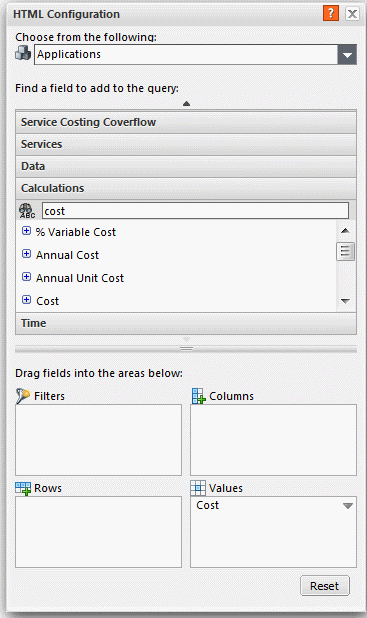
    Assuming this is a from-scratch report, I took your advice and looked at the HTML Configuration dialog to the right of my report table.


    Its top-of-dialog context says Applications, but no fields or metrics have been dragged down to the bottom four areas (Filters, Columns, Rows, Values) - so this HTML component doesn't know which object context (if any) to use.


    My formula uses Cost and Budget, both of which are metrics.


    To set the context for this report component, I found Cost in the Calculations perspective and dragged it down to the Values area:
    html_cost.png

    ...and then my formula worked correctly, showing the warning message.


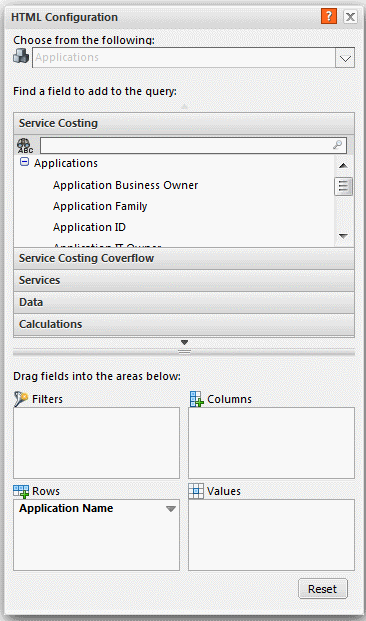
    Even better: drag a locked field down to the Values area. This will gray out the object context area (top of configuration dialog) to denote that the HTML component is now locked to the Applications object:
    html_applications.png

    ...in the example above, I dragged the Application Name field, which was published in the Service Costing/Applications perspective and locked to the Applications object.


    My formula still works correctly, but now I have reduced the chance of inadvertently changing the context next week when I work on this report some more.


    #CostingStandard(CT-Foundation)