IBM Apptio

Apptio

A place for Apptio product users to learn, connect, share and grow together.


#Aspera
#Apptio
#Automation
#FinOps
#Apptio
#ITAutomation
 View Only
  • 1.  [+] STUMPER: Equally weighted path in model

    Posted 04/28/15 10:00 AM

    STUMPER: Pre-solved Q&A to sharpen your TBM and Apptio skills.

    Solution posted in 7 days if nobody submits a correct answer.

    See title for rating: [+] Easy   [++] Moderate   [+++] Challenging


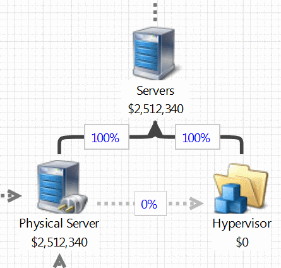
    I'm building a cost transparency model. It's not quite finished yet.
    Here is one section of it as of 20 minutes ago:
    equally working.png


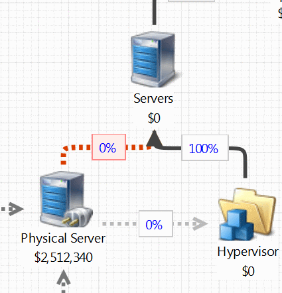
    I made a lot of model configuration changes in the last 20 minutes, but just now noticed my model now looks like this:
    equally broken.png


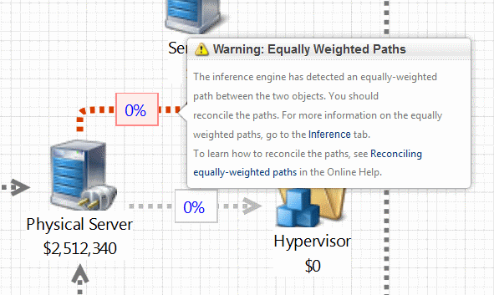
    What is that red line? I hovered my mouse over it and saw:
    equally warning.png


    Okay, I have no idea what that means or how I caused this issue.

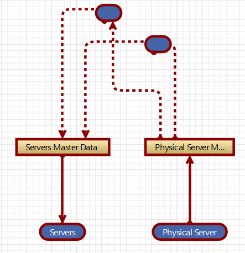
    But I did right-click the red allocation line and try tracing it in the Inference tab:
    equally diagram.png


    Does that help at all?


    How did I cause this issue, what does it mean, and how can I try to fix it?


    #CostingStandard(CT-Foundation)


  • 2.  Re: [+] STUMPER: Equally weighted path in model
    Best Answer

    Posted 04/28/15 02:33 PM

    The simple answer is undo everything from upto 20 mins ago and do it again more carefully this time.


    Jokes apart - !The most likely cause of the issue is that there are multiple Key columns in the Physical Servers Master Data dataset that have an inference link to columns in the Servers Master Data dataset.


    What does this mean? On the modeling surface, Apptio sees more than one inference path between objects and confused about which one to use for the allocation. When you click on the red allocation on the modeling surface, you should be able right click the line, click on Show Inference Trace and then see the actual columns that are causing the multiple paths.


    Resolution: In the inference trace, find the columns that are incorrectly linked and you have one of the following options:

    • Change the column that was incorrectly linked to a Label.
    • Change the content of the inference link so that it is unique. For e.g. Make the key for Physical Servers to Servers be: "Phy Svr to Svr - ServerName1" and the key between Physical Servers to Hypervisor be: "Phy Svr to Hypervisor - ServerName2".


    You could also consolidate the key column so that every unit in the Physical Servers object will either have a link to Severs or Hypervisor but not both.


    #CostingStandard(CT-Foundation)


  • 3.  Re: [+] STUMPER: Equally weighted path in model

    Posted 04/28/15 03:25 PM

    You solved my issue, thank you.


    I took your advice and looked more carefully in the Inference tab when tracing the red allocation path, and I saw:

    equally red.PNG


    From the two middle red boxes, I see that Apptio found a data-based reference using two key-type columns instead of just one.


    It turns out I don't need the Physical Server Master Data.App Key column at all - I added it when I was running some tests and I forgot all about it.


    I changed Physical Server Master Data.App Key from key-type to label-type and my equally weighted path warning went away. Everything is working properly now.


    #CostingStandard(CT-Foundation)


  • 4.  Re: [+] STUMPER: Equally weighted path in model

    Posted 01/19/18 08:26 AM

    Hi I have a similar issue, but a very difficult time to identify where the problem is based on these instructions. I simply can't find two key connections between the two data sets. Can you please try to guide me where to look?


    Inference screen shot:

    Screenshot of all key columns in Vendors Master Data Set:

    Screenshot of all key columns in Cloud Service Providers Master Data Set:

    All the values in Columns are unique. Can the issue be caused by the fact that the weighting is 0 due to above AWS Cost Allocation Bill Master data containing 0 value in Cost column?

    Thank you in advance 


    #CostingStandard(CT-Foundation)


  • 5.  Re: [+] STUMPER: Equally weighted path in model

    Posted 01/19/18 08:28 AM

    Cost Model Screenshot


    #CostingStandard(CT-Foundation)


  • 6.  Re: [+] STUMPER: Equally weighted path in model

    Posted 01/19/18 01:40 PM

    You may want to try comparing the values of

    Vendor Master Data.Vendor_CSP Key

    and

    Cloud Service Provider Master Data.Vendor_CSP Key


    My guess is that no values match between these two columns (but they should).


    As a result, Apptio is attempting to take an indirect route for allocation logic purposes, seen in your inference screenshot.

    Normally this is okay, but in this case Apptio found two indirect routes with the same number of steps ("hops").


    The equally weighted path warning is saying, "Since we don't know which of these two indirect routes is better than the other, we're not taking either route."


    #CostingStandard(CT-Foundation)


  • 7.  Re: [+] STUMPER: Equally weighted path in model

    Posted 01/22/18 08:14 AM

    Thank you for your response! So "equally weighted path" error message not only means there are two key columns trying to use one allocation line, but also could mean that there is no match when a match is expected. In this case I don't expect any match since I don't have right datasets yet (append to Master Data Set is has 0 rows). It's good to know. Thanks again. 


    #CostingStandard(CT-Foundation)