IBM Apptio

Apptio

A place for Apptio product users to learn, connect, share and grow together.


#Aspera
#Apptio
#Automation
#FinOps
#Apptio
#ITAutomation
 View Only
  • 1.  [+] STUMPER: Delete unwanted rows from raw source data

    Posted 03/19/15 10:18 AM

    STUMPER: Pre-solved Q&A to sharpen your TBM and Apptio skills.

    Solution posted in 7 days if nobody submits a correct answer.

    See title for rating: [+] Easy   [++] Moderate   [+++] Challenging


    Recently our IT accounting department switched to a new exporting tool.


    I'm analyzing cost source actuals pulled from our GL. Here's a birds-eye excerpt (click to enlarge):

    GL zoomOut.png


    Looks good--except, wait: what are these 3-line section breaks I keep seeing every so often?

    GL zoomInpng.png


    My file has 2,000 total rows and around 100 or so of these section breaks.

    I'm expecting to receive data in this format every month from now on.


    I have a lot of questions:

    Do I need to keep these 3-row section breaks? Do they contain critical information?

    Should I approach the accounting department and ask them to re-run their data pull using different export parameters?

    Should I delete these in my spreadsheet (and if so, how)?

    Should I ignore the section breaks and just upload this data into Apptio anyway?

    Any other options to consider?

    What's my best strategy here?


    #CostingStandard(CT-Foundation)


  • 2.  Re: [ ] STUMPER: Delete unwanted rows from raw source data
    Best Answer

    Posted 03/19/15 10:33 AM

    Hi Chris,


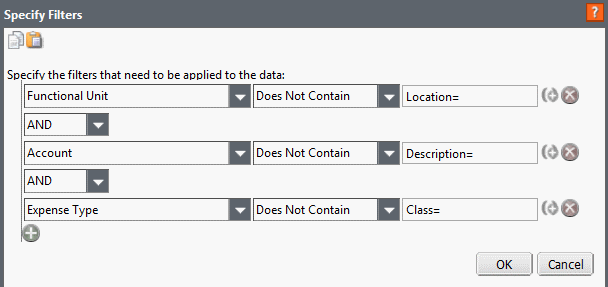
    It looks like your 3-row section breaks have information that is already contained in the data that exists below it, rendering it not necessary.  There are several methods that you can take to remove these columns, but with Apptio being so useful for taking raw data and pulling out the information you need, I would suggest loading into Apptio and using 3 data filters.  From the information you sent it looks like the breaks always contain "Location=" in Functional Unit, "Description=" in Account and "Class=" in Expense Type.  You can create 3 data filters on a transformed table of the raw data using the "Does Not Contain" function because the only time those statements appear are on the breaks.


    #CostingStandard(CT-Foundation)


  • 3.  Re: [ ] STUMPER: Delete unwanted rows from raw source data

    Posted 03/19/15 11:57 AM

    OK, I took your advice and more closely analyzed the 3-row section breaks:


    Location=200 seems to refer to the Functional Unit values (CC-200, CC-210, CC-220, etc.).

    Description=Apps - Back Office looks like it's repeating the Functional Unit Description values.

    Class=Reg is the same for all 100 section breaks and it doesn't appear to be useful for my purposes.


    So you're right: I don't need these section breaks.


    Since I anticipate receiving the same type of data in future months, I like your suggestion of using Apptio to help automate the data cleanup--so I don't have to manually clean the data in a spreadsheet every month.


    I uploaded the file as-is into Apptio.

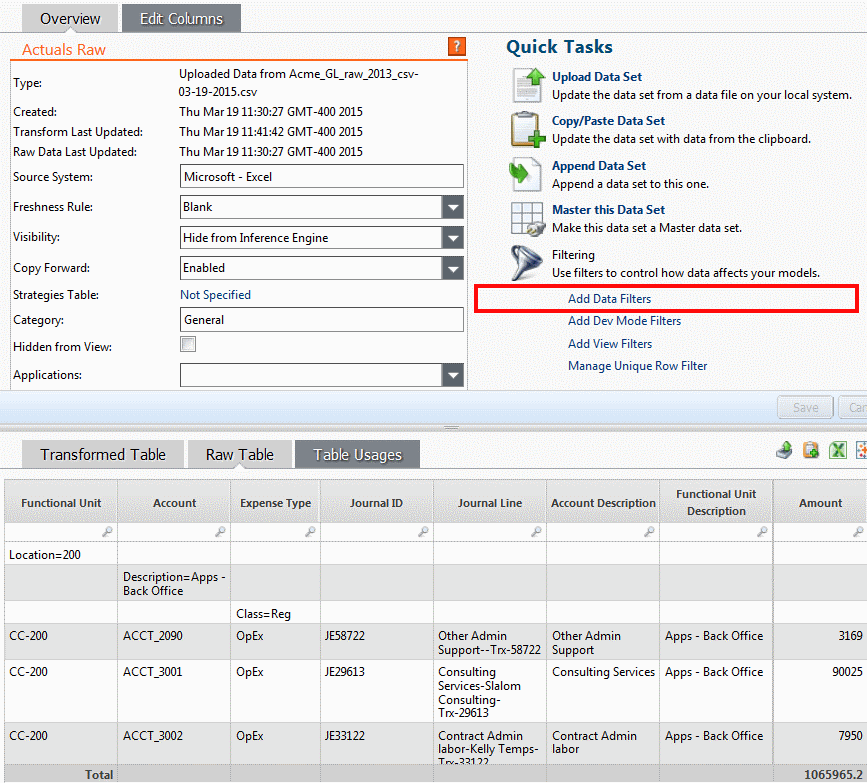
    When I click the Raw Table tab, I see the section breaks.

    I also see the Add Data Filters link (in red below):
    add data filters.png


    Using your guidelines, I created three new filters:
    add data filters 2.png


    Alternatively, I could have created just one new filter, such as: Journal ID Is Not Null

    ...but this is riskier than your recommended filters, because I might inadvertently filter out important rows.

    Your approach is safer because it's more specifically targeted to the rows I want to remove.


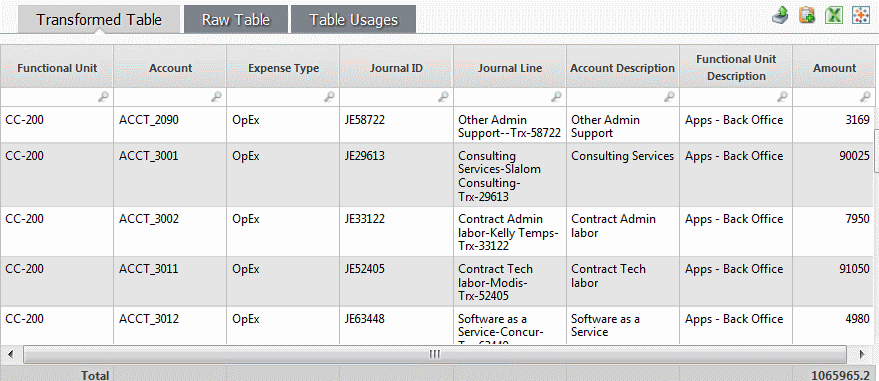
    After saving the new filters, I select the Transformed Table tab and I see:
    add data filters 3.png


    Your advice worked, and it set up a good data cleanup automation process for future months.


    #CostingStandard(CT-Foundation)


  • 4.  Re: [+] STUMPER: Delete unwanted rows from raw source data

    Posted 04/10/15 06:57 PM

    Hi Chris,

    I really like these Stumper series. The solution that @Andrew Mulvaney and you suggested would definitely be the one that I would choose as well. One difference would be that in this data - I noticed that the Amount column (Column H in the worksheet) does not have a sub total row. This means that I can totally set a data filter on this dataset with the condition: Amount is not null.


    The advantage is that for a large dataset, it would be more efficient since we are using only a single filter rather than three.


    Cheers!

    Sanjay Valiyaveettil


    #CostingStandard(CT-Foundation)