IBM Apptio

Apptio

A place for Apptio product users to learn, connect, share and grow together.


#Aspera
#Apptio
#Automation
 View Only
Expand all | Collapse all

Referring to the current user role

  • 1.  Referring to the current user role

    Posted Fri June 05, 2015 06:04 AM

    Dear all,


    is there a way to refer to the current user role using formulas in data transforms od in reports?
    We need to create customized reports which show different values depending on the user role.


    Thank you in advance!
    Paul


    #CostingStandard(CT-Foundation)


  • 2.  Re: Referring to the current user role

    Posted Fri June 05, 2015 08:29 AM

    Hi Paul,


    If you wanted to display a user's name or role on a report, you can perform the following:


    1. In Edit mode, use the ribbon bar to insert an HTML component on to your report.

    2. In the Edit Content window you can enter one or more of the following:


         <%=$CurrentUser:Users.Id%> - This will display the current user ID (i.e. pdekanov@swissre.com)

         <%=$CurrentUser:Users.Full Name%> - This will display the current user name (i.e. Paul Dekanov)

         <%=$CurrentUser:Users.Role%> - This will display the current user role (i.e. Admin)


    You will have to play with the formatting to get the exact look/feel but you can utilize general HTML tags to do so like in this simple example:


    <b><%=$CurrentUser:Users.Full Name%><br></b>

    <%=$CurrentUser:Users.Role%><br>

    <%=$CurrentUser:Users.Id%><br>


    This should produce the results:


    Paul Dekanov

    Admin

    pdekanov@swissre.com


    Please let me know if that helps to answer your question or if you need further assistance.


    Regards,

    Bill


    #CostingStandard(CT-Foundation)


  • 3.  Re: Referring to the current user role

    Posted Mon June 08, 2015 07:32 AM

    Paul,


    Are you trying to limit what data is shown in a report based on the role of the user?  For example, if you create a Supply Chain User role, you would only want a user in that role to be able to view data that rolls into the Supply Chain business unit (sort of like a permanent slicer)?


    I am not aware of any way to do this.  I think this would be great functionality to add, but my understanding is that if a user can access a report, then they have the ability to see all of the data in that report.  If this is an absolute must-have for you, then you might be able to do something like create different copies of the same report and set visibility and filters on all the components of the report.  I wouldn't recommend this, though, since you'd be creating a lot of work for yourself in terms of maintaining multiple versions of the same report.


    James


    #CostingStandard(CT-Foundation)


  • 4.  Re: Referring to the current user role

    Posted Mon June 08, 2015 12:56 PM

    Hi James and Paul,


    Having access to a report does not necessarily grant a user the ability to see all report data.


    Redaction, if put in place at the data level (Data tab) or model object level (Models tab), will restrict the data seen in a report chart or table.


    Redaction is handled per user ID (not by user role).

    Additional details (when logged into Apptio): Help > Reporting Guide > Advanced report features > Redaction


    #CostingStandard(CT-Foundation)


  • 5.  Re: Referring to the current user role

    Posted Tue June 09, 2015 12:31 PM

    Dear all,


    thank you a lot for the explanations!
    Yes, we are using the data based Redaction, but it would be great to have per role, not only per user ID.


    I don't intend to limit the data depending on the role, but just to hide some details in a report, e.g. something like this:


    =if($CurrentUser:Users.Role="Admin",{L0 Service ID},"OPS")


    Unfortunately it doesn't work with this syntax. I would very appreciate any hints how to refer to a user role or at least to ID in the formula columns.


    Bill, if I display the user role in a HTML box, can I then refer to this box from a formula?


    Thank you again and best regards,

    Paul


    #CostingStandard(CT-Foundation)


  • 6.  Re: Referring to the current user role
    Best Answer

    Posted Tue June 09, 2015 04:09 PM

    Hi Paul,


    The short answer is No.  Report components cannot really reference other report components. 


    Now for the longer answer...(apologies in advance if this is a long-winded answer!)


    From what you described above, it sounds like you want to set the visibility of some reporting components based on role. This can be done; however, it is tied to the ENTIRE report component not just a single column(s).


    In the past, I've used a workaround which involved having multiple copies of the same report component, each displaying different columns based on the persona (role) that would be accessing the report. 


    It is definitely not one of my best practice techniques but sometimes necessity supersedes logic.  If that is a route you want to consider try this quick experiment:


    1. Create a report component that has a couple of columns (call this component A)

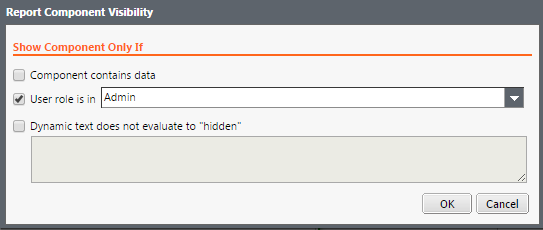
    2. Click on Component A, then select Author | Visibility from the ribbon bar and make sure only the Admin role is checked
    3. Copy/paste that report component (call this Component B), and hide/remove a column

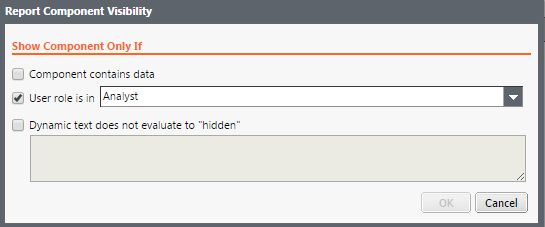
    4. Click on Component B, then select Author | Visibility from the ribbon bar and make sure that only the Analyst role is checked


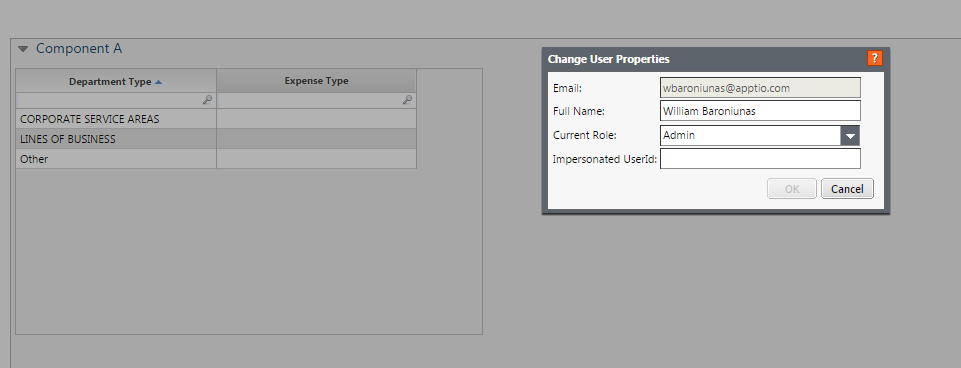
    When you are ready to test this out, in view mode, change your persona to the Admin role and you should see:
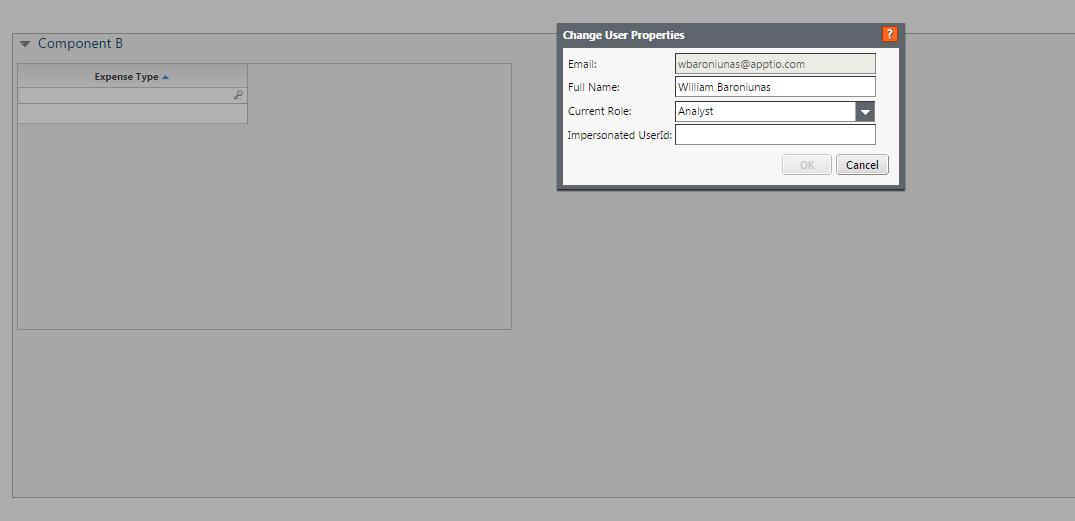
    Now change your persona to the Analyst role and you should see:
     

    There are some ways to control the positioning of the components based on which ones are visible (i.e. put them in a group box and set the group box properties to "snap them" into position either vertically or horizontally.
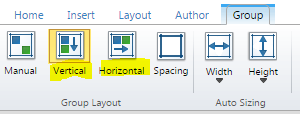
     

    Again, this may require more ongoing maintenance than you'd care for but it all depends on how critical it is to have a restricted view of specific columns.  If you decide on going this route we can assist you with some of the nuances but this might prove useful when considering the Apptio visibility settings for other aspects of your solution.


    Hope that helps!

    Bill


    #CostingStandard(CT-Foundation)


  • 7.  Re: Referring to the current user role

    Posted Wed June 10, 2015 05:55 AM

    Hi Bill,


    thank you a lot for the detailed answer, especially the settings for the Group Layout were new to me.
    However since we have a lot of slicers on the report and some of them will have different fields depending on the user role I would rather go to copy the whole tab and to set different permissions for it.


    Do you think it would make sense?


    Thank you!
    Paul


    #CostingStandard(CT-Foundation)


  • 8.  Re: Referring to the current user role

    Posted Thu June 11, 2015 07:42 AM

    Are you thinking that it would be just one additional copy of the tab/report, or are you expecting to do this multiple times? Try to gauge the level of effort it would take to maintain the solution (i.e. every time you make a change you'll have to update multiple copies of the same report). Also, keep in mind that the more slicers and reports you add could adversely affect your pre-load times.


    I would suggest that you record the pre-warm times before and after you add the additional tab/report.  If the pre-load times increases dramatically then you'd probably want to consider some alternative.  If the pre-load time only takes an extra few minutes then you'd be in decent shape - except having extra reports to tend to.


    Hope that helps!

    Bill


    #CostingStandard(CT-Foundation)


  • 9.  Re: Referring to the current user role

    Posted Tue June 16, 2015 12:55 PM

    Hi Bill,


    Thank you for your reply!

    Yes, this would be only one copy of each of our tabs. This should be feasible to maintain.

    Regarding the pre-load time to be honest we've set all our projects to "real time" calculation for the following reasons:

    1. Sometimes we need to upload data and make projects available very quickly and cannot wait half a day for pre-load.

    2. Our reporting is for internal use only and the number of active users per day is very limited.


    Best,

    Paul


    #CostingStandard(CT-Foundation)


  • 10.  Re: Referring to the current user role

    Posted Thu October 18, 2018 05:37 AM

    Hi,

    does anybody know if the formula =IF(eval("{$CurrentUser}:{Users.Role}") ="Example Role","Yes","No") does no longer work in R12?

    Or does the formula not work in the row-level security project?


    Thanks for any hints.

    Fabian


    #CostingStandard(CT-Foundation)


  • 11.  Re: Referring to the current user role

    Posted Thu October 18, 2018 08:03 AM

    I have added a new discussion concerning the usage of the formula mentioned above.

    Override AdminView information based on user role? 


    #CostingStandard(CT-Foundation)