Once a table is checked in, whatever build it is part of will have to finish. So if that user last uploaded to the table, checked in the data, you won't be able to check out the table until that build has completed.
The other option if you can't wait is to go into their workspace, and do the upload there.
Essentially you will "Lock" a document/table/report/metric if you check it in until the build that was created is finished.
Support hopefully will be able to track this down for you, but the only case where you won't see the document checked out, and you won't be able to check it out is when there is a pending build holding a lock on that document.
Lastly, tables consist of 2 parts, a "raw table" and the "configuration" end users typically only see it as one item, however datalink, and the API will only checkout the "raw table"
If this user was running a API, the same rule applies you will have to wait until the build finishes. If there are no pending/running builds, and the user doesn't actually have it checked out in their workspace, then support will have to resolve it from the backend.
Original Message:
Sent: 01-18-2023 08:04
From: Adewunmi Agbato
Subject: .Raw Table is already checked out by
Thank you @Guillermo Cuadrado. I already escalated to Support.
Original Message:
Sent: 01-16-2023 04:24
From: Guillermo Cuadrado
Subject: .Raw Table is already checked out by
Although this may sound obvious, @Adewunmi Agbato, ask your fellow TBMA to open the table you want, and see if it appears red. If so, they have it checked-out.
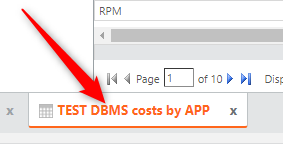
Then, with the focus on that table, ask them to click the Revert Changes button. Apptio should offer you to revert the changes to that table only:
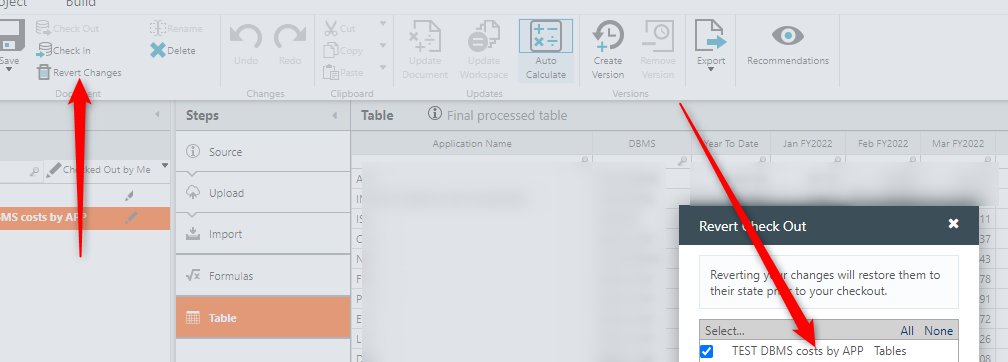
I am aware you may have tried this already. In that case, it is indeed a case for Support.
------------------------------
Regards, Guillermo
Original Message:
Sent: 01-13-2023 20:54
From: Adewunmi Agbato
Subject: .Raw Table is already checked out by
Thank you @Debbie Hagen for you quick response to my question. Your response is very helpful. I will contact Apptio Support right now,
Original Message:
Sent: 01-13-2023 19:40
From: Debra Hagen
Subject: .Raw Table is already checked out by
Hello @Adewunmi Agbato,
I'm sorry you're seeing that issue. If the other user doesn't have it checked out, you should be able to check it out. Since I can't access your project to see who has what checked out, I'd recommend contacting Apptio Support. They can take a look at the project to determine why the Actuals tale appears to be checked out by the other user.
For your convenience here info on Support Contact options:
Also, for future reference, if you have a question that needs a distinct answer, I'd recommend posting it as a "question" when you create a thread you have the option of it being a type "question" or "discussion". Discussion is more to invite others to provide their input. Question let's us know that you need a specific answer. I hope this is helpful.
------------------------------
Debra Hagen
Apptio