IBM Apptio

Apptio

A place for Apptio product users to learn, connect, share and grow together.


#Aspera
#Apptio
#Automation
#FinOps
#Apptio
#ITAutomation
 View Only
  • 1.  lookup_table_path in LookupFromPath function

    Posted 06/23/20 02:47 PM

    I am trying to use the function LookupFromPath in a formula column (Last FY Expense) in an ad-hoc table (Table 1) in a report.  The report has two tables that use different models in the Ad Hoc component configuration of the report.


    Table 1

    Account

    Last FY Expense

    1000


    1001


    1002


    Table 2

    Account

    LFY Cost

    1000

    $10

    1001

    $50

    1002

    $80


    ==========================================================


    Results:

    Table 1

    Account

    Last FY Expense

    1000

    $10

    1001

    $50

    1002

    $80


    In the Last FY Expense column I have the formula:

    =LookupFromPath("lookup_table_path",Account,Account,LFY Cost)


    How do I determine the lookup_table_path? 


    Table 2 has an API URL of:

    abc.com:Cost Transparency/Reports/Jun:FY2020/CostModels/Default/.View:lookupfrompath


    My report name is lookupfrompath.  Table 2 has a component id of 8.


    Thank you for your help!

    Jeanne


    #CostingStandard(CT-Foundation)


  • 2.  Re: lookup_table_path in LookupFromPath function

    Posted 06/29/20 10:18 AM

    @Gregory Nutt can you help?


    #CostingStandard(CT-Foundation)


  • 3.  Re: lookup_table_path in LookupFromPath function

    Posted 06/29/20 11:11 AM

    Hey, Jeanne Grzelak - I will answer your question as I understand it, but first I want to state that this function is not recommended for performance implications.  The recommended approach would be to use a CopyTable DL Connector (aka Apptio-to-Apptio connector) to push Table 2 back into the Data layer where you can then utilize a standard Lookup() function.


    That being said, the LookupFromPath() function performs similar to the Lookup() function, but instead of pointing to a Data table, you can point to a Data Path.  A Data Path is how Apptio defines a report table (among other things).  You did call out your API URL so you were close to the truth here, but what you want is actually the 'Show Full Data Path' option in the context menu for the report, as opposed to the 'Show API URL' option.
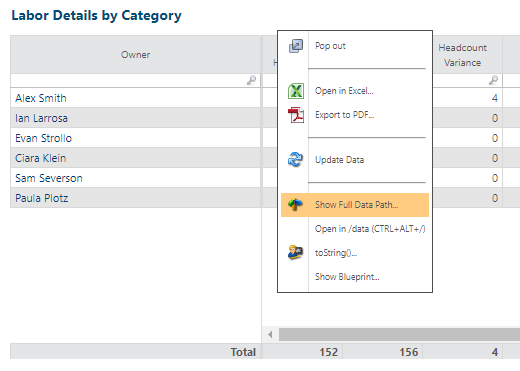
     

    Depending on the complexity of your report component, this can be a very long block of text.  But, in general, you should see something like the following:

    {Domain}:{Project Name}/
    Reports/
    .DateGoesHere/
    CostModels/
    Default/
    {Modeled Object}/
    .Summary

    There are a few other common lines in there: like !NEWCOLUMN, !LIMIT_COLUMNS, or the like. 


    Outside of this being a useful tool when trying to understand how a table is being built, the nuts and bolts of reading a data path are irrelevant to your query.  For your purposes, you should just be able to take this entire data path, surround with quotes (might need to make sure you don't have any double-quotes inside the path as well), and copy that into your lookup_data_path argument.


    #CostingStandard(CT-Foundation)