Molly,
This specific KPI you are looking at, is it for an Out of the Box report or a Custom Report? If it is an Out of the Box report I would check out a few areas on why the comma is not appearing:
Out of the Box:
1) Check whatever you have aligned with Active Project is a Numeric column and not a Label
2) Check the metric to ensure that it is set to Numeric and not a Label
3) If both of these are set correctly, can you right click on the KPI and click Show Full Datapath and post that here? I will be able to see a little more on what is going on with that.
Custom Report:
If the report is Custom then you want to look at the following steps:
1) Check whatever you have aligned with Active Project is a Numeric column and not a Label
2) Check the metric to ensure that it is set to Numeric and not a Label
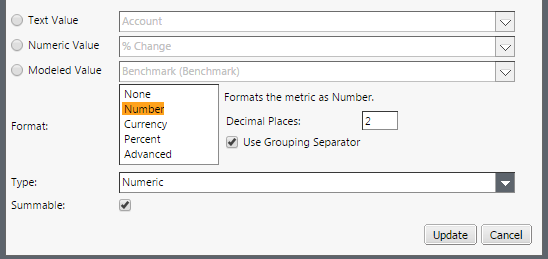
3) Create a new column in a new ad hoc config window can pull in whatever is backing Active Projects data and verifying that it has the commas.
If it does, then lock that new column to a perspective and switch out the KPI
If it does not, then edit the column to be a Format: Number, Type: Numeric, and Summable. Once this is done then lock that new column to a perspective and switch out the KPI
Please let me know if this helps or if you have any other questions. I will keep an eye out for the full datapath screenshot if it is still not working.
Thank you,
Doug Mahan