IBM Apptio

Apptio

A place for Apptio product users to learn, connect, share and grow together.


#Aspera
#Apptio
#Automation
#FinOps
#Apptio
#ITAutomation
 View Only
  • 1.  Interface ITP to CT not functional

    Posted 03/06/18 12:08 PM

    Hello,


    Currently working in a costing model for l'Oréal, I have been facing a real issue on date partition.

    Actually, when we export plan data from ITP to CT, the format of data is P1 FY2018, P2 FY2018, etc.

    When we change plan year, the export format changes as well (say P1 FY2019, P2 FY2019, etc).


    However, in date partition options, there is no possibility to make the changing year work properly. It will work for one year. Let's say it works for 2018 as this is the first budget year I exported from ITP to CT.
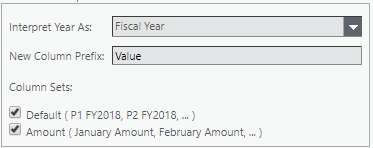
    When I get to a 2019 period, date partition step does not work anymore as it is looking for a header containing "2018" in it, even if this is my 2019 budget I am dealing with.

    This way, date partition step only works for one year at a time, which is very problematic when we want to compare several budget years in a custom report.


    Can you help ?


    #ApptioPlanning(ITP/ITFMF)


  • 2.  Re: Interface ITP to CT not functional

    Posted 03/06/18 05:26 PM

    I'm not entirely sure I follow the steps you describe or that I can help, my apologies, but it seems your goal is to do custom reports in CT of future year (2019 and onwards) budgets, would this be right? And you have the Project End date set up to cover the future years you want to cover? (Again, not sure if I can help but if you want to share over a quick skype let me know, happy to have a look. It has got me curious.)


    #ApptioPlanning(ITP/ITFMF)


  • 3.  Re: Interface ITP to CT not functional

    Posted 03/07/18 03:38 AM

    It is exactly it. Let's say I'm set on period December 2018, and want to look at: Budget 2018 YTD and Budget 2019 YTD.

    I set projet time settings to December 2019.

    The problem is that the date partition on ITP budget formats does not adjust to the right year.

    So if at the moment of date partition set-up, I was working on Budget 2018, the date partition format will be P1 FY2018, P2 FY2018,...

    But when I upload a budget using a different year (say 2019), date partition does not work anymore as it is still looking for column headers such as PX FY2018, even if my plan is related to 2019.

    This is the interface between ITP and CT which is not correct as it is exporting column headers which are not recognized by date partition.


    #ApptioPlanning(ITP/ITFMF)


  • 4.  Re: Interface ITP to CT not functional

    Posted 03/07/18 04:30 AM

    Can you get it to work manually?

    I am think you may need to split the process and change the column headers to be "Year" "Month" then have the periods in the data.


    #ApptioPlanning(ITP/ITFMF)


  • 5.  Re: Interface ITP to CT not functional

    Posted 03/07/18 04:45 AM

    Thanks Thodi, I'll try and see how it goes ! It could be a temporary way to solve my issue.


    But this is still a workaround and for me, a new development should be made to add an option in Date Partition step to transform ITP-formatted columns directly. I'm currently dealing with this issue with Apptio Support and can tell you how it goes


    #ApptioPlanning(ITP/ITFMF)


  • 6.  Re: Interface ITP to CT not functional

    Posted 03/08/18 12:09 PM

    Hi Elodie,


    At the bottom of the Cost Transparency Integration settings in ITP there is an option to publish the data as rows instead of columns, and the date partition in the CT tables can be changed to work with this format.


    I agree this should just work out of the box!


    Hope this helps,

    Jim


    #ApptioPlanning(ITP/ITFMF)


  • 7.  Re: Interface ITP to CT not functional

    Posted 03/09/18 03:42 AM

    Hi Jim,

    Thanks I did not see it before. I'll test right now and see how it goes.

    Many thanks !


    #ApptioPlanning(ITP/ITFMF)


  • 8.  Re: Interface ITP to CT not functional

    Posted 03/09/18 09:12 AM

    Finally, it in ITP, Cost Transparency Settings, I chose to publish date in rows instead of columns, I obtain a column called "Date" with P1 FY2018, P2 FY2018 etc in rows.


    The Date Partition still does not work on this.

    However, I found a way: create one column per month (January, February,...) with following formulas= if(Find("P1 FY",Date)>0, Amount,"") and it fills in correctly my 12 columns.

    Then Date Partition works.


    So thanks again Jim, problem solved !


    #ApptioPlanning(ITP/ITFMF)


  • 9.  Re: Interface ITP to CT not functional

    Posted 08/08/19 01:34 PM

    Another way to do it, is to upload a lookup table between P1 ... P12 and Month. and then create a different Month column with a lookup formula, to finally create a Different Date column with a friendlier date format "Month FYYYY"


    Hope this helps too!


    #ApptioPlanning(ITP/ITFMF)