IBM Apptio

Apptio

A place for Apptio product users to learn, connect, share and grow together.


#Aspera
#Apptio
#Automation
#FinOps
#Apptio
#ITAutomation
 View Only
Expand all | Collapse all

How to Subtotal/Group

  • 1.  How to Subtotal/Group

    Posted 11/21/16 02:19 PM

    Hi TBM Community-


    In the IT Finance - Cost Pools report, I like how the bottom table has a hierarchy showing.  I would like to apply this same formatting to the IT Fiance - Waterfall report.  Ideally I would like to have Cost Pool be the top of the hierarchy (like it is in IT Finance - Cost Pools) and then be able to toggle Cost Center Name, Account Group, Account Subgroup, etc. to be underneath it.  I've tried following a few instructions out there on the Help page, but I must be missing something because every time I switch from having (for example) Cost Center under Cost Pool to Account Group under Cost Pool the hierarchy look disappears.


    Anyone know of a solution to this?


    Thanks!

    Molly


    #CostingStandard(CT-Foundation)


  • 2.  Re: How to Subtotal/Group

    Posted 11/23/16 09:42 AM

    Hi @Jesper Kisby a lot of the "first responders" in the US are on holiday, do you you have any insight for Molly? Also pitching in some ETBMAs across the pond @Oliver Smith and @Thomas Bognar. Thanks guys :-) #SmallButInternationalCommunity.


    #CostingStandard(CT-Foundation)


  • 3.  Re: How to Subtotal/Group

    Posted 11/23/16 09:54 AM

    Hey Molly! (and @Rhonda Keller )


    I saw this yesterday and meant to reply but got stuck with a load of work so apologies for that.


    What you need to do, is go into edit mode, and select another column from the picker. Then go back to the table and using the red ribbon at the top go onto data, then click subtotal and you should be able to choose which columns you want to subtotal by. (you can choose more than just cost pool from the picker, but you have to select at least one more thing to give you the ability to use the subtotal feature)


    Hopefully this explanation and the screenshot helps  If not, don't hesitate to ask as I'm happy to help a fellow Apptian.


    Also, apologies for all the scribbles in the screenshot.


    #CostingStandard(CT-Foundation)


  • 4.  Re: How to Subtotal/Group

    Posted 11/23/16 10:24 AM

    oli - faster than light


    #CostingStandard(CT-Foundation)


  • 5.  Re: How to Subtotal/Group

    Posted 11/23/16 10:32 AM

    Only just beat you to it  shame I couldn't do it to be the first European Elite


    #CostingStandard(CT-Foundation)


  • 6.  Re: How to Subtotal/Group

    Posted 11/23/16 05:21 PM

    Hi Oliver! 


    Thank you so much for your reply.  I really appreciate it!


    I tried what you said, however, I am still coming up with a few issues.  So when I do as instructed above, it shows up great when you look at it:
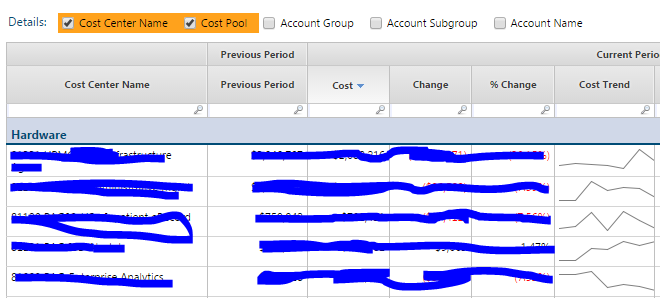
     

    But, when I un-select Cost Center Name and then re-select it I get the following:
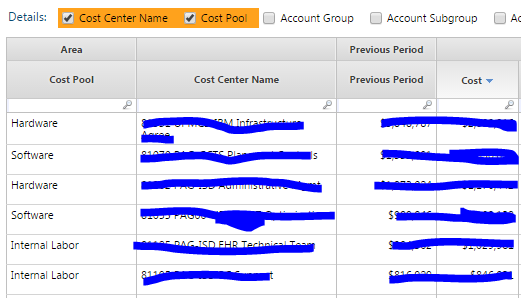
    The hierarchy disappears.  


    I would love for it to work like it does on Cost Pools where if I un-select Cost Sub Pool I can see just Hardware, Software, etc. alone and then I can re-select Cost Sub Pools and the hierarchy will reappear.


    I'm not sure why this doesn't work properly in Waterfall.  Any ideas?  


    If you need more information just let me know.


    Thanks for all of your help!!


    Molly


    #CostingStandard(CT-Foundation)


  • 7.  Re: How to Subtotal/Group

    Posted 11/24/16 04:34 AM

    Hi Molly, 


    No problem, glad to help! I think it may be because there isn't a column that is always in the table (if you know what I mean). So if you always want to show it by Cost Pool, I would take Cost Pool out of the Picker, and put it as the column in the table. Then select the other columns using the picker and do the subtotal again, which would in theory lock those guys to be under each cost pool. 


    I'll do a bit of testing and see if that works, then post back here when I find the solution


    Oli


    #CostingStandard(CT-Foundation)


  • 8.  Re: How to Subtotal/Group

    Posted 11/24/16 04:55 AM

    I'm sorry but I can't get it to work like the other one  Like you said, as soon as you unselect one option then go back to it selected, it doesn't subtotal  The only other thing I can think of is stealing it from the Cost Pools Report and adding back in the columns you need to the Waterfalls report. We may need some help from other Apptians! 


    I'll keep trying if I have time later today as I'm convinced it can be done by just changing that report, I just can't figure t out straight away. Let me know if you get any further!


    Oli


    #CostingStandard(CT-Foundation)


  • 9.  Re: How to Subtotal/Group

    Posted 11/28/16 09:44 AM

    Thanks, Oli!  I appreciate you looking into a solution for this.  Hopefully we can get a few other Apptio folks to take a look as well so we can come up with a solution!


    Best,

    Molly


    #CostingStandard(CT-Foundation)


  • 10.  Re: How to Subtotal/Group

    Posted 11/28/16 09:55 AM

     Yes definitely. Thanks Oli!. Hey Jon, @Jonathan Strauss back from holiday? If so, any thoughts? oh and welcome back ;-)


    #CostingStandard(CT-Foundation)


  • 11.  Re: How to Subtotal/Group

    Posted 11/28/16 01:46 PM

    I'm back! Hope everyone in the states had a nice holiday. 


    My sandbox is acting up today so it may be tomorrow before I can play around with it.


    Cheers,


    #CostingStandard(CT-Foundation)


  • 12.  Re: How to Subtotal/Group
    Best Answer

    Posted 11/29/16 01:17 PM

    Hey Molly,


    In Oli's picture below try making 1 more change:


    Change that drop down to Cost Pool instead of Cost Center. That should do the trick. I can uncheck Cost Center (keeping cost pool checked) and switch to Account Group (or anything) and the hierarchy view remains.


    Let me know if that works!


    Cheers,


    #CostingStandard(CT-Foundation)


  • 13.  Re: How to Subtotal/Group

    Posted 11/29/16 01:26 PM

    Hi Jonathan!


    That did work for the selecting and unselecting, but I still have a column that repeats the cost pool:


    Any way to get rid of this column so it's standard hierarchy rather than having this extra column?


    Thanks!

    Molly


    #CostingStandard(CT-Foundation)


  • 14.  Re: How to Subtotal/Group

    Posted 11/30/16 05:25 AM

    Thanks for helping us both out! I knew it was possible  I thought I was on the right track as well, I just couldn't work out that final bit.


    Cheers,

    Oli


    #CostingStandard(CT-Foundation)


  • 15.  Re: How to Subtotal/Group

    Posted 11/29/16 01:44 PM

    Hi Molly,


    Not that I'm aware of.


    I even tried a trick where I added Cost Pool to the table itself, removed it from the picker, grouped/subtotal by Cost Pool and then hid the Cost Pool column (couldn't hide it when it was only there because of the picker) and that still doesn't hide it.


    Cheers,


    #CostingStandard(CT-Foundation)


  • 16.  Re: How to Subtotal/Group

    Posted 11/29/16 01:59 PM

    Thank you for your help! Much appreciated!


    #CostingStandard(CT-Foundation)