IBM Apptio

Apptio

A place for Apptio product users to learn, connect, share and grow together.


#Aspera
#Apptio
#Automation
 View Only
  • 1.  How can I make one column, in a table, editable?

    Posted Fri March 03, 2017 10:45 AM

    In the Data Quality Reports, there is a table at the bottom (image below) that we'd like to change, so that the User Description Column is Editable so that any of us can go in can go in and edit it so that it makes a bit more sense to End Users. We want to do this to help everyone's understanding of Allocations, as the Allocation Description column next to it is in more 'Apptio Speak' and we'd like to be able to simplify it slightly, or customise it to suit our users.
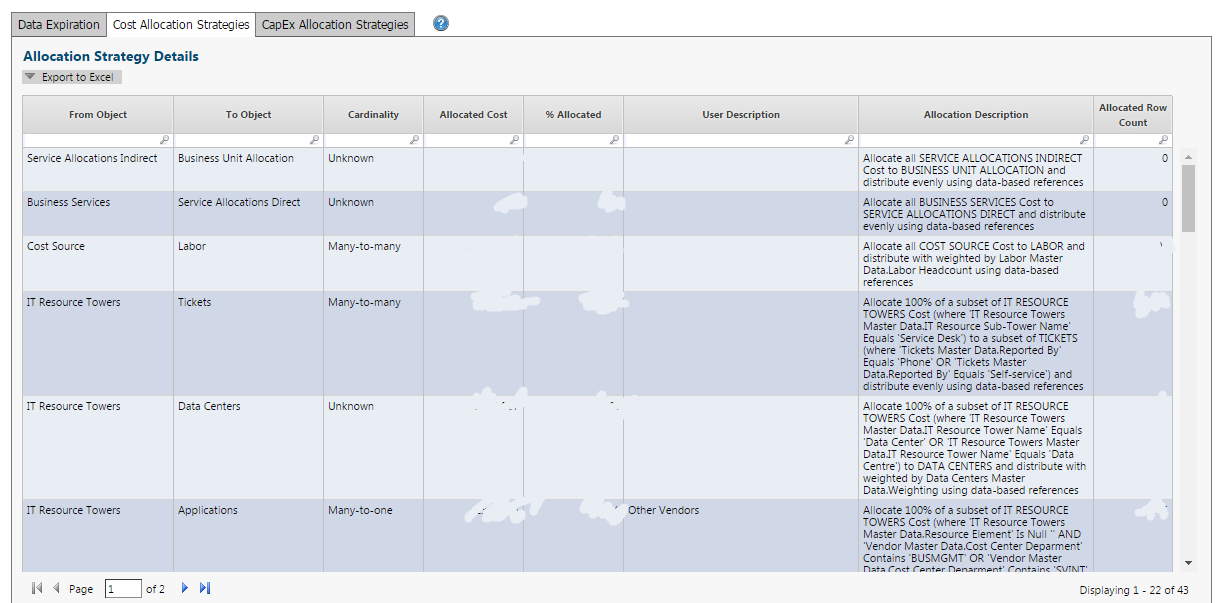


    If anyone knows how to do this/ has any suggestions, it would be greatly appreciated. 


    Thanks,

    Oli


    #CostingStandard(CT-Foundation)


  • 2.  Re: How can I make one column, in a table, editable?

    Posted Fri March 03, 2017 11:28 AM

    @Debbie Hagen this is one of the fields you flagged to our users during our training.  The team can't work out how we update it!


    #CostingStandard(CT-Foundation)


  • 3.  Re: How can I make one column, in a table, editable?

    Posted Fri March 03, 2017 12:42 PM

    Hi @Sasha Dunford and @Oliver Smith are you talking about where you can add descriptions to your allocations?  It's in the models tab, in the Selected Allocation pane.


    Cheers,

    Deb


    #CostingStandard(CT-Foundation)


  • 4.  Re: How can I make one column, in a table, editable?

    Posted Fri March 03, 2017 01:36 PM

    We will be using that in the future, but I thought that something similar was possible in the Data & Allocations report?


    #CostingStandard(CT-Foundation)


  • 5.  Re: How can I make one column, in a table, editable?

    Posted Tue March 07, 2017 03:10 AM

    I don't think so... not in the OOTB version of the report. I'm not sure you'd want to either, unless you could push it back into the proper field in your model. I would think you'd want to keep it current in the model, which would then fill in the values in the report.  That's where those values come from.


    Let me check with someone who might know for sure...

      @Chris Davidson  Do you know a way to make that user field in the Allocation Strategies report editable?


    Thanks,

    Deb


    #CostingStandard(CT-Foundation)


  • 6.  Re: How can I make one column, in a table, editable?

    Posted Tue March 07, 2017 04:44 AM

    I think I misunderstood your previous comment! Do you mean that if we use that filed in the model to describe the allocation, it then goes through and shows on the report?


    #CostingStandard(CT-Foundation)


  • 7.  Re: How can I make one column, in a table, editable?
    Best Answer

    Posted Tue March 07, 2017 05:35 AM

    Yes Oli, that is correct.  The User description field on the Allocation tab in the model feeds that Allocation Strategies report.


    #CostingStandard(CT-Foundation)


  • 8.  Re: How can I make one column, in a table, editable?

    Posted Tue March 07, 2017 05:41 AM

    Brilliant! Thanks very much


    #CostingStandard(CT-Foundation)


  • 9.  Re: How can I make one column, in a table, editable?

    Posted Mon March 06, 2017 04:11 AM