A place for Apptio product users to learn, connect, share and grow together.
Hello everyone!
I have a tab (specifically IT Finance - Labor - by Role) that I would like to hide from our users while I make the data accurate. Is it possible to keep that tab but not have it linked to the report for the time being (sort of like how you can add reports to collections or take them off but they still exist)? All I can find on editing tabs is the following:
Would deleting the tab make it disappear forever?
Thanks in advance!
You may want to try:
1. Switch to report editing mode.
2. Select the tab component in the report.
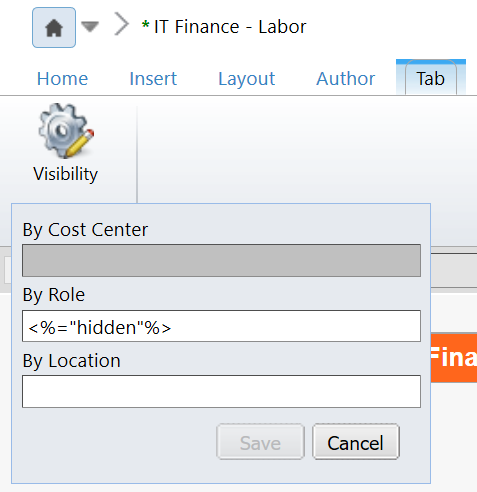
3. (top) Ribbon > Tab > Visibility
4. Set By Role tab visibility rule to:
<%="hidden"%>
Hi Christopher!
Thanks so much for your help! This works! Only problem I'm still having is that I would also like to hide IT Finance - Labor Details - Variance... but that one is grayed out (just like By Cost Center is above). Can I not hide Variance?
Thanks!
We're not able to hide the first (leftmost) tab in a tabbed group.
But you could rearrange the tab order if needed (by copying/pasting components from one tab to another and then renaming the tabs as needed).
Great! Thanks so much!