IBM Apptio

Apptio

A place for Apptio product users to learn, connect, share and grow together.


#Aspera
#Apptio
#Automation
#FinOps
#Apptio
#ITAutomation
 View Only
  • 1.  Export a report as PDF with all data

    Posted 11/05/15 09:43 AM

    I have built a report with a slicer for each of my operating units (56 of them). I need to distribute that sliced report to each operating unit manager but I don't want each manager to see the others' data. The table in the report displays about 25 rows, but there are 50-60 rows of data. When I export the report to PDF, it only shows what's on the screen, not all of the data. My solution was to export each report into excel, but then all of the pie charts, graphs, etc are lost and the whole reporting functionality goes away. Are there any solutions to exporting a report to PDF where Apptio will show all of the table data?


    #CostingStandard(CT-Foundation)


  • 2.  Re: Export a report as PDF with all data

    Posted 11/05/15 04:27 PM

    Report PDF layouts can be edited to look different than the normal on-screen report layouts.


    For instance, an on-screen table layout can be set to show 25 rows, whereas the PDF table layout could instead be set to show 60 rows.


    After clicking the red PDF export button:

    PDF_button.PNG

    ...you'll be in the PDF print preview mode.


    You can then select a report table, then: Ribbon > Table > Rows per page
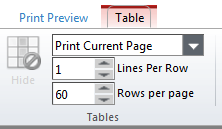
    tablesPerPage.PNG


    Notice you can also change Print Current Page to the more extensive Print All Pages, which disrupts the original layout but ensures all table rows will be exported no matter what.


    #CostingStandard(CT-Foundation)