IBM Apptio

Apptio

A place for Apptio product users to learn, connect, share and grow together.


#Aspera
#Apptio
#Automation
#FinOps
#Apptio
#ITAutomation
 View Only
Expand all | Collapse all

End User Device Age

  • 1.  End User Device Age

    Posted 07/19/19 09:46 AM

    Hi Everyone,

    Has anyone got any advice of how to produce the Age of the End User Devices?

    I have have a look in the Cookbooks & Data Advisor

    But nothing to help me work out what the formula is.


    Appreciate any thoughts, sorry is a Friday afternoon question:)


    #CostingStandard(CT-Foundation)


  • 2.  Re: End User Device Age

    Posted 07/19/19 10:31 AM

    Hi Paula Foster,


    Do you have device Purchase Date in your data set?


    #CostingStandard(CT-Foundation)


  • 3.  Re: End User Device Age

    Posted 07/19/19 10:55 AM

    Yes i do for some of my devices.


    #CostingStandard(CT-Foundation)


  • 4.  Re: End User Device Age

    Posted 07/19/19 11:18 AM

    Paula Foster 

    If your data for end user devices can bring a purchase date or in-service date and you could calculate the device age from that. 

    I think I found a previous content that has formula for coming up with age

    https://tbmcouncil.jiveon.com/message/20496?commentID=20496#comment-20496


    #CostingStandard(CT-Foundation)


  • 5.  Re: End User Device Age

    Posted 07/23/19 06:43 AM

    Thank you @Hee Sung Kang for taking the time to reply, i found you comment & the link, it was very useful, i just need to try and sort out if the problem i am having is related to the data format.


    #CostingStandard(CT-Foundation)


  • 6.  Re: End User Device Age

    Posted 07/19/19 11:25 AM

    Hi,


    You can use a formula if your raw data does not have it:

    =if(Months(CurrentDate())<Months(Purchase Date),"",Months(CurrentDate())-Months(Purchase Date)

    Note: Purchase date is my assumption that you have it in your data. If not you can use invoice date or something else that is in your data.


    Let me know if you have more questions,

    Lauren Griessel


    #CostingStandard(CT-Foundation)


  • 7.  Re: End User Device Age

    Posted 07/23/19 06:40 AM

    Hi @Lauren Griessel, thank you for taking the time to reply to my question.

    I have added this formula in and changed the Purchase date to Delivery Data


    =if(Months(CurrentDate())<Months(Delivery Date),"",Months(CurrentDate())-Months(Delivery Date)


    However its come up with an error
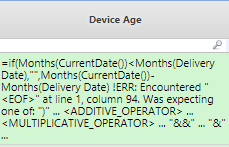
    I think but am not sure this could be due to the delivery data format? example below
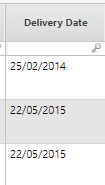
    Do you agree? and if so do you know what format it should be?

    Appreciate any help you can give me:)


    #CostingStandard(CT-Foundation)


  • 8.  Re: End User Device Age

    Posted 07/23/19 10:15 AM

    Hi Paula,


    Yes, it is because your date format is incorrect. By default when you use the current date formula it pulls back the date in the "american" format: MM/DD/YY. Thus, you will need to alter your date format to this format for the formula to work. I have tested this in my sandbox and it worked:


    Ensure you change the column type to date and then fill in the date format.


    Let me know if that doesn't work,

    Lauren Griessel


    #CostingStandard(CT-Foundation)


  • 9.  Re: End User Device Age

    Posted 07/23/19 10:58 AM

    Hi @Lauren Griessel, thank you for the confirming this, i will attempt to correct the date tomorrow when its not so busy and let you know.


    #CostingStandard(CT-Foundation)


  • 10.  Re: End User Device Age

    Posted 07/25/19 07:54 AM

    Hi @Lauren Griessel, i am trying to test this out, I created a new column bring in the UK date and have changed the type to Data and have tried different ways for the date format but i can get it to changed to the US date. 

    I am sure its something very simple that i have missed but can't see it.

    Do you have any thoughts?


    Appreciate any help


    #CostingStandard(CT-Foundation)


  • 11.  Re: End User Device Age

    Posted 07/25/19 10:53 AM

    HI Paula,


    Instead of trying to change your date column to the "american" format lets rather try and change the current date formula structure. Here is an article if you want more information: https://tbmcouncil.jiveon.com/docs/DOC-4924


    We can instead change the formula to this:

    =if(Months(CurrentDate("DD/MM/YY"))<Months(Delivery Date),"",Months(CurrentDate("DD/MM/YY"))-Months(Delivery Date)


    That should do the trick I hope!


    Let me know,

    Lauren Griessel


    #CostingStandard(CT-Foundation)


  • 12.  Re: End User Device Age

    Posted 07/25/19 12:30 PM

    Hi Lauren,

    The link refers to R12 but we are still in R11, does this changed things?


    #CostingStandard(CT-Foundation)


  • 13.  Re: End User Device Age

    Posted 07/25/19 03:29 PM

    Nope. I checked with R11 experts and they say it should work!


    #CostingStandard(CT-Foundation)


  • 14.  Re: End User Device Age

    Posted 07/30/19 09:02 AM

    Hi @Lauren Griessel, the good news is that I have managed to get the age of some of our devices for Jan19 Woo Hoo  

    The bad news is that it appears in Jan19 only It does not appear in the months that follow.

    I made the changes way back at the start of our project Jul 2016 so it should flow through.

    Any thought why this might be the case?


    I looked at the dates and all match apart from when i get to Jun so will need to go back to my providers to get consistency on the date format.

    As always appreciate any advice 


    #CostingStandard(CT-Foundation)


  • 15.  Re: End User Device Age

    Posted 07/30/19 11:46 AM

    Hi Paula,


    Is your data set versioned? Usually when a data set is versioned formulas do not flow through to months after the version.


    Thanks,

    Lauren Griessel


    #CostingStandard(CT-Foundation)


  • 16.  Re: End User Device Age

    Posted 07/31/19 04:16 AM

    Hi Lauren,

    Yep my data set is versioned, current time period is Jan2019 and it versioned from July2016


    #CostingStandard(CT-Foundation)


  • 17.  Re: End User Device Age

    Posted 08/19/19 12:01 PM

    Hi FSartori@apptio.com">Fabio, Hope your well, I still have not got to the bottom of this problem, any thoughts or guidance?


    #CostingStandard(CT-Foundation)


  • 18.  Re: End User Device Age

    Posted 08/19/19 12:24 PM

    HI Paula,


    I assume your data set is versioned in the month where your formula has stopped working. Please check that and let us know.


    Thanks,

    Lauren Griessel


    #CostingStandard(CT-Foundation)


  • 19.  Re: End User Device Age

    Posted 08/20/19 05:23 AM

    Hi Lauren, 

    I made the changes in the month we started time which was July2016 to a Transformed dataset which then filters into the Master dataset.

    This clip is from the transform ACT End User Devices TA


    #CostingStandard(CT-Foundation)


  • 20.  Re: End User Device Age

    Posted 08/20/19 10:36 AM

    HI Paula,


    That is correct but usually when formulas do not flow through there is another version of the data set so check the month that is not flowing and see if it is versioned there to. If it is not I am all out of ideas and I suggest opening a support case or asking your CSM if they can help.


    Have a great day,

    Lauren Griessel


    #CostingStandard(CT-Foundation)


  • 21.  Re: End User Device Age

    Posted 07/30/19 09:08 AM

    One other point, the formula above it not work, after trying all things i finally worked out it was missing a ) bracket at the end

    =if(Months(CurrentDate("DD/MM/YY"))<Months(Delivery Date),"",Months(CurrentDate("DD/MM/YY"))-Months(Delivery Date))


    #CostingStandard(CT-Foundation)


  • 22.  Re: End User Device Age

    Posted 07/30/19 10:56 AM

    I have re-uploaded my file so now all the dates are in the same format dd-mmm-yyy   

    Still only the device age is calculated for Jan and not for Feb through to June


    #CostingStandard(CT-Foundation)


  • 23.  Re: End User Device Age

    Posted 08/20/19 02:04 PM

    Hi Paula


    Looking in to it i suspect that it may not be too happy with the data.  Best thing to do when formulas are not working is to split it up in to columns so you can see where it brakes. So I would create 2 new columns for the Months(CurrentDate("DD/MM/YY")) and the Months(Delivery Date), then see what you get value wise. I did notice that the dates you have in the data are US format and as your setting are probably UK then it may be having a hissy fit.


    Possible issues could be that its a Label, there is a space on the end of the data, it dosnt like the inconsistency on the year (2 digits or 4 digits), US format, etc. 


    Give that a try and see how you get on.


    ;-)


    All the best


    David  


    #CostingStandard(CT-Foundation)


  • 24.  Re: End User Device Age

    Posted 08/21/19 11:13 AM

    HI @David Eyres, great to hear from you.

    This issue is that I have the formulas working but they only appear in the month of Jan for each year.

    Why is this?

    Perhaps we could chat via phone?


    #CostingStandard(CT-Foundation)


  • 25.  Re: End User Device Age

    Posted 08/21/19 01:26 PM

    Hi Paula


    The issue is that Capital D in the Months(CurrentDate("DD/MM/YY")) is returning day in the year and not day of the month. January dates are returned 01/01/19 and February is returned 32/02/19 as 1st of Feb is 32nd day of the year. Then when that value is looked at by Months() in January it works, but when it gets to February it dosn't understand it and it throws a null response. 


    The formatting that is used by the currentdate() function is detailed in here. DateFormat function 


    So you want to use Months(CurrentDate("dd/MM/yy")) instead.


    Give that a go and let the community know if it solves the issue.


    All the best


    David


    #CostingStandard(CT-Foundation)


  • 26.  Re: End User Device Age
    Best Answer

    Posted 08/23/19 06:16 AM

    It a happy Friday today, with the help of @David Eyres i have finally cracked the Age Device issue.

    Its was all to do with having lower case dd in the month "dd-MM-YY" & the providers of the Inventory having a mixture of YY & YYYY and a small amount of doggy data.


    =if(Months(CurrentDate("dd-MM-YY"))<Months(Delivery Date),"",Months(CurrentDate("dd-MM-YY"))-Months(Delivery Date))


    Again thank you David for getting to the bottom of this.


    It a great start to the Bank holiday, woo hoo:)


    #CostingStandard(CT-Foundation)