Dear Chris
>>>> I did save to the default location for the keyboard file. <<<<
What exactly did you do by your statement above? Did you take the action as described in this Technote? https://www.ibm.com/support/pages/steps-map-keyboard-host-functions-using-access-client-solutions
When I tried opening my 5250 session and selected from its menu bar Edit --> Preferences --> Keyboard, I then made one change to a Host Function key and then click SAVE button followed by OK. Then I closed the session (specifying NO for saving current session config) and then reopened it again and looked at the Keyboard map again, I saw my change was still there. No problem at all. I did not specifically "save to the default location" at all.
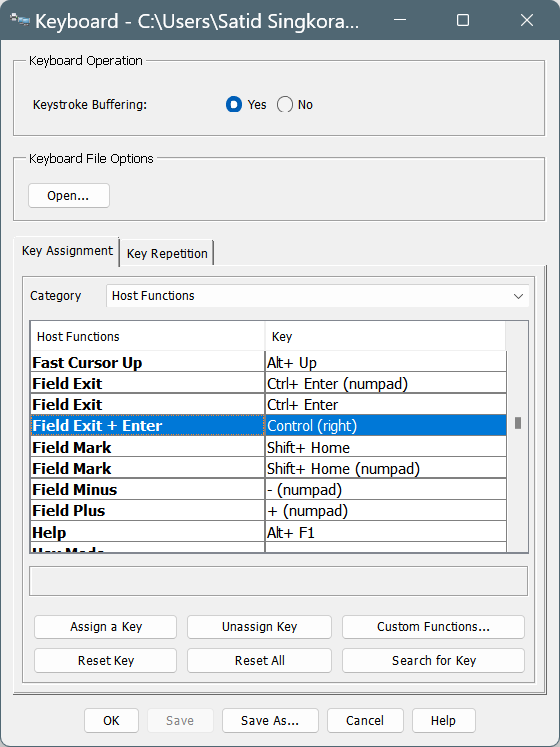
I then did another change and used Save As to the default file IBMi.kmp (in the picture below) and the change was still preserved.
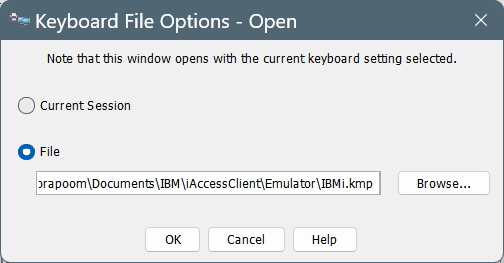
When you select Edit --> Preferences --> Keyboard and then click the button Open in the section Keyboard File Options, what do you see? is it like this ?
One thing you can do is to update your ACS codes to the current release. I'm using the emulator one release higher than yours 1.1.9.1.
------------------------------
Education is not the learning of facts but the training of the mind to think. -- Albert Einstein.
------------------------------
Satid S.
------------------------------