I've got an annoying issue that I have been unsuccessful in solving. Our Actuals come in to CT with a Transaction Date that is read as a label. The source data shows the data with the data type as Custom Date as M/d/yyyy hh:mm:ss a in excel with the time as 12:00:00 AM. CTs import step reads it as a label and and shows it as yyyy-MM-dd hh:mm:ss .
By the time it goes through transforms to get to our ITPF Actuals Master that we upload into Spend Management in ITP, it appears to be formatted correctly in the column in CT- but when we export the table to excel, it adds time 0:00 back to the export. This format is not accepted in ITP in a manual upload. Because of the very short window of time within which we have to open our forecast after receiving actuals, we cannot wait for actuals to finish calculating in dev to be able to use the integration from CT to ITP. So we have to export our final ITPF Actuals Master to Excel (and then save as CSV) to be able to upload in Spend Management. But every time we do this, we have to reformat the Transaction Date to "Short-date" before uploading. We have tried all kinds of overwriting of the data to have the final table export as desired but have not been able to find the correct combo where the final table exports as MM-dd-yyyy with No hours or minutes to be accepted in ITP.
The config is currently set up as follows (but trust me when I tell you we have tried many, many different options including changing import type setting to be a date, truncating the time off) but none of the attempts have provided the export to excel in the correct format.
Here is the current state-
Actuals (initial table uploaded)
- Transaction Date imports as a label in the following format yyyy-MM-dd hh:mm:ss (but the hh:mm:ss comes in as all zeros)
- Transaction Date is overridden (still a label) with =Left($_,10) in another attempt to get rid of the time
- At this point, it is still in label format and exports to Excel as follows which looks great but won't be read by ITP
Actuals Transform 1 - which is based off the Output of Actuals table
- Transaction Date - (Type changed to date) and formula added to put it in the format needed=DateFormat($_,"MM-dd-yyyy")
- Shows on screen as:
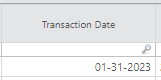
- But exports to Excel as this - note the format is now completely different as M/d/yyyy h:mm
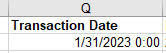
And this carries through all the next transforms as well -even though within each transform I apply the same Date Format formula of =DateFormat($_,"MM-dd-yyyy")
I am stumped as to why it doesn't recognize the data as a date and attempts to force it into any date format do not have the desired results in any export to excel.
If anyone has any suggestions I'd love to try.
#CostingStandard(CT-Foundation)