IBM Apptio

Apptio

A place for Apptio product users to learn, connect, share and grow together.


#Aspera
#Apptio
#Automation
#FinOps
#Apptio
#ITAutomation
 View Only
  • 1.  Cross-object Slicer

    Posted 04/20/15 04:17 PM

    *WARNING: Long Explanation Ahead*


    The top two requests from my users are:

    1. Let me save my slicer selections
    2. Let me make slicer selections once across multiple tabs


    The first one I plan to accomplish with a Global Filter, but that leads into the second problem. My cost centers are grouped using a single mapping dataset; let's call it Blurred Project List. I use lookup functions in Accounts Payable, Cost Source, and Labor to include a group and subgroup for each row. Because the group names are listed in each dataset, I had to duplicate the slicers if I wanted to have multiple types of data on a single report.


    To get around this limitation, I created a series of keys in my data and created a generic object in the Cost, Budget, and Forecast models called Blurred Project List. I then created an allocation line from the Cost, Accounts Payable, and Labor objects. Ignore the "Unfiltered" part. Also ignore the 100.11% allocation. My numbers are randomized in the screenshot so things are a bit wonky.
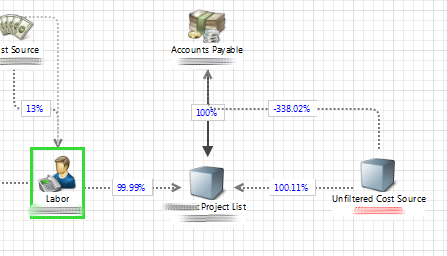
     

    ProjectListModel.png


    This has allowed me to create a report that has (for example) cost and labor data (from different objects) and use a single set of slicers.
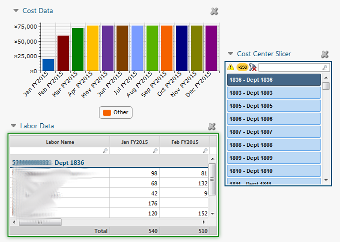
    CrossObjectWorking.png

    Now, when trying to create the global filter, I run into a problem. The "Data" perspective is not available when creating a global filter. So in a test report, I create a Blurred Project List perspective and add my fields. If I do not lock them to the object Blurred Project List, they are not available to add to a Global Filter. I then lock them to the object, and can add them to the global filter. When the fields are locked to the object Blurred Project List, they no longer filter the cost and labor objects. I then edit the perspective and uncheck the "Lock to object Blurred Project List" while leaving the fields added to the global filter. Once that is done, I can no longer edit nor recreate the filter, but everything works. I can add the global filters by copying the component to the clipboard and pasting it to each individual report.


    Finally, my questions:

    1. Is this a bug? I don't want to push this into production if it will break in subsequent upgrades.
    2. My two underlined points above are somewhat contradictory. Is that how it is supposed to work?
    3. My solution is somewhat convoluted and probably ill-advised. What is the RIGHT way to do this?


    #CostingStandard(CT-Foundation)


  • 2.  Re: Cross-object Slicer

    Posted 04/21/15 10:53 AM

    Escalating to Apptio Support to assist customer with slicer use with a Global Filter problem and best way to accomplish desired results.


    #CostingStandard(CT-Foundation)


  • 3.  Re: Cross-object Slicer
    Best Answer

    Posted 04/23/15 05:40 PM

    Tony,


    on the concerns that you underlined above:

    1) It is intentional that unlocked fields are not available for global filters. There is a best practice in apptio that you should always use locked published fields for everything, and there are numerous situations where unlocked fields can have unintended behavior. I would advise against attempting to go live with the non-locked global filter that you managed to make. When you try using it on other objects, depending on data cardinality, it is likely to not work as intended.

    2) The filters filter only the dollar amounts flowing through modeled metric when you are interacting with another model object. Rows that have $0 associated with them still show up in many cases. I think those are why labor does not appear to be being filtered. Try adding a filter of  the cost metric, != 0 to your query. This will filter out rows on the labor object that are showing up, but have no costs. Off your description I'm guessing that's the cause of the second issue [labor not getting filtered]. If not roger is right,, apptio support can look at the exact report, which will help get you unstuck. But hopefully the above helps.


    #CostingStandard(CT-Foundation)


  • 4.  Re: Cross-object Slicer

    Posted 03/15/16 04:37 PM

    A year later I'm finally getting back to this... Your solution of adding a filter "Cost != 0" works in most cases. I now have the issue where it is filtering out too much. In some cases, you DO want to show lines that have no cost. For example, I have a table that shows month over month labor charges. In a month where there are no charges, the row disappears entirely. I should still see that line, because there were charges in the previous month and/or subsequent months. Any way around that?


    #CostingStandard(CT-Foundation)