IBM Apptio

Apptio

A place for Apptio product users to learn, connect, share and grow together.


#Aspera
#Apptio
#Automation
 View Only
  • 1.  Can you change the color of a graph in an overlay chart i.e. second layer not shown as blue like the base layer

    Posted Wed August 14, 2019 08:40 AM

    I would like the Budget Line to be Black and the Actuals in Blue


    #CostingStandard(CT-Foundation)


  • 2.  Re: Can you change the color of a graph in an overlay chart i.e. second layer not shown as blue like the base layer

    Posted Wed August 14, 2019 11:33 AM

    Hi,


    You should be able to change the colors of any of the metrics on a report using the properties:

    1. Right Click on the chart you want to alter and choose properties.

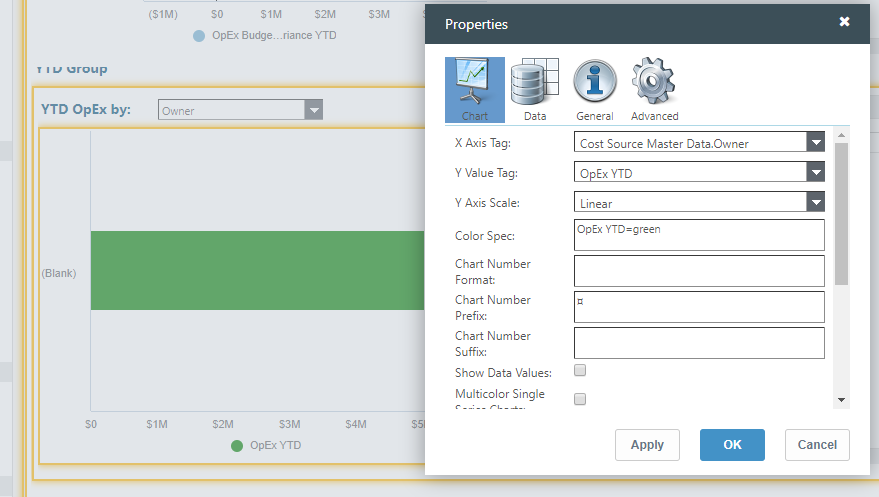
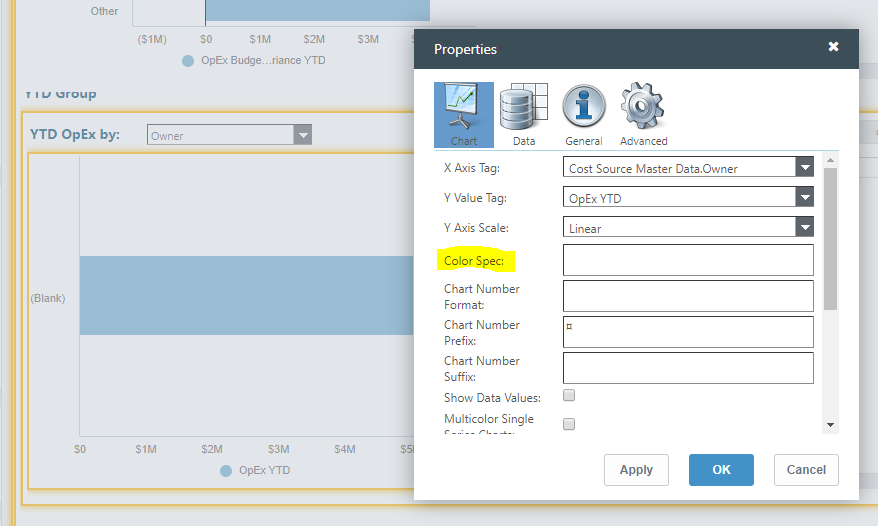
    2. The first tab (Chart) you will see a Color Spec option.

    3. Type out the name of the metric and then you can use Hex code or lowercase of a colors name to change the color.

    4. In the example below I changed it from the OOTB blue to green


    Let me know if you need any clarification,

    Lauren Griessel


    #CostingStandard(CT-Foundation)


  • 3.  Re: Can you change the color of a graph in an overlay chart i.e. second layer not shown as blue like the base layer

    Posted Tue March 03, 2020 01:52 PM

    @Lauren Griessel how do you apply this to multiple labels? E.G., Opex=Green, Capex=Blue. Semicolons and commas don't seem to work and I can't carriage return in the properties either.


    Thanks in advance!


    #CostingStandard(CT-Foundation)


  • 4.  Re: Can you change the color of a graph in an overlay chart i.e. second layer not shown as blue like the base layer

    Posted Tue March 03, 2020 01:56 PM

    Hey,


    When I tested this worked:

    OpEx=green;CapEx=blue


    Thanks,

    Lauren Griessel


    #CostingStandard(CT-Foundation)


  • 5.  RE: Re: Can you change the color of a graph in an overlay chart i.e. second layer not shown as blue like the base layer

    Posted Thu March 27, 2025 12:53 PM

    Hi, I am new to creating reports in APPTIO. i am looking for this option. i do not get any pop-up when i right click on a report. do I need a specific role to get the report properties ?

    Please advise.


    ------------------------------
    Prakash Yanamandra
    ------------------------------


  • 6.  RE: Re: Can you change the color of a graph in an overlay chart i.e. second layer not shown as blue like the base layer

    Posted Fri March 28, 2025 05:12 AM

    Hello, @Prakash Yanamandra.

    You get the properties when you right-click on the headings of a table in a report:


    Then you can select Properties.

    If you refer to changing the colors, as an entry in this thread describes (Wed August 14, 2019 11:33 AM), you need to select the chart you want and ensure you are in the Overlay chart.


    ------------------------------
    Regards, Guillermo
    ------------------------------


  • 7.  Re: Can you change the color of a graph in an overlay chart i.e. second layer not shown as blue like the base layer

    Posted Tue March 03, 2020 02:00 PM

    Thanks Lauren! I must've had a typo or it didn't like my space in between, but it works for me as well! Cheers!


    #CostingStandard(CT-Foundation)