IBM Apptio

Apptio

A place for Apptio product users to learn, connect, share and grow together.


#Aspera
#Apptio
#Automation
 View Only
  • 1.  Can Column Picker selection follow the Drill-Down ?

    Posted Fri October 20, 2017 05:53 PM

    Hi Community


    I´m playing with various setup of custom reports or chart and I´m wondering (of course, I tried many and many approaches) how to do this:


    Pie chart represents the distribution of costs among some kind of business hierarchy.

    Column picker (single selection) allows to display the cost as PnL YTD, CashFlow YTD, Annual Budget or Annual Forecast.

    The Pie chart is configured in that manner, that drills down to detailed destination report, where subordinated business hierarchies ("rows") are displayed by Pie Chart.

    For each listed Column Picker option, the pie chart has enabled the drill function. 


    The "destination" report for drill-down is, as mentioned above, again a Pie chart with Column Picker to allow the single selection of  PnL YTD, CashFlow YTD, Annual Budget or Annual Forecast.
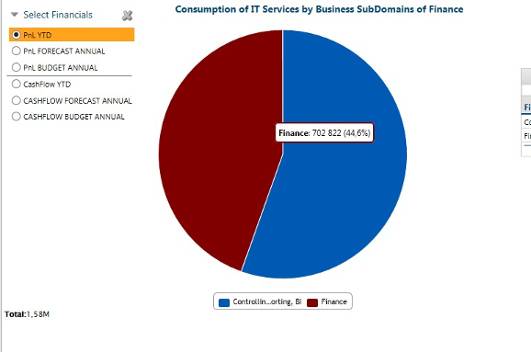
     

    Behavior of this setup is that the destination Pie Chart displays the selected subordinated hierarchies ("rows"), but ALWAYS displyas the pre-set Column Picker value of destination report. In this case it is PnL YTD.

    It does not matter of which Column Picker selection (PnL YTD, CashFlow YTD, Annual Budget or Annual Forecast) have been the drill run, it always lands on the "PnL YTD".


    Is there an effective way how to change also the Colum Picker value on destination report, which to follow the selection on the parent report, by drilling the CHart or Table?


    Thank you for any comment, advice or direction to similar topic.


    Best regards

    Tomas


    #CostingStandard(CT-Foundation)


  • 2.  Re: Can Column Picker selection follow the Drill-Down ?

    Posted Fri October 20, 2017 06:07 PM

    Hi @Tomas Petrovic, my gut instinct is no, you cannot select a setting where the displayed metric from a radio button will be carried through/persistent to another separate radio button component within a drilled report. I'd have to experiment but if you select the setting in the ribbon "Selected value" and then navigate to a table (or something that can show more than one metric) it may behave closer to what you're looking for. Hope that's helpful! 


    #CostingStandard(CT-Foundation)


  • 3.  Re: Can Column Picker selection follow the Drill-Down ?

    Posted Fri October 20, 2017 06:43 PM

    Hi Shelby,


    thank you for superquick reply.


    I have just tested your suggestion to set also "selected value" on parent object (report table, chart) of drilling.


    The result is that the Pie Chart shows the data only in case when the Column Picker on destination report is manually set to the same option as it is on parent report wherefrom the drill was run.

    While the other option are selected, the pie Chart brokes.


    Other components on destination report of drill (tables, bar charts)  work fine again when the same column picker value is selected, in other cases of selection they do not brake, but displays two columns of values - the original metric selected on parent report and the new one selected on destination report (which is not the desired outcome).


    Therefor, if you don´t have any other idea, I propose NOT to drill with "Selected values" AND change the Column Picker selection manualy on the destination (drill) report.


    • Configuration of drill-down on parent object. The PnL FORECAST ANNUAL selected on Column Picker:

    • Behavior of destination report when Column Picker selection matches the selection on parent:

    Destination report of drill, when the same Column Picker option is selected as on the parent report

    • behavior of destination report when Column Picker selection differs from one on parent report:


    Best regards

    Tomas


    #CostingStandard(CT-Foundation)


  • 4.  Re: Can Column Picker selection follow the Drill-Down ?

    Posted Fri October 20, 2017 06:52 PM

    @Tomas Petrovic you are right, if you want to use a pie chart, it will not render correctly due to their limit of displaying one metric. If the visualization must be a pie chart, do not use "Selected Value". The user will need to change the metric via the radio button manually. If you are OK with having a table or different chart then the "Selected Value" may be applicable.


    Hope that helps clarify,

    Shelby


    #CostingStandard(CT-Foundation)


  • 5.  Re: Can Column Picker selection follow the Drill-Down ?

    Posted Fri October 20, 2017 06:56 PM

    @Shelby Nuccitelli, thank you for clarification :-)


    Have a nice weekend

    Tomas


    #CostingStandard(CT-Foundation)