IBM Apptio

Apptio

A place for Apptio product users to learn, connect, share and grow together.


#Aspera
#Apptio
#Automation
#FinOps
#Apptio
#ITAutomation
 View Only
  • 1.  Adding Past Years' Spend to Projects

    Posted 01/18/17 02:06 PM

    Hi TBM Community!


    Per the request of our users, we would like to have two columns added to the IT Management - Projects - Project Details report in Cost Transparency.  They would like to see the prior year's CapEx and OpEx actuals so that we can accurately depict our Remaining Project Budget (Project Budget for us is not broken apart across years... it is one lump sum per project).  


    Does anyone know of a way that we could do this?  


    Thanks!


    #CostingStandard(CT-Foundation)


  • 2.  Re: Adding Past Years' Spend to Projects
    Best Answer

    Posted 01/18/17 02:33 PM

    Adding new table columns which use the TimePeriod() function might help with this.


    Examples:


    Cost from 12 months ago

    LY Cost = TimePeriod(Cost, -12)


    Rolling 9-month total cost look-back

    Rolling 9 Mo Cost Total = TimePeriod(Cost, -1) + TimePeriod(Cost, -2) + TimePeriod(Cost, -3) + TimePeriod(Cost, -4) + TimePeriod(Cost, -5) + TimePeriod(Cost, -6) + TimePeriod(Cost, -7) + TimePeriod(Cost, -8) + TimePeriod(Cost, -9)


    If instead you want to see the total for the entire previous fiscal year (regardless of which time period is selected by a user at top center of screen), consider Apptio's built-in time options per metric: Right-click Cost in the Values section of the ad hoc query configuration dialog, then Value Field Settings > Last Fiscal Year, seen here:
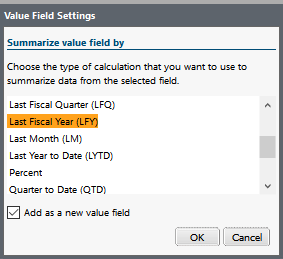


    The Value Field Settings options also include Last 12 Months (rolling look-back) to save you the trouble of creating a 12-piece TimePeriod() formula.


    #CostingStandard(CT-Foundation)


  • 3.  Re: Adding Past Years' Spend to Projects

    Posted 01/18/17 03:01 PM

    Thanks, Chris!  Is there a way to duplicate the current OpEx and CapEx columns we have in here for this current fiscal year so I can edit them appropriately in the Value Field Settings?  I need to have both FY16 total and FY17 YTD.


    #CostingStandard(CT-Foundation)


  • 4.  Re: Adding Past Years' Spend to Projects

    Posted 01/18/17 03:14 PM

    Figured it out!  But for some reason it's giving me a $0 sum total which is most definitely incorrect.  I'll have to investigate a little further!


    #CostingStandard(CT-Foundation)


  • 5.  Re: Adding Past Years' Spend to Projects

    Posted 02/09/17 08:59 AM

    Great post Chris. I like your idea and I think it will work very well for this customer use case.  Keep up the great ideas.


    #CostingStandard(CT-Foundation)


  • 6.  Re: Adding Past Years' Spend to Projects

    Posted 08/10/17 06:45 AM

    Hey Chris,


    I'm after a rolling 12 month view of some MIPS usage, and I've done the calculation that you said above TimePeriod(MIPS,-1)+... and I was wondering if there has been any improvements to the way this can be done? As in, is there a Rolling12Months(MIPS) type formula I can use, or is the only way to do all of the time period calcs?


    Thanks,

    Oli


    #CostingStandard(CT-Foundation)


  • 7.  Re: Adding Past Years' Spend to Projects

    Posted 08/11/17 03:55 PM

    To display one column per month (Example: 12 columns to show 12 months), drag Months (Yr) from Time perspective to Columns section of ad hoc query configuration dialog. Then right-click Months (Yr) > Range to adjust the look-back (or look-forward) distance.


    But to combine multiple months into one column, stick with the TimePeriod() method mentioned in above posts.


    If you specifically want a 12-month look-back, the above posts show a shortcut using Value Field Settings > Last 12 Months (LTM).


    #CostingStandard(CT-Foundation)


  • 8.  Re: Adding Past Years' Spend to Projects

    Posted 08/10/17 11:03 AM

    Fab question, been wracking my brain trying to figure this out myself - got to love community


    #CostingStandard(CT-Foundation)