IBM Apptio

Apptio

A place for Apptio product users to learn, connect, share and grow together.


#Aspera
#Apptio
#Automation
 View Only
  • 1.  Total Row question - calculate for one row but not another

    Posted Mon March 30, 2015 11:14 AM

    I have a table that has a handful of numeric columns in it.  I have the Total Row option selected to show the total for each column.  The problem is, one of my columns should not be totaled because the sum of all the values does not make sense in the context of the report.  Is there a way to turn off the summarization for this one column?


    My first thought was to create a new column that referenced this column, and then leave the "Summable" option unchecked.
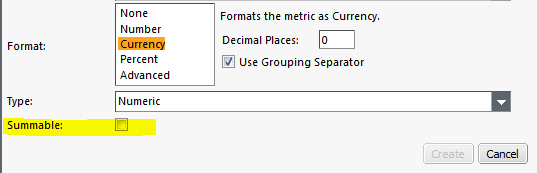
        

    This did not work, and I'm not sure why.  If this doesn't produce a column that does not have a summary value, I'm not even sure what this option does.


    My second thought was to just make it a label rather than a numeric value.  This worked, but then everything was left-justified.  If this is my only work-around, is there a way to make a text field right-justified?


    #CostingStandard(CT-Foundation)


  • 2.  Re: Total Row question - calculate for one row but not another

    Posted Mon March 30, 2015 01:37 PM

    So in order to do this you should set the Type to "Label" and it will not total up using the Total Function within Apptio:


    You can also set it to a number and change the formatting (i.e. Decimal Places) and then set it back to label, therefore you have the formatting of the number that you want but it won't be included in the Total Bar at the bottom of the component:


    #CostingStandard(CT-Foundation)


  • 3.  Re: Total Row question - calculate for one row but not another

    Posted Mon March 30, 2015 02:00 PM

    Thanks, Bob.  This did work, but I have to admit, it's not exactly a user-friendly solution.  Would have been much nicer if I could have just edited the existing column and told it not to sum that one.


    #CostingStandard(CT-Foundation)


  • 4.  Re: Total Row question - calculate for one row but not another

    Posted Mon March 30, 2015 02:12 PM

    I take it back.  This didn't work like I wanted it to.  When I initially made the change, it looked right (looks like a number, no total in the summary line, and right-justified).  But when I saved the report and went back to View mode, it went back to being left-justified.


    #CostingStandard(CT-Foundation)


  • 5.  Re: Total Row question - calculate for one row but not another

    Posted Tue March 31, 2015 01:34 PM

    I don't think that I have ever been able to get around the left/right justified issue. A lot of times when creating a "calculated column" that is a label and text, it shows up as right justified. This especially happens with evalWikis


    #CostingStandard(CT-Foundation)


  • 6.  Re: Total Row question - calculate for one row but not another
    Best Answer

    Posted Thu April 02, 2015 10:45 AM

    Try this: ="<span style='float:right;'>"&Currency(Cost YTD)&"</style>" in the formula field of the new column, but obviously substitute your field name.


    #CostingStandard(CT-Foundation)


  • 7.  Re: Total Row question - calculate for one row but not another

    Posted Thu April 02, 2015 10:57 AM

    Combining Bob's answer of changing the Type of the field to Label and Tony's answer of using the Span Style, I was able to get the desired result.  I used NumberFormat instead of Currency since I am dealing with headcounts.


    Thanks Bob and Tony!


    #CostingStandard(CT-Foundation)


  • 8.  Re: Total Row question - calculate for one row but not another

    Posted Thu April 16, 2015 04:02 PM

    I'd be a little careful with the span approach. Injecting custom HTML like that can csometimes result in things rendering wierd, and/or differently between web browsers.


    Personally I just do an if statement. Here's the quick example I just through together:

    =IF(Release="Total ","",Currency($_,"#,###"))


    NOTE: there is a space after the word 'Total'community total 1.pngcommunity total 2.png


    #CostingStandard(CT-Foundation)