Apptio for All

 View Only

 Total Column in Report

Jump to  Best Answer
  • ApptioforAll
Jenny Franklin's profile image
Jenny Franklin posted 07/23/21 09:33 AM

Need your help please😁

Got a report where we're pulling in the Q1, Q2, and YTD numbers.

The client also wants to see units in Q1 and Q2 (but not YTD - just cost for that).

Not seeing how to show that without creating a separate report out to the side with just the cost total.  Any ideas?  Thanks, Everyone!! 🙌


(Also, you'll see there is a Total column there where Cost is renamed to YTD 2021. That's because when we pulled in the YTD metric, it did not equal Q1+Q2, so had to improvise.)


#ApptioforAll
Alex Allan's profile image
Alex Allan  Best Answer
Hi Jenny,

You are right, unfortunately there is no way in which you can remove the Units YTD column and leave just the Cost YTD.  I would suggest you create two tables, one for Units less YTD total, one for Cost including a YTD total.  Each of these could be presented in individual tabs or side by side.

Hope this helps.

Thanks Jenny.
#ApptioforAll
Jenny Franklin's profile image
Jenny Franklin
Thank you for confirming, @Alex Allan​!
#ApptioforAll
Guillermo Cuadrado's profile image
Guillermo Cuadrado

I agree with the expert's opinion, but I found a way that might be workable (please note the emphasis on the conditional).
The trick would to get rid of the time series in the report. Thus:
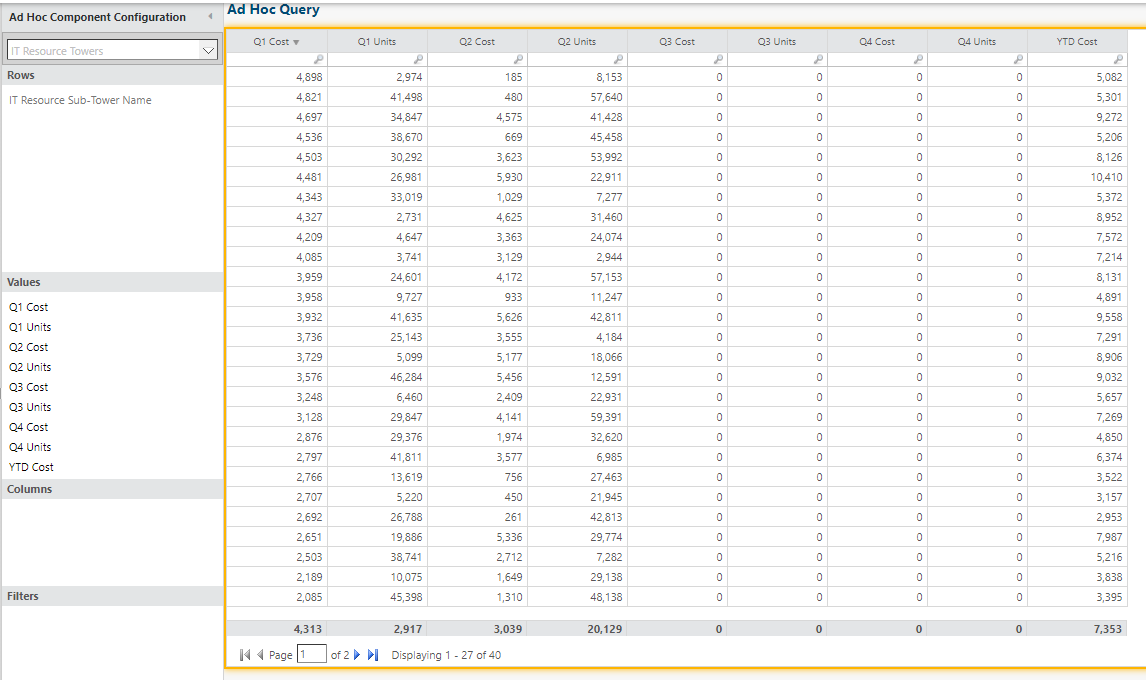

The question is how to populate the columns without going nuts with LookupObjectUnitValue() calls.

Something I have tried in the past is downloading your original report as a table with Datalink, and then using that as the basis for a report that wouldn't have time in the Columns section of the report. I don't have time to do that, but I'm pretty sure it could work.

Good luck, @Jenny Franklin and thanks to @Alex Allan for the insight.

​​​​
#ApptioforAll
Jenny Franklin's profile image
Jenny Franklin
Thank you so much, @Guillermo Cuadrado!​
#ApptioforAll