Apptio for All

 View Only

 How to Create a table starting from a report

Jump to  Best Answer
  • ApptioforAll
Dario Andrita's profile image
Dario Andrita posted Mon January 24, 2022 06:37 AM
Hi all,

I have a report, and I want to copy automatically this report in a table. how I could do this?

Thanks all!
#ApptioforAll
Guillermo Cuadrado's profile image
Guillermo Cuadrado  Best Answer
OK, the only explanation I can find is that the report should be in PRD. Only Apptio Support can confirm this.
Sorry, I cannot help further.
#ApptioforAll
Apptio Community Member's profile image
Apptio Community Member
It's a good question :D
#ApptioforAll
Jenny Franklin's profile image
Jenny Franklin

Hi @Dario Andrita,

Once the report has calculated in Staging, go over there, right-click on the report in Staging and select 'Show API URL'.   Copy that, and then create a Datalink Connector using the Apptio connector and paste the URL in the appropriate field.  

https://help.apptio.com/en-us/datalink-classic/datalink/connectorguides/c-apptio.html?Highlight=datalink%20apptio%20connector 


#ApptioforAll
Dario Andrita's profile image
Dario Andrita
@Jenny Franklin Thanks for your help!
I copy "Legacy API" from my report and I tried to create a datalink, but when it run I obtein a empty table (only with headers). Do you know how it is possible?

Thanks so much
#ApptioforAll
Jenny Franklin's profile image
Jenny Franklin

Do you not have one that says Show URL API?  If it's a legacy report, then I'm at a loss, sadly, but hopefully someone can hop on to help!  Tagging @Matt Temple to see if he's ever done this using a legacy report​.
#ApptioforAll
Dario Andrita's profile image
Dario Andrita
Yes, I have. I went on the report and click on "Show API URL"


after that, I copy "Legacy API" URL and paste on the Download information --> Apptio Export URL


#ApptioforAll
Matt Temple's profile image
Matt Temple
After the window appears from clicking the "Show API​ URL":

  1. Scroll to the "Download format" section (just above the Legacy API section).
  2. Pick one of the available formats (eg TSV, JSON, XML) and copy the related URL.
  3. Paste and navigate to the URL into a different Internet browser tab/window to validate the URL. It should download a file. If it doesn't, return to step #3 and resolve.
  4. Inspect the downloaded file to validate content. If content is missing/incomplete, consider changing the date period referenced in the URL (see bold red date period in sample URL below) to an earlier period.

After you confirm the URL is valid and the downloaded data looks acceptable, use the URL in your Datalink connection (if applicable).

https://accenture.apptio.com/biit/api/v2/report.xlsx?reportPath=-@Caccenture.com%3ACost+Transparency/Reports/.DateGoesHere/CostModels/Default/.View%3AFinancial+Review&date=Dec:FY2022&componentId=3748&environment=prd&userLanguage=en-US​
#ApptioforAll
Guillermo Cuadrado's profile image
Guillermo Cuadrado

We use the Copy Table connector in Datalink (Classic). After some tinkering, I had to choose the TSV format API URL as described in some answers. We have two such connectors that run every month. Let me know if you need further details, @Dario Andrita


N.B.:

  • The only issues we had at first was choosing the correct API URL
  • Also, the connector fails if we select the Validate data  option after the time period selection. Don't know why, but it works like this for us
  • Don't worry about the date part of the URL, I left it at whatever value was there and it works every month. Somehow, Datalink figures out what to do.
  • We use the PRD URL. Have not tried from STG as suggested above.

#ApptioforAll
Dario Andrita's profile image
Dario Andrita
Hi @Guillermo Cuadrado thank you for your answere.

I did what you told me, datalink run correctly but if I check the new table created, I can see only the headers, without data. Do you know how I could resolve this?


#ApptioforAll
Dario Andrita's profile image
Dario Andrita
Hi @Guillermo Cuadrado an update: in my last comment I copy TSV Format under "Legacy API". If I choose TSV Format under "Downlaod format" and run datalink I have this error message:

#ApptioforAll
Guillermo Cuadrado's profile image
Guillermo Cuadrado

Without access to the system it's hard to make recommendations, but here we go. Check the connector's execution history (in the Actions menu):


I'd check the number of bytes transferred, and, especially, what period it loaded it onto.

 
Also, take a look at the calculation queue: until the DEV one completes, you won't see the update. This is important!

In the table you're loading data to, in the Upload step you should see something like this:
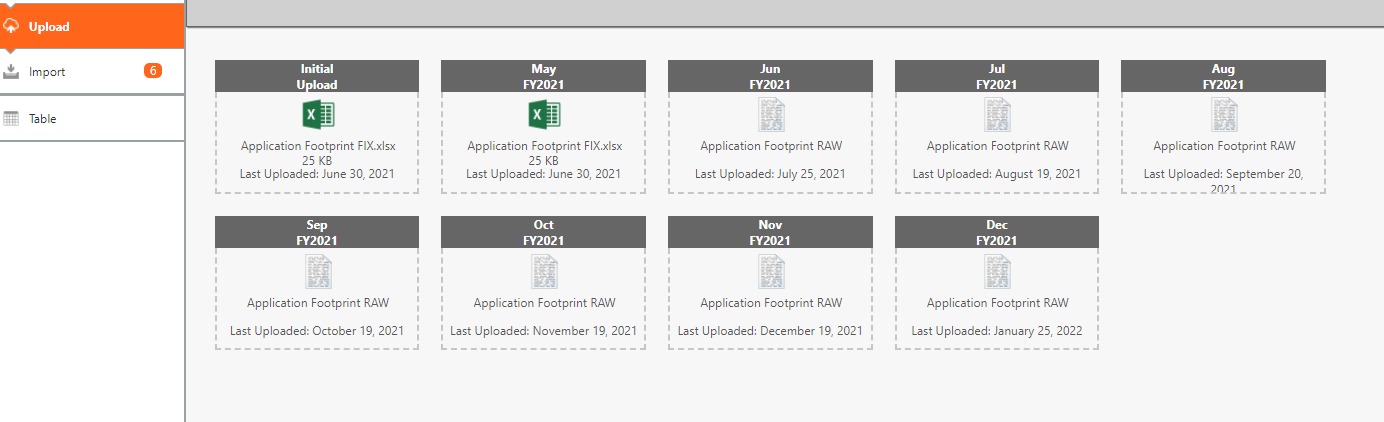

Note the months the connector loaded data onto, as opposed the first few where I was uploading data manually.

 
You should see the upload with today's time stamp on the month the connector loaded data to.


#ApptioforAll
Dario Andrita's profile image
Dario Andrita
Hi @Guillermo Cuadrado, I'll try to explain step by step

I'm in november 2021, I clickon report  -> show API URL ->copy TSV Format under Download format


now I configure datalink. in "Select Data Destination" -> Apptio Export URL  I paste URL and I select time period = Nov 2021


In Apptio Destination I wrote table name and select time period = Nov 2021. After that save datalink.
 
If now i try to run datalink, I have the below error

I don't know why... the steps done seems correct.
#ApptioforAll
Guillermo Cuadrado's profile image
Guillermo Cuadrado
Maybe a silly question: what happens if you copy & paste the API URL in a new browser window? Does it download the data?
Is it possible that you only have the report in DEV?
The 404 error seems to show that the API call cannot find the target page (the report).
#ApptioforAll
Dario Andrita's profile image
Dario Andrita
@Guillermo Cuadrado the report is in Staging environment. If I copy & paste the API URL in a new browser window, I'm able to download correctly the tsv file.
I try to copy only the table of the report I'm interesting in on an other report. Now when I run  datalink , it found the file but the table is always empty.


A question: it's possible that I can't see value because  there are some metrics in the report?

#ApptioforAll
Debbie Hagen's profile image
Debbie Hagen
Wow so much amazing help here from our Apptio Community of experts! Thanks all! 

 @Dario Andrita it sounds like you've gotten some great suggestions but for some reason it's still not working.  Since neither our Apptio First Responders or our Apptio Community Experts are able to access your environment for data privacy reasons, I'm going to go ahead and second Guillermo's suggestion to contact Apptio Support. 

The Support team can help determine whether something is broken, not possible,  or whether there is simply  a step or a setting that is missing.  Please do submit a support ticket so we can help you resolve this.

kind regards,
Debbie


#ApptioforAll