IBM Apptio

 View Only

 Count of unique values from sending object.

Jump to  Best Answer
  • CostingStandard(CT-Foundation)
Apptio Community Member's profile image
Apptio Community Member posted 04/25/22 06:45 PM
Hi Apptio community,

I am trying to come up with a way to show a uniquecount() value on an object lower in the model.

Example 1: Vendors
Vendor costs are split across multiple towers, infrastructure, and ultimately get split across our (business) applications and (business) services. The Apptio model wants to split any attempt at a count metric I have attempted to build, so a value of 1 can get split up depending on how the vendor supports our organisation. But at the Application object, if the vendor sends cost to Application X, then I want to show a count of 1 for the vendor. Similarly, if the SAME vendor also sends costs to Application Y and Application Z, I again want to show a count of 1 for this vendor.

Example 2: Technical Applications
We have a custom object that sit below the OOTB Applications object which shows costs of our technical applications. These costs are then either directly related to business applications, or are spread over all business applications. The costs then roll up to the Services object. At this Services layer, I again want to show the count of technical applications a business service consumes. If a technical app gets split across 100 business applications, and 5 of these all link to 1 business services, I still want to show a count of 1 for this technical app (not 0.05) at the services level. Apptio wants to split the number.

While I have a workaround it is messy and prone to introducing errors should we change the model in anyway.

Does anyone know of a way of showing the uniquecount from the sending object, based on certain criteria I can define myself (primarily Cost YTD!=0)?

Thanks Mark
#CostingStandard(CT-Foundation)
Attachment  View in library
Example.JPG 36 KB
Guillermo Cuadrado's profile image
Guillermo Cuadrado  Best Answer

I take it that what you want is to determine the number of technical applications that relate to your Service Offerings, @Mark Johnson without CT allocating fractions of the amount.

FIRST IDEA:
You could replicate the allocation lines without the weighting you're using today. You'd end up with a much higher number in the Business Services object, but each entry would reflect how many relationships there are to a single Tech App. This way, you could enter your condition.

One issue I can see is that you have a 2-level allocation step between Tech Apps & Business Services. You'll end up with an exceedingly large number, if you count 1 at every level, and there are 1:n relationships on both steps.

SECOND IDEA:
I thought some more about your issue and there might be a more elegant way of doing this, without changing the allocation lines. It involves creating a second metric, with its driver at the Business Applications object. Its logic (formula) could be something like:
=If(Cost YTD!=0 AND Modeled Count>0,1,0)
Again, I need to test this, but it feels like the best approach.
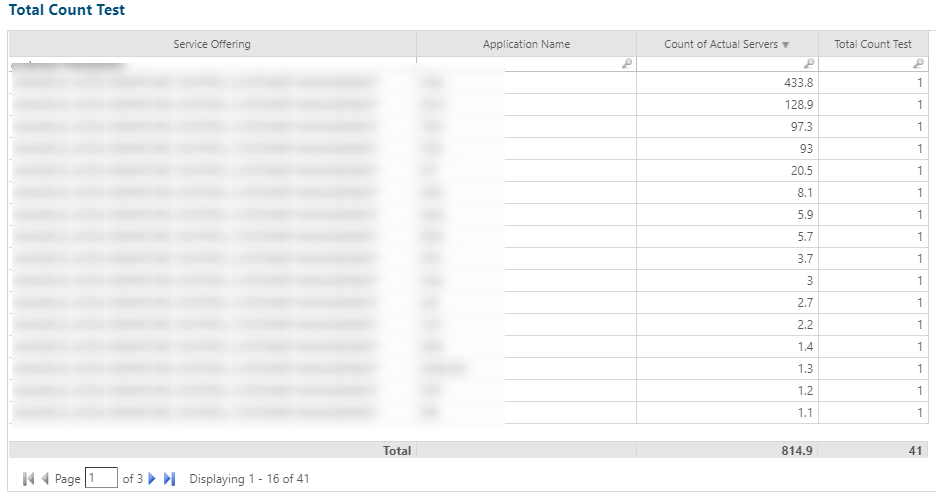
It's not exactly your scenario (Vendor = 1), but it would be equivalent (logically). See that for each one of the Application / Service Offering pairs, the system counts 1 instance. 

This is how I did it:
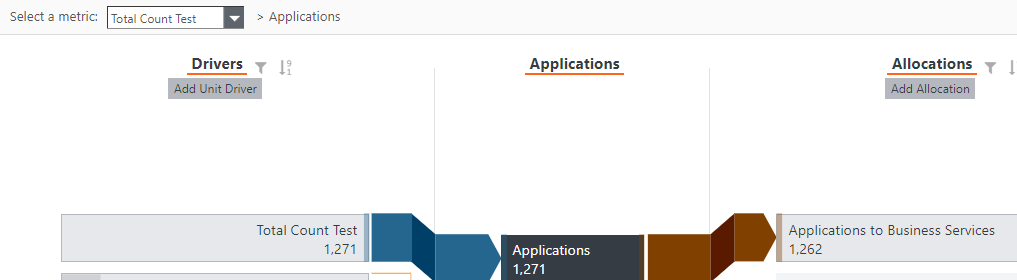

I created a new Total Count Test driver and activated the metric to go up to Business Services:
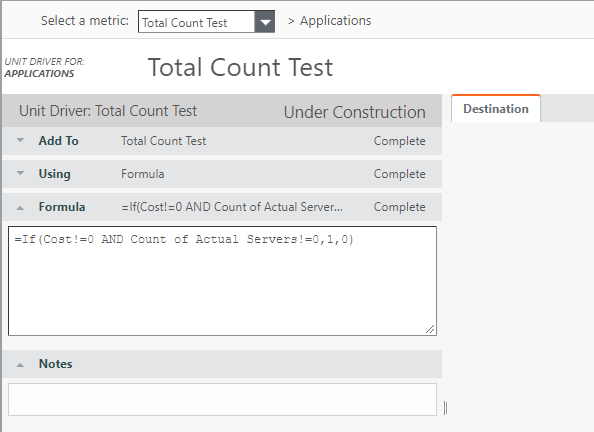

(It also works with Cost YTD!=0).


I'll write a blog post with more details after I finish my trials.

P.S. We are using your approach to count the number of servers up the model, so we can see how many there are per Business Service. The standard allocation works fine for us.


#CostingStandard(CT-Foundation)
Claudia Secco's profile image
Claudia Secco
Hi Mark,
I include in the discussion @Ian Talbot, @Adrian Smoothy, @Nick Brandwood, that maybe can give some indication
#CostingStandard(CT-Foundation)
Jenny Franklin's profile image
Jenny Franklin

Another option, if I'm thinking right this morning lol, may be doing a bit of math to create the count in the source master table and use that to determine the unique count.  Could start of with something like this, and then whittle it down with logic until it =1 for uniqueness.  That may be more of the messy logic you were referring to, though, so @Guillermo Cuadrado's way is probably best. 😊

Mando Way This Is The Way GIF - Mando Way This Is The Way Mandalorian -  Discover & Share GIFs

​


#CostingStandard(CT-Foundation)
Apptio Community Member's profile image
Apptio Community Member
Hi @Guillermo Cuadrado - thanks for the options. I have already implemented a solution which is very similar to your second suggestion however it is rather fiddly and if our model changes may require time to rework, given the new metric created and its associated allocations need to mimic some of the logic of the cost model in order for it to work currently. There were also some challenges around Cost YTD when a technical application did not have any costs in the current period.

It is actually quiet simple to produce the correct numbers in a two-object drill report, and this solution ​has been used to mock up some report KPIs (thankyou @Andrew Sheridan for your help here). This approach however does not allow me to bring these values in ​to certain reports built where I am showing a number of metrics side by side for (Business) Applications + Services. The solution you proposed does overcome this challenge and it was my hope there was a "better way" to deliver what is fundamentally a pretty basic calculation.

Appreciate your response here though!
#CostingStandard(CT-Foundation)