IBM Apptio

 View Only

 Can you have multiple rows in a single cell for reporting purposes?

Jump to  Best Answer
  • CostingStandard(CT-Foundation)
Rachel Pearson's profile image
Rachel Pearson posted Mon March 28, 2022 12:05 PM
Hi All,

I am wondering if it is possible to have multiple rows of data/information in a single cell when uploading an Excel file into TBM Studio? I have an Excel file that contains multiple variance explanations for a single category that are identified with bullets in Excel. In Excel it looks great, but when I upload into TBM Studio, the explanations are "collapsed" or turned into a run on string with the bullets just separating the explanations in a single row vs. the multiple rows.

I've included some sample screenshots below to help explain better. The first screenshot is what the rows look like in Excel and the second screenshot show the rows "combined" in Apptio. Our goal is to mimic multiple rows in a single cell like Excel as we are utilizing this table for reporting purposes and it will enhance the cleanliness and format of the tables. This might not even be feasible, so any guidance would be greatly appreciated. Thank you!


#CostingStandard(CT-Foundation)
Veronika Petri's profile image
Veronika Petri  Best Answer
Hello Rachel, as you said, Apptio will not display multiple rows as in Excel. An alternative for reporting could be the use of a Tree table, for example: 
For the Tree table, the data set in Apptio would need one line per category & variance explanation (which could be created via SplitEx on Variance Details column in your data set)
Account Group Variance Details Amount
Labor Test 0
Labor  Test 2 0
Consultant & Temp Support Test 0
Other Expenses Test 0
Other Expenses Test 2 0
Other Expenses Test 3 0

#CostingStandard(CT-Foundation)
Apptio Community Member's profile image
Apptio Community Member
Veronika's suggestion is best for your scenario where all items can be split and displayed as a tree.  
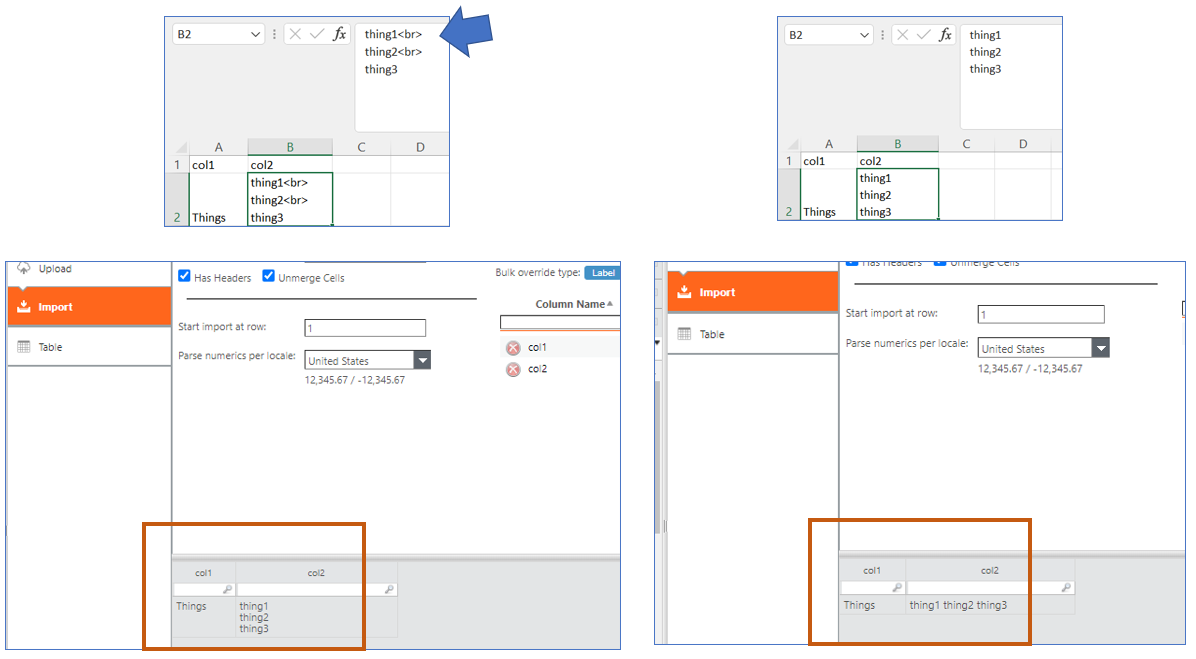
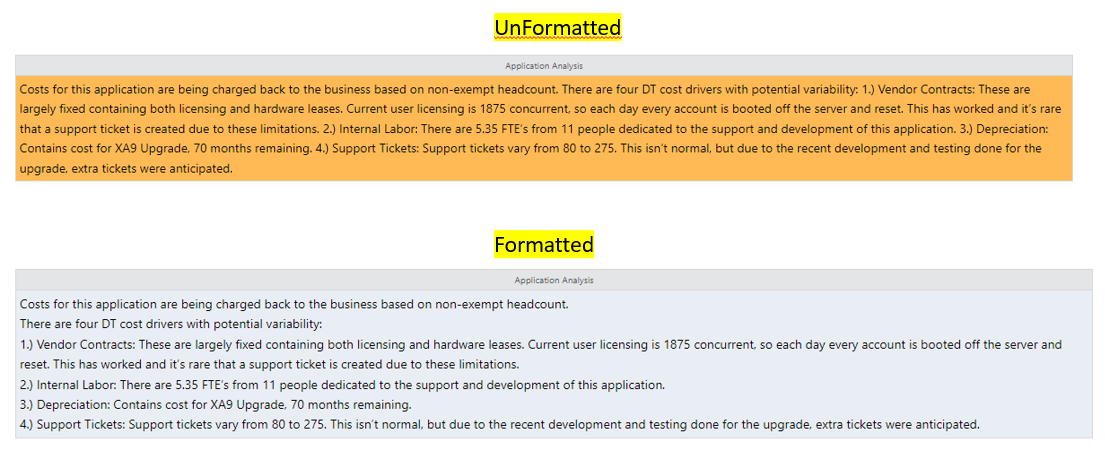
Another option is adding html line breaks <br> to the file before uploading.  This is more manual and would only make sense if splitting could not be done... like the 2nd scenario below.  

Here's an example relevant to your scenario.  

Here's a scenario where splitting would not work, but using line break improves readability.  
#CostingStandard(CT-Foundation)
Rachel Pearson's profile image
Rachel Pearson
@Veronika Petri @Josh Roberto The SplitEx will definitely come in handy when wanting to report on multiple rows of data. I believe since we already do manual format manipulation to the Excel files, adding the html code won't require an additional process so I believe this is the best route for the TBM Office and end users. Thank you both for your swift and helpful suggestions! It really makes a difference being able to collaborate with other Apptio users, so much appreciated :)​​​
#CostingStandard(CT-Foundation)