Cognos Analytics

Cognos Analytics

Connect, learn, and share with thousands of IBM Cognos Analytics users! 


#Product
#Analytics
#CognosAnalytics
#Analyticstools
#TechXchange Partner
#TechXchange Session
#TechXchange Presenter
#AI
 View Only
  • 1.  Server name error when testing gateway cognos configuration

    Posted 12/17/20 02:14 AM

    Hello,

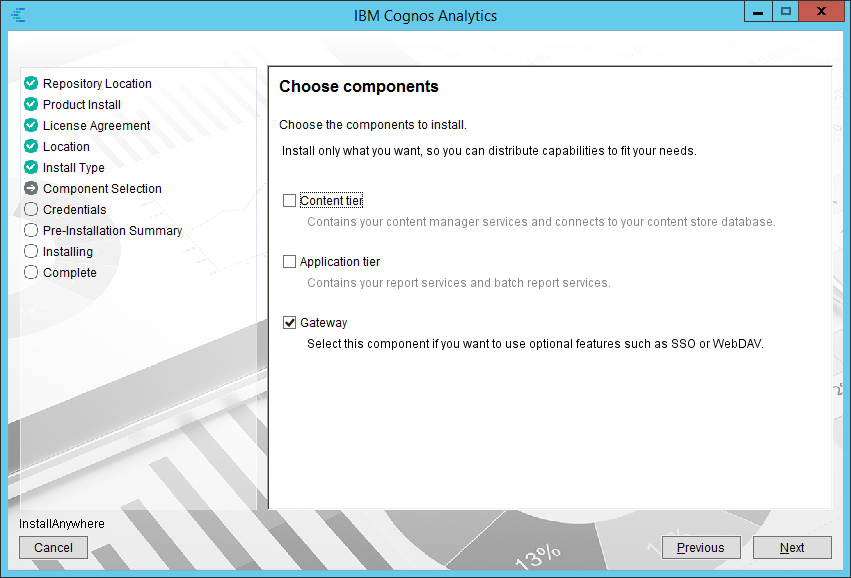
    I installed distributed Cognos 11.1 R7 with 2 CM and 1 GTW.

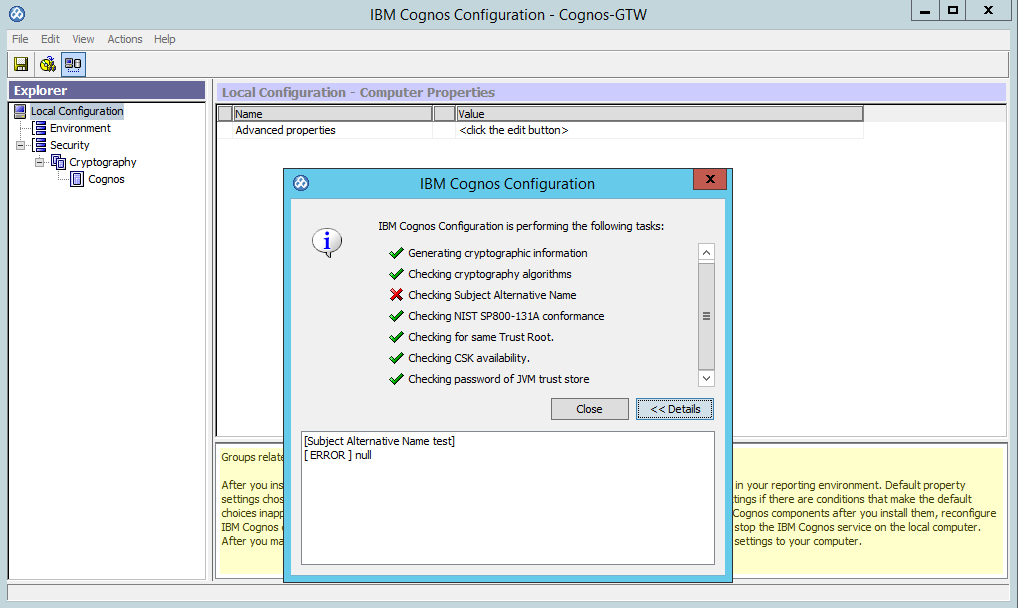
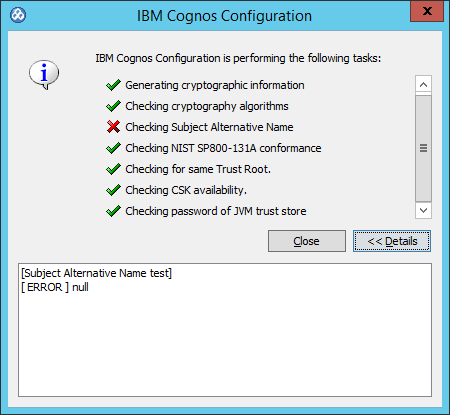
    When I test Cognos configuration on gateway I got this message (sorry it's in french) :

    does it occur because of no domain associate in full name on this computer (no dns, just a specific workgroup name) ?

    I didn't find the documentation very clear about this

    https://www.ibm.com/support/knowledgecenter/en/SSEP7J_11.1.0/com.ibm.swg.ba.cognos.inst_cr_winux.doc/t_configuresslforcognos8.html

    as I understand it's new feature to enforce security, but not very clear how to manage this in distributed environment : should CM and GTW have the same "server common name" or each his own ?

    I'm puzzle if my configuration is wrong or if the computer properties not well filled.

    Tried few name like : servername, servername.workgroup, servername.domain.com 

    without success.

    Could you help ?

    Many thank

    Thank you


    ------------------------------
    Vivien
    ------------------------------

    #CognosAnalyticswithWatson


  • 2.  RE: Server name error when testing gateway cognos configuration

    Posted 12/18/20 08:27 AM
    Edited by System Admin 01/20/23 04:24 PM

    Hi Vivien,

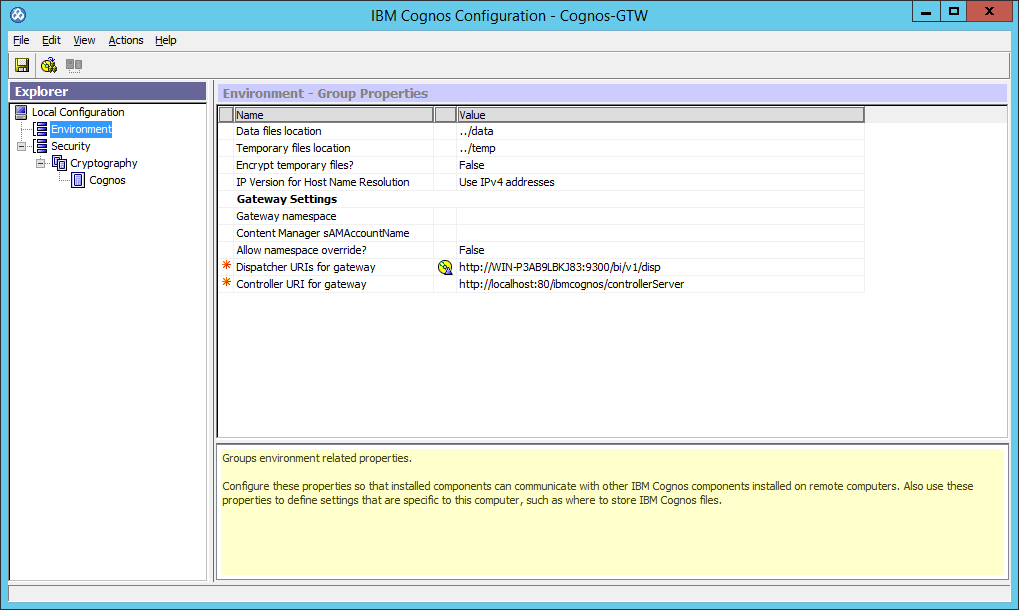
    Hard to diagnose in french, but you need to make sure the FQDN is the same throughout.  The Configuration Group and Cryptography->Cognos tabs in Cognos Config are the likely culprits.  Check these and try it again.

    -Todd


    ------------------------------
    Todd Schuman
    ------------------------------


  • 3.  RE: Server name error when testing gateway cognos configuration

    Posted 12/23/20 05:16 AM

    Hi Todd,

    thank you to take time to answer my problem.

    I have no issue in configuration like you.

    My issue raise when the machine has only the Gateway component installed. I hope I could try to reproduce on a new environment in English.

    Thank you again


    ------------------------------
    Vivien
    ------------------------------


  • 4.  RE: Server name error when testing gateway cognos configuration

    Posted 12/24/20 09:15 AM
    Edited by System Admin 01/20/23 04:36 PM

    Hello team,

    I still facing the issue with Cognos 11.1 R7 FP2

    I install Cognos CM/App on a windows VM named : WIN-P3AB9LBKJ83

    Cognos on WIN-P3AB9LBKJ83  start well and works fine.

    Then I install Cognos Gateway on a windows VM named : Cognos-GTW

    I open Cognos Configuration to configure Cognos :)

    But when I test configuration I got this message :

    note : it will appear only the first time Cognos Configuration is open and until configuration will be saved. After save configuration no more error message will be displayed.


    #CognosAnalyticswithWatson


  • 5.  RE: Server name error when testing gateway cognos configuration

    Posted 12/25/20 07:42 AM

    Hi,

    Just a few thoughts from me.

    1.. Can you reach your dispatcher URI from the browser in your gateway? It might not be able to see it or communicate over port 9300. 

    2.. I always use fully qualified domain names everywhere to rule out networking name issues. If I have to use netbios names I use them consistently not mixing FQDN and NETBIOS.

    3.. As Todd mentioned you might have an issue with your server group settings, again i always go FQDN for those.

    4.. The subject verification part references files on your dispatcher, when you save your config on the dispatcher does everything pass and give you a green tick. There is an issue with the PDF Algorithm files that needs to be patched which are in the same area but that might be a different issue.

    Regards

    Andy


    ------------------------------
    Andrew Copeland
    ------------------------------


  • 6.  RE: Server name error when testing gateway cognos configuration

    Posted 12/25/20 10:49 AM
    Edited by System Admin 01/20/23 04:09 PM

    Hello Andrew,

    thank you for your feedback. please find my answer below

    1. Yes I'm able to reach dispatcher. Here a screenshot : 

    2. neither Content Manager, neither Gateway is attach to DNS server. So I guess it's only netbios names use in my configuration

    3. Should I use a use FDQN such as WIN-P3AB9LBKJ83.domain.loc even if none of computer are member of domain ?

    if I try I got this message :


    4. regarding the PDF Algorithm I set 256 bit key in Content Manager and Gateway. No issue with this.

    I try different settings on gateway such as


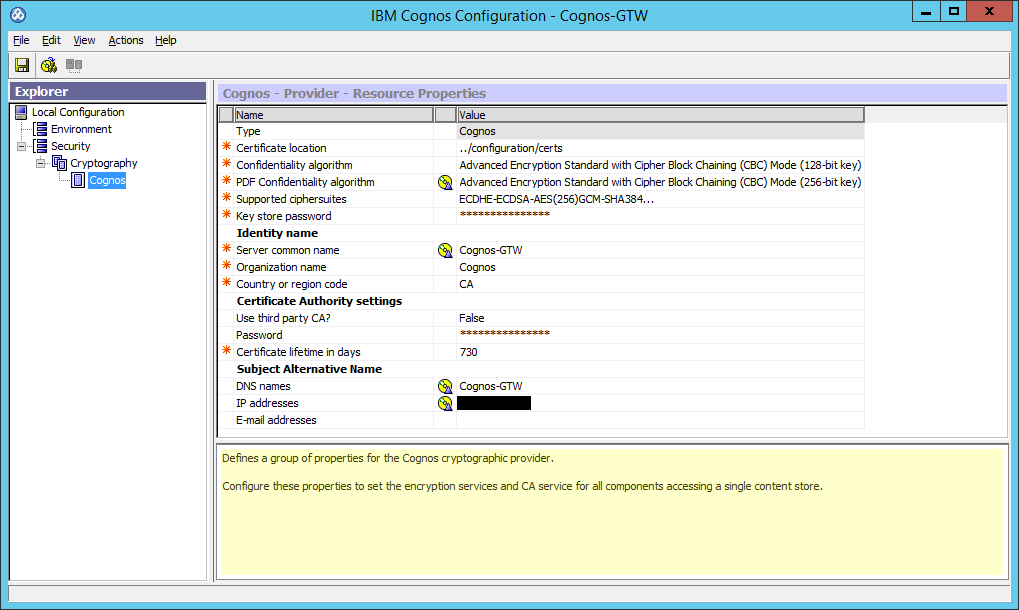
    Unfortunately test still failed :(


    For information settings on Content Manager computer :

    Thank you again for replying,

    regards,


    ------------------------------
    Vivien
    ------------------------------


  • 7.  RE: Server name error when testing gateway cognos configuration

    Posted 12/26/20 10:47 AM

    Hello,

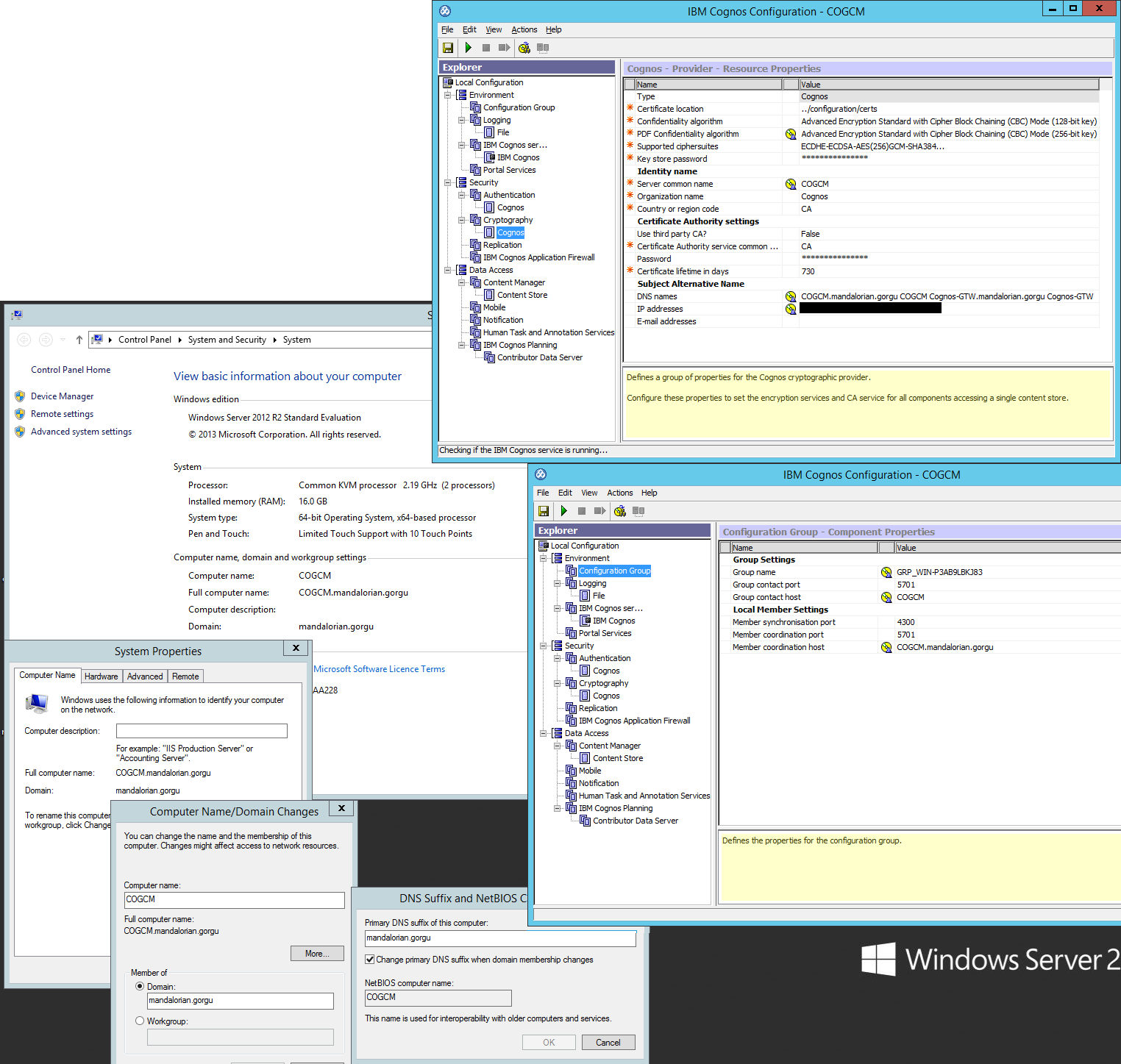
    as FDQN seems important in this setting, I create a ACtive Directory Domain Controller on a third VM.Then I add to this domain the 2 Cognos VM and update the setting with different parameters (below one of them), but still failed on gateway cognos configuration test.


    On VM with Content Manager/App Tiers :


    On VM with Gateway :
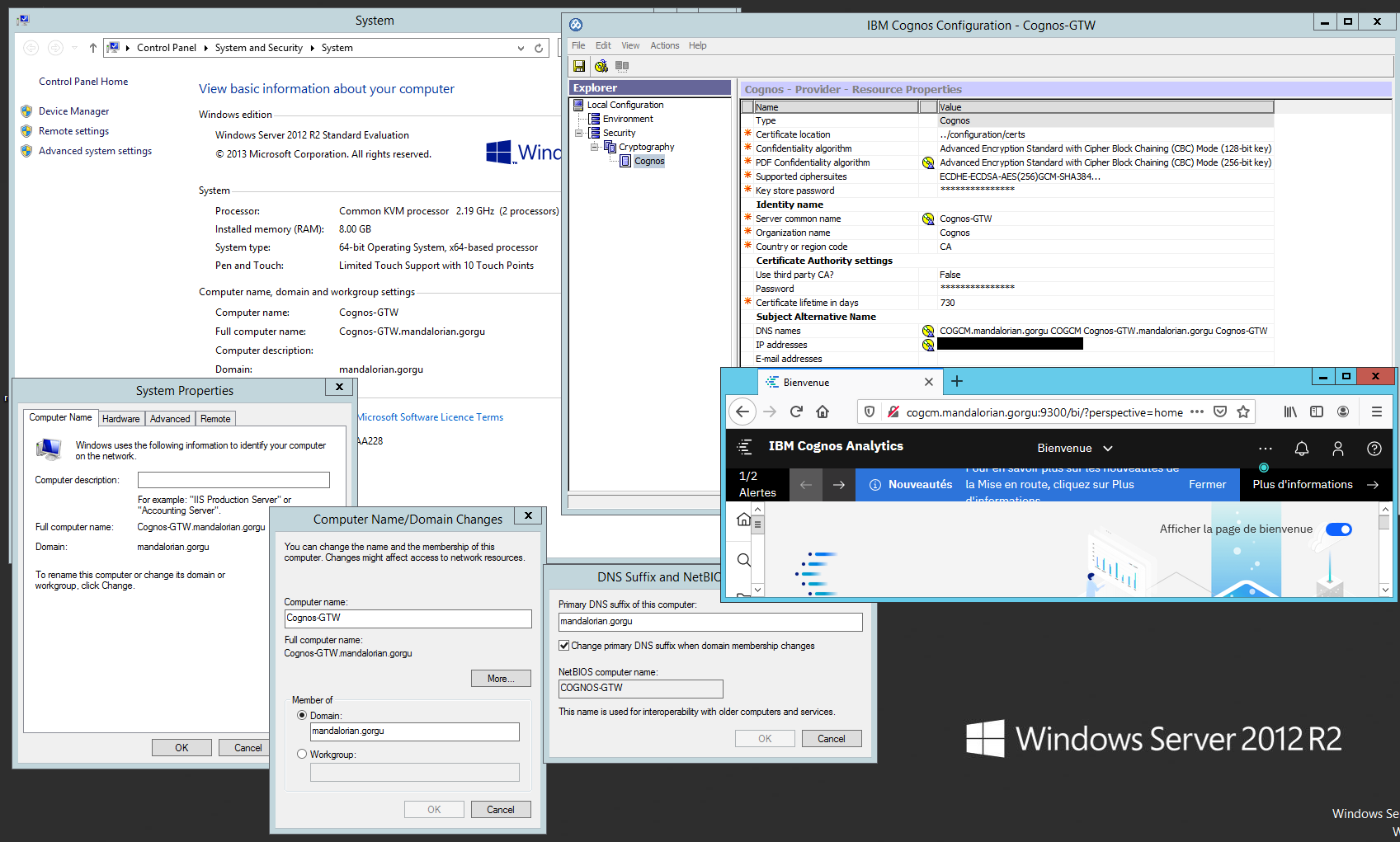


    ------------------------------
    Vivien
    ------------------------------


  • 8.  RE: Server name error when testing gateway cognos configuration

    Posted 12/28/20 08:59 AM

    Hi Vivien,

    The DNS line in your CM Crypto->Cognos config looks odd.  It seems like you have multiple entries in here.  Just put only the FQDN for the specific server here (CM for CM, GW for GW).   Also, try and remove the IP from both servers as well as it can sometimes cause an issue.


    ------------------------------
    Todd Schuman
    ------------------------------


  • 9.  RE: Server name error when testing gateway cognos configuration

    Posted 12/28/20 01:54 PM

    Hi Vivien,

    I ran into same issue after upgrading to v11.1.7 FP2. I did a over the top install on 11.1.3 on a single server. IBM support suggested adding an ip/server name mapping entry in hosts file. The file will be located at: C:\Windows\System32\drivers\etc. After adding the entry, my issue was resolved. Good luck.


    ------------------------------
    Vithal Madhira
    ------------------------------


  • 10.  RE: Server name error when testing gateway cognos configuration

    Posted 12/29/20 06:49 AM

    Hi Vithal,

    thank you for your feedback. I have no issue on single server. It's appears only with on a VM with only the Gateway Component install.

    regards,


    ------------------------------
    Vivien
    ------------------------------


  • 11.  RE: Server name error when testing gateway cognos configuration

    Posted 12/29/20 06:44 AM

    Hi Todd,

    Thank you for your feedback I appreciate.

    I agree with you it seems odd. But it was one of my test (I tried lot of combination)  based on this information : https://cogknowhow.tm1.dk/archives/2821 

    And when checking this settings it's ok on CM side :


    Anyway I try your recommendation


    as I wrote, I tried a lot of combination, with the same result Checking Subject Alternative Name test fail each time on Cognos Gateway :(

    I guess there a bug somewhere...


    ------------------------------
    Vivien
    ------------------------------