OK, so let me have another crack at it. By "document" I assume you mean some written (or photographic, or archival preservation) and preserved evidence of a "join". So, first off, your Framework Manager model is just an inert collection of metadata objects (query subjects, query items, relationships, etc.) created to represent some form of business logic. All of these static objects are documented in great detail using the Model Report tool. But the model has no moving parts - like "joins".
The moving parts (the SQL and any associated "joins") are called into play when you test a data extraction scenario, like maybe query items needed for a particular report. Then any "join" that might manifest itself in the test SQL becomes document-able. It shows up in the Query Information tab of your FM Test Results dialog box and then disappears when you close the dialog box. But while the dialog box is open the SQL and any joins it contains can be "documented" from there:
1) you can click the Print button and send your SQL to a printer or maybe a PDF doc.
2) you can copy and paste the SQL into NotePad (which is what I do frequently)
3) you can take a screen shot and save as an image file like the one below
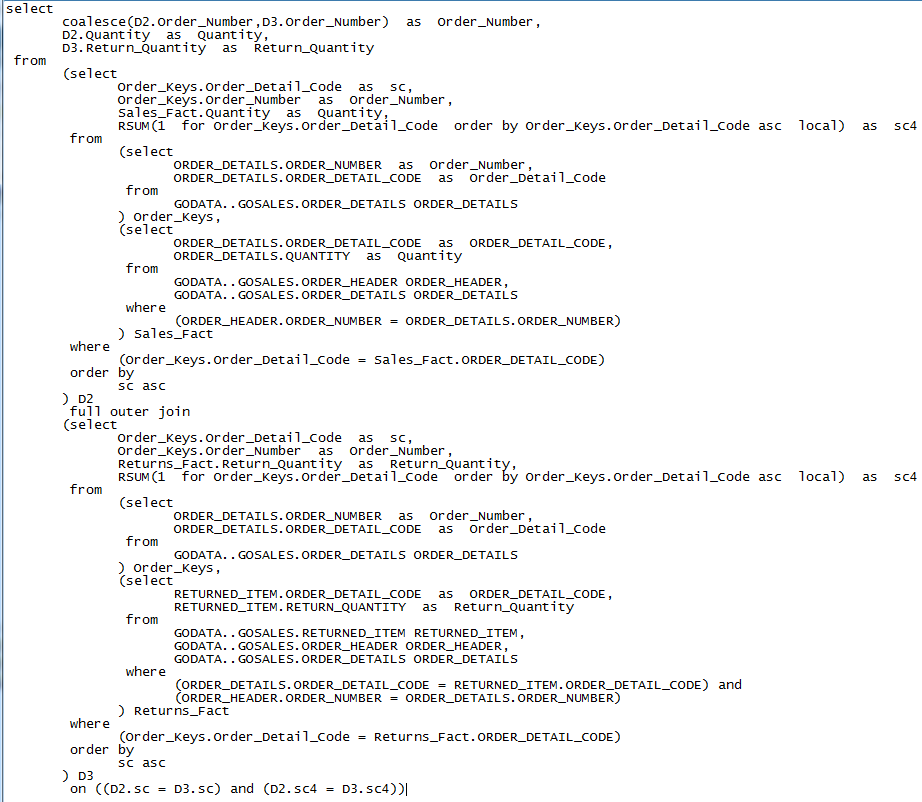
Either way, your "join" is documented (a "full outer join" in the case above). And then you run your next test and document that SQL. It's a one-off process each time. Of course you can also capture your join by documenting the SQL in IBM Cognos Analytics Reporting as it relates to the report you are creating.
So, documenting SQL joins in Framework Manager is possible, one join at a time.
If I'm missing your point or not understanding exactly what you're trying to document, let me know.
Ciao from Newberg, OR
-syd <â¿â>
------------------------------
Syd
Cognos Consultant / Trainer
Newberg OR
------------------------------
Original Message:
Sent: 11-22-2018 04:29 AM
From: Rutu D
Subject: Framework Manager Documentation
Thanks Syd for your reply.
However, I wanted to check if there is any direct way to document it.
Regards,
Rutu
------------------------------
Rutu D
------------------------------
Original Message:
Sent: 11-22-2018 02:03 AM
From: Syd Shewchuk
Subject: Framework Manager Documentation
The Model Report will only show the properties and origin of objects in the model. Join information would be specific to an assembled query. For instance, in Framework Manager you would select your desired query items, test them and then look at the tested "Query Information" to view the query SQL and any joins involved. So to answer your question, the "join" information is found in the Query Information tab of your Test Results dialog box. You may see a "where" clause in your SQL - if you want an explicit "join" clause then make the appropriate change in the Model Governor settings.
------------------------------
Syd
Cognos Consultant / Trainer
Newberg OR