Hi John,
Yes , performed "Configuring Reverse Proxy for OpenID Relying Party" during this under tab "Reuse Options" unchecked Reuse Certificates and Reuse ACLs.
There are two ACLs created with the federation name. But none of those is attached over /mga and the metadata object space.
Here I must say the ACL mentioned in my previous post (
isam_mobile_nobody) was there previously and its attached over the metadata object space already.
NOTE: The ACL which was created with my federation name was attached on fim junction and the sub object spaces.
Thanks,
Usman
------------------------------
UsmanAli Shaik
------------------------------
Original Message:
Sent: Tue June 23, 2020 03:20 AM
From: Jon Harry
Subject: Discovery URL Configuration -ISAM 9.0.6 - Issue
Hi Usman,
I'm glad you found the main reason for the metadata issue.
You definitely shouldn't change the "nobody" ACL. That is going to open up access wherever that is attached.
A different ACL which allows public access should be attached to the metadata endpoint.
This ACL would usually be attached when running the OIDC/OAuth configuration wizard for the Reverse Proxy. Have you run that wizard.
Wizard is found under Reverse Proxy screen in LMI. Select the Reverse Proxy and then find under Manage button.
Jon.
------------------------------
Jon Harry
Consulting IT Security Specialist
IBM
Original Message:
Sent: Tue June 23, 2020 01:00 AM
From: UsmanAli Shaik
Subject: Discovery URL Configuration -ISAM 9.0.6 - Issue
Good morning John,
There was typo in OIDCDefination name in httptransformation rule, rectified it. Then accessed https://webseal/.well-known/openid-configuration --> Challenged for Authentication --> url is transformed to /mga/sps/oauth/oauth20/metdadata/OIDCDefination and received Forbidden error on this page
Then assigned permission r on isam_mobile_nobody ACL on metadata object space for Any-other . json response file with all required end points and other details is displayed in Chrome.
Is it the way should be configured or its abnormal. I mean why do we need to allow permission r on the ACL When this ACL is created and assigned by default!!
Thanks,
Usman
------------------------------
UsmanAli Shaik
Original Message:
Sent: Mon June 22, 2020 06:06 AM
From: Jon Harry
Subject: Discovery URL Configuration -ISAM 9.0.6 - Issue
Hi Usman,
You gave URL: https://webseal/mga/spa/oauth/oauth20/metadata/OIDCDefinition above.
I hope this was a typo. Actual URL is /mga/sps/.... (not /mga/spa/...)
I see the correct URL in the traces so I expect this was just a typo.
When you edit the OIDC definition, it should show a URL for access to the metadata. Does this match what you are requesting?
If this URL doesn't have the junction at the front that means you didn't include the junction in the prefix requested in configuration.
All of this assumes your junction to AAC runtime is /mga. I guess it is but thought I would check.
Jon.
------------------------------
Jon Harry
Consulting IT Security Specialist
IBM
Original Message:
Sent: Sat June 20, 2020 07:56 AM
From: UsmanAli Shaik
Subject: Discovery URL Configuration -ISAM 9.0.6 - Issue
Hi John,
Firstly thanks for your usual quick response.
My OpenID Connect and API Definition name is OIDCDefinition only.
we I am accessing the url directly (means https://webseal/mga/spa/oauth/oauth20/metadata/OIDCDefinition ) , challenged for EAI authentication, done successful authentication. Redirected to url above url but getting same 404 error.
Is it related to ACL issue or mga junction creation or any other ? How to troubleshoot further to identify the root issue to fix it.
thanks,
Usman
------------------------------
UsmanAli Shaik
Original Message:
Sent: Thu June 18, 2020 06:08 AM
From: Jon Harry
Subject: Discovery URL Configuration -ISAM 9.0.6 - Issue
Hi Usman,
The fact that /mga is missing from the request to the AAC backend is expected. /mga is the junction name. The context root for the application on AAC is /sps. So, a request to the runtime for /sps/... is good.
Of course, that doesn't explain why your request for the metadata is not working.
The URL you are converting to looks correct. The only thing I can't validate is that you have the correct definition name at the end of the URL. The URL format should be /mga/sps/oauth/oauth20/metadata/<definition name>.
I suspect that you have not updated the transformation rule from the default OIDCDefinition to your definition name.
This is the line in the rule you need to update:
<xsl:with-param name="by" select="'/mga/sps/oauth/oauth20/metadata/OIDCDefinition'" />
Cheers... Jon.
------------------------------
Jon Harry
Consulting IT Security Specialist
IBM
Original Message:
Sent: Thu June 18, 2020 01:22 AM
From: UsmanAli Shaik
Subject: Discovery URL Configuration -ISAM 9.0.6 - Issue
Dear Folks,
Working on OIDC based integration first time. Completed the core Set-up and stuck with Discovery URL Configuration for the target application to consume it and get all required ISAM End-Point URLs for further action
Followed the below link to facilitate the Discovery URL
https://community.ibm.com/community/user/security/blogs/raghavan-arun1/2019/10/16/oidc-op-conformance-for-well-known-endpoint-in-ibm
As part of basic testing from my end, found 404 error after accessing https://webseal/.well-know/openid-configuration .
Enabled pdweb.debug.log and pdweb.http and found there is something wrong from ISAM Side.
Below from pdweb.debug.log

Below from pdweb.http logs

Below from pdweb.debug.log
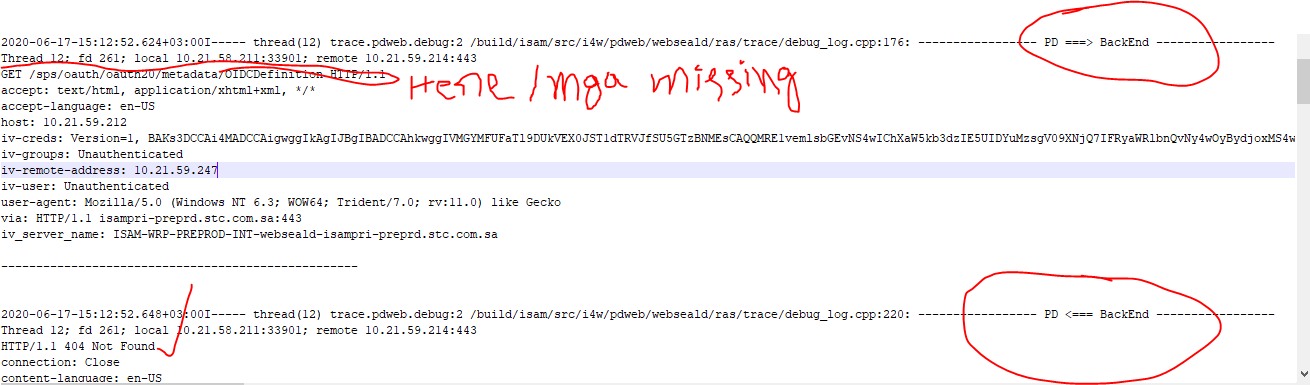
Is it known issue or anything I am missing still .
Thanks,
Usman
------------------------------
UsmanAli Shaik
------------------------------