Hi all,
I've included some additional information below. Unfortunately this can be difficult to troubleshoot since much of this is based on a customer's ServiceNow configurations, which can vary.
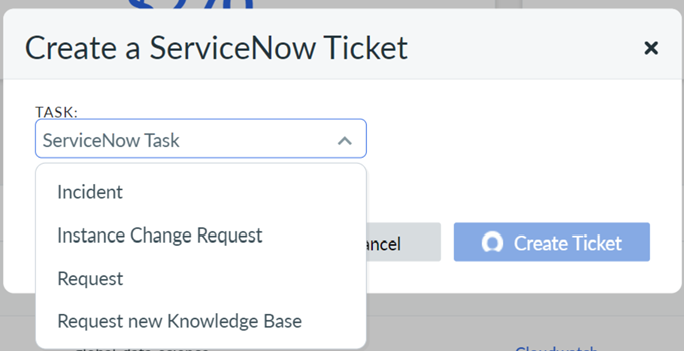
Cloudability currently supports 2 ServiceNow task types- "Incident" and "Request". The "Request" type is extensible so any number of custom request types can be created based off of that and Cloudability would support all/any of those. Once the ServiceNow credentials have been hooked into Cloudability, these tasks should be pulled in and shown when creating a ServiceNow ticket or policy.
Example of available types with two additional "custom" request types (Instance Change Request, Request new Knowledge Base):
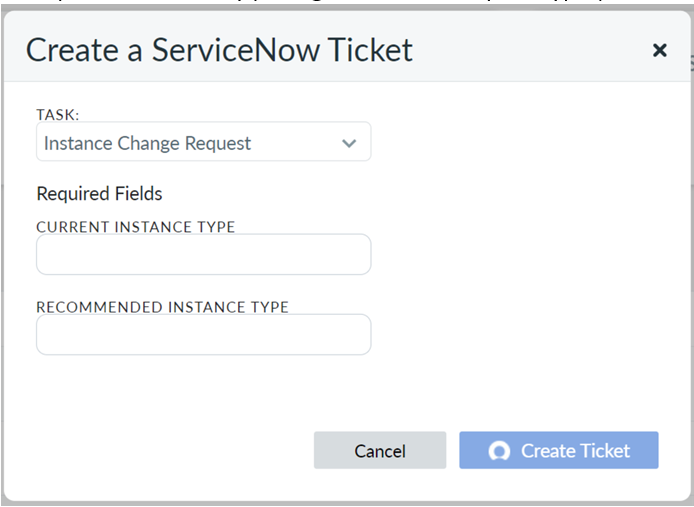
Cloudability also supports the additional input of "Required Fields" that are tied to task types and defined within your own ServiceNow instance.
Example of Cloudability pulling in a custom request type (that was created in ServiceNow) called "Instance Change Request" that had Required Fields attached to it called "Current Instance Type" and "Recommended Instance Type":
Cloudability includes a short description of the Rightsizing Recommendation as well as a link back to the recommendation(s) in Cloudability and any resource tags that are attached to that resource.
Example of an Incident ticket Terminate recommendation, the resource tags would appear in place of the labeled *Resource Tags* placeholder:
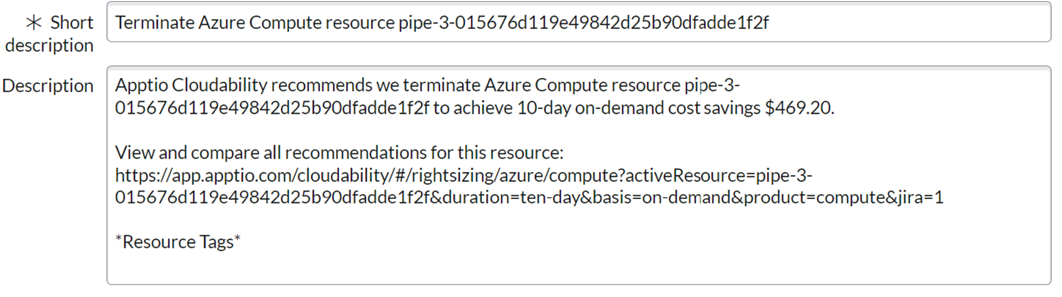
So aside from information pertaining to the recommendations themselves, task type, & required fields, tags would be the only other dynamic text currently included.
There is additional API documentation available in the Help Center.
There are also options in ServiceNow that may allow you to alter the flow and/or assignments as you see fit, such as using routing and assignment rules.
Updates/synchronization between ServiceNow & Cloudability should be occurring regularly. The "Realized Savings" value is calculated/displayed once a change/termination of the resource has been detected.