Hi @Chandra Medarametla
setting:
RSVP.EXCEL.NUMBEREDSHEETNAMES - TRUE
RSVP.EXCEL.PAGEGROUP_WSNAME_ITEMVALUE - TRUE
And adding to pages a pageset (in the screenshots below there are two pagesets - this is due to my experiments ... don't let this confuse you):

Then, add your page "foooo" with the content for each tab to the detailed pages of the pageset.
And defining the grouping and sorting on the pageset:
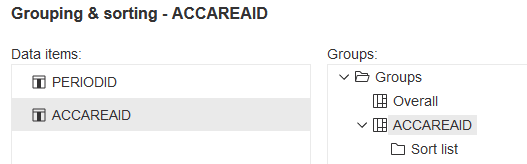
This will make the pageset look like this:
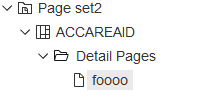
And eventually create a new TAB in Excel with the AccountAreaID.
But you are not done yet ...
Define the Query on the page object of "foooo":
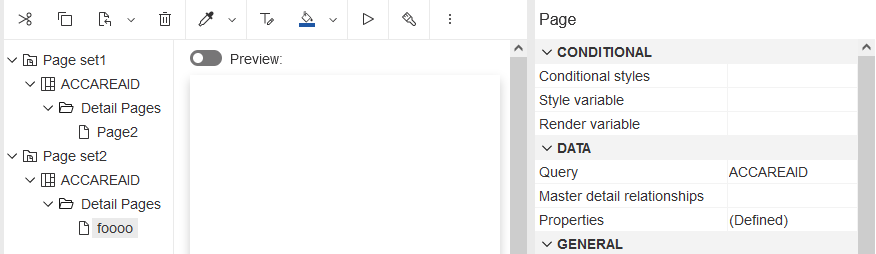
And then the Master Detail Relation Ship on the list of the page object (list can chart, repeater, crosstab ... ):
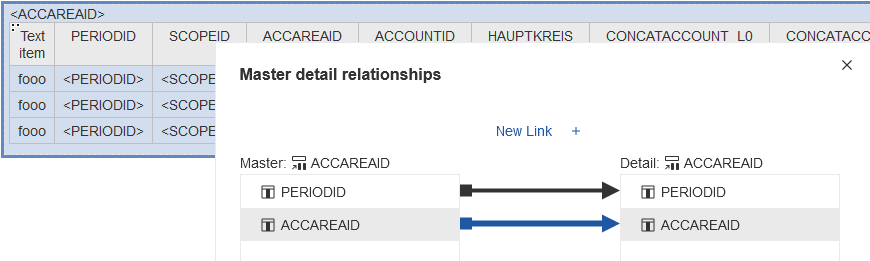
So, as I am working on a financial accounting system the ACCAREAID (Account Area ID = Activa, Passiva, EBIT, ... ) groups the accounts

As you can see, each accountarea ID is the name of the tab ... :-)
There is no accountAreaID 14 + 15.
Above did the trick for me, if this helped you please like the answer. If not, please let us know as well.
Regards,
Ralf
------------------------------
Ralf Roeber
https://linkedin.com/in/ralf-roeber/------------------------------