You should have 3 containers running when you run
docker ps -a:
319f8e214616
ca_jupyter_server-instance:latest "tini -g -- start-si…" 2 weeks ago Exited (137) 3 days ago ca_jupyter-xOjpBbm9ueW1vdXM_5F
c38c9e91e5f7
ca_jupyter_hub "jupyterhub -f /srv/…" 2 weeks ago Up 2 weeks 0.0.0.0:8000->8000/tcp ca_jupyter_hub
174fc751f22f
ca_jupyter_viewer "python -m nbviewer …" 2 weeks ago Up 13 days 8080/tcp ca_jupyter_viewer
Try the following commands:
sudo apt-get update
sudo apt-get upgrade
cd /opt/ibm/cognos/jupyter/dist/scripts/unix/
sudo ./stop.sh
sudo ./prune.sh
sudo ./install.sh
sudo docker ps -a
sudo docker inspect <containerID> | grep IP
NB: <ContainerID> for the jupyter_hub
Check the IP address has been allocated to the container instance and then test.
------------------------------
ANTONIO MARZIANO
------------------------------
Original Message:
Sent: Tue May 21, 2019 09:55 AM
From: Farhod Rasulov
Subject: 11.1.2 and Notebooks
Hello ,
I am also getting error 500 while connecting CA and Jupyter Notebook. I have ubuntu 18.4 and CA Server is in windows installed.
Is there any preinstallation required? I could install jupyter and run containers, but when CA installer finished it showed, jupyter installed but some error occured during installation.
However, 2 container are running!!
When I connect jupyter in CA, jupyter logs showing Error 500:
[E 2019-05-20 08:56:18.101 JupyterHub log:158] 500 GET /bi/v1/jupyter/hub/notebooks/new?kernel_name=python3 (@::ffff:<CAServer>) 24.59ms
Does anyone have that error and know how to resolve them?
Thannx
Regards
Farhod
------------------------------
Farhod Rasulov
------------------------------
Original Message:
Sent: Fri May 10, 2019 05:59 PM
From: ANTONIO MARZIANO
Subject: 11.1.2 and Notebooks
Hello Vivien
I didn't specifically install any packages, what I did was run the following commands BEFORE installing Jupyter
apt-get update
apt-get upgrade -y
NB: With Ubuntu 18.04 the command is:
apt update
apt upgrade -y
then installed Jupyter and that's it.
------------------------------
ANTONIO MARZIANO
Original Message:
Sent: Fri May 10, 2019 03:02 PM
From: Vivien
Subject: 11.1.2 and Notebooks
Hello Antonio,
thank you very much for your reply.
As libmotif3 is mentioned as a requirement on Ubuntu installation but is deprecated on 18.04, may I ask you what was your option about this. Did you install an other library or something else to sucess ?
thanks again,
Vivien
------------------------------
Vivien
Senior Consultant
Talan Solutions
Paris
Original Message:
Sent: Tue May 07, 2019 11:24 AM
From: ANTONIO MARZIANO
Subject: 11.1.2 and Notebooks
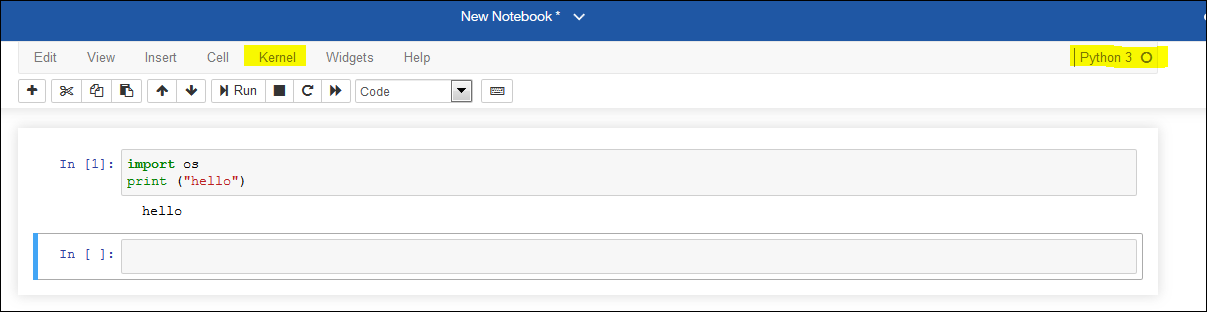
@Martin Otto Hi Martin, I've installed Ubuntu 18.04 and I've successfully installed Jupyter Notebook Server and in creating a new notebook I can see the kernel is initialized and in an idle state.
Your docker container log output doesn't show anything that is related to the issue you are experiencing.
A couple of things:
1. Can you create a new notebook? If so, click on "Kernel" - "Restart"
2. Try "Kernel" - "Reconnect". Does that work?
NB: I'm assuming when you provisioned Ubuntu you ran the updates BEFORE installing Jupyter:
sudo apt update
sudo apt upgrade -y
Let me know. Thanks
------------------------------
ANTONIO MARZIANO
Original Message:
Sent: Mon May 06, 2019 09:02 AM
From: VINCENT BABINEAU
Subject: 11.1.2 and Notebooks
@Martin Otto can you give a bit more detail on your install, specifically, do you have a web server fronting your CA install? If so, did you double-check your rewrite rules?
------------------------------
VINCENT BABINEAU
Original Message:
Sent: Fri May 03, 2019 02:21 PM
From: Martin Otto
Subject: 11.1.2 and Notebooks
Hi Ryan, Hi Antonio,
I installed the docker image on a Ubuntu 18 in a VMWare... CA 11.1.2 connects to the Notebook Server, but the "connect to Kernel" fails.
The Notebook opens successfully.
There are several hints in the Jupyter Community, but I did not manage the system to connect to the kernel successfully.
Are there any IBM-People with additional hints?
Martin Otto
IBM Analytics Champion 2019
senior solution expert, avantum consult AG
------------------------------
Martin Otto
senior solution expert
avantum consult AG
Konstanz area
Original Message:
Sent: Fri May 03, 2019 11:50 AM
From: ANTONIO MARZIANO
Subject: 11.1.2 and Notebooks
Hi Ryan
Can you check the following:
docker images
make sure the 'ca_jupyter_server-instance:latest is visible' status is "up...."
If its down or stopped then you need to start it:
docker container restart <containerID of the image>
Does it start successfully?
Check the logs by doing docker container logs <containerID>
------------------------------
ANTONIO MARZIANO
Original Message:
Sent: Thu May 02, 2019 08:57 PM
From: Jim Youldassis
Subject: 11.1.2 and Notebooks
Hi Ryan,
Did the Cognos admin assign Capabilities and enable Jupiter Notebooks.
If you haven't done so already, have a look at the recent Notebook videos here.
https://www.youtube.com/channel/UCS3gkkTTvLOc9HTUJSNeOxg
------------------------------
Jim Youldassis
NA Cognos Analytics Program Manager
IBM