Introduction
This article describes how we can secure an API end to end so that it is accessible only by authorized users and so that we have an audit trail of who has used the API. In particular, we look at how a user’s identity can be propagated between components in a hybrid cloud architecture, so that resource access can be authorized within different components of the architecture.
Security requirements
Before designing an end to end security solution, it is necessary to clearly define the security requirements. A complete security solution will put mechanisms in place to achieve the following objectives:
- Identification: the ability to assign an identity to the user who is invoking the API.
- Authentication: the process of validating the identity claimed by the user.
- Authorization: the process of checking whether a user should be given access to a resource.
- Integrity: to ensure that transmitted messages are not altered in an unauthorized or accidental manner.
- Confidentiality: to ensure that an unauthorized party cannot read the transmitted messages.
- Auditing: the process of recording who has invoked the API.
In our hypothetical scenario, the user of an IBM Cloud application requests access to a catalog of information that is stored in CICS. The IBM Cloud application accesses the CICS application by invoking the catalog API. An API Gateway acts as a proxy for the catalog API which is deployed in z/OS Connect EE.
This scenario is shown in Figure 1.
Figure 1 Hybrid cloud scenario
Note: We refer to the API managed by API Connect as the ‘managed API’, and we refer to the API deployed in z/OS Connect EE as the ‘system API’.
The security requirements are as follows:
- The connection from the public cloud IBM Cloud environment to the enterprise must be secure.
- The overall system must be protected from attack, for example, Denial of Service (DoS) attacks.
- The user must login to the IBM Cloud application using a valid identity and password.
- The user’s credentials must be checked against an LDAP registry.
- The user must be authorized to invoke the API.
- The IBM Cloud application must be authorized to invoke the API.
- Rate limits must be applied to API calls.
- The request must be audited.
- The user must be authorized to run the CICS transaction.
- Transmitted messages must be secure (private and protected from tampering).
Security solution design
The first consideration in our design is to implement security in depth. This highlights the need for security policy to be enabled in all components of the architecture. Let’s look at where we might apply security controls at different points in the overall architecture.
- The IBM Cloud Secure Gateway service can be used to securely connect the IBM Cloud application to data and applications in the private network. To do this we create a Secure Gateway Client on a DataPower appliance.
- Protection is performed at the earliest point in the architecture; this is what DataPower is good at (e.g protecting against DoS attacks).
- Rate limiting can be performed by the API Gateway which allows policies to limit specific users to a maximum number of managed API calls per time interval.
- It’s best to authenticate the user early and then pass on the security credentials to the different servers so that the user’s identity can be used for authorization and audit. Authentication will be performed in DataPower.
- User authorization can be done at one or many enforcement points. Note, however, that in order to authorize in the backend system (CICS in our scenario) it will be necessary to map the credentials used for user authentication against the LDAP registry to a user in the RACF registry.
- Application authorization of the IBM Cloud application will be done using an API key that is shared through the API Connect Developer Portal with the client application developer.
- System API calls will be authorized in z/OS Connect EE using the Authorization interceptor.
- System API calls will be audited in z/OS Connect EE using the Audit interceptor.
- Confidentiality and integrity will be implemented using TLS (Transport Layer Security).
Note: Setup of TLS and the use of HTTPS client authentication with z/OS Connect EE will be described in a future article.
Figure 2 shows a high level overview of the security design for our scenario.
Figure 2 Security design
Figure 2 shows the following set of security controls that are implemented in our security design:
- The user logs into the IBM Cloud application using a “distributed” identity and a password. The user credentials are sent with the API request in an HTTP authorization header over a secure connection to DataPower.
- DataPower performs a number of security functions:
- Acts as Secure Gateway Client for IBM Cloud connectivity
- Protects the system against malicious attack
- Authenticates the user and forwards the distributed user ID in an LTPA (“Lightweight Third Party
Authentication”) token to API Connect
- LDAP is used as the user registry for distributed users and groups.
- API Connect checks the IBM Cloud application client ID and forwards the request to z/OS Connect EE.
- z/OS Connect EE performs a number of security functions:
- Validates the user credentials (LTPA token)
- Calls RACF to map the distributed ID to a RACF user ID
- Calls RACF to check that the user is authorized to invoke the API
- Audits the request to record who invoked the API
- Propagates the distributed ID to CICS
- RACF is used for the mainframe user registry, mapping distributed IDs to RACF user IDs and for authorizing
API calls.
- CICS maps the distributed ID to a RACF ID and performs further authorization checks to make sure that the mapped RACF user ID is authorized to access CICS resources.
In the remainder of this article we describe an implementation of this security design that uses the capabilities of
IBM DataPower, IBM API Connect, z/OS Connect EE, z/OS and CICS. And then we show a case where an authorized user successfully invokes the API, and we also show cases where unauthorized users are preventing from invoking the API.
Security configuration
In this section we show how security controls are configured for each of the components in the solution.
IBM Cloud
This section describes how the user logs into the IBM Cloud application, and how a secure tunnel is created from
IBM Cloud to the enterprise.
Logging into the IBM Cloud application
The IBM Cloud application challenges the user to login with a Username and password (Figure 3).
Figure 3 User login
The user credentials for user JeanLeclerc are sent in a base64 encoded HTTP Authorization header on each API
call.
Securing the connection from IBM Cloud to the enterprise
The IBM Cloud Secure Gateway service is used to create a secure tunnel between the IBM Cloud application and
the API Gateway. To do this we first create a secure gateway using the IBM Cloud Secure Gateway tile (Figure 4).
Figure 4 Secure Gateway service details page
When creating the secure gateway, a gateway ID and security token are dynamically generated. These are then
used when configuring the Secure Gateway client in DataPower. Figure 5 shows our configured Secure Gateway.
Figure 5 Secure Gateway
For detailed information on creating a Secure Gateway service refer to the ITSO Redbooks publication An Architectural and Practical Guide to IBM Hybrid Integration Platform
DataPower
DataPower is used to enable a secure connection to IBM Cloud, to protect the system, to authenticate the user and
also as an API Gateway (see API Connect below).
Enable secure connection to IBM Cloud
Secure Gateway clients are provided for Linux, Windows, Mac OS X, Docker containers and DataPower. To connect
to the Secure Gateway in IBM Cloud, we define the Secure Gateway client in DataPower. We use the gateway
identifier and security token that IBM Cloud generated, and we define an access control list for hosts and ports to
allow or deny access through the secure gateway. Figure 6 shows our configured Secure Gateway service.
Figure 6 Operation state of Secure Gateway
Protect the system
DataPower can be used to protect against a wide range of threats including denial-of-service (DoS) attacks, message
tampering, SQL injection and viruses. It can also be used to limit the number of non-malicious requests so
that the mainframe is not flooded. DataPower Monitors allow you to define a message set, the specification of a count-based or time-based threshold, and the administrative controls to impose when the message set exceeds the configured thresholds. Figure 7 shows our Message Count Monitor which sets a threshold of 50 messages per second.
Figure 7 DataPower Message Count Monitor
Authenticate the user
An AAA (Authentication, Authorization and Audit) policy is configured for a DataPower MPGW (Multi-Protocol
Gateway) in order to authenticate the user by using the HTTP Authorization header sent with the API request. Figure
8 shows one of the policy rules for the MPGW.
Figure 8 DataPower MPGW
The AAA policy is configured to bind to the LDAP server, authenticate the user and create an LTPA
token which is forwarded to the API Gateway. For more information on configuring an AAA policy with DataPower see
AAA policies.
LDAP
Figure 9 shows the LDAP registry used in our scenario. The registry contains different groups for employees, customers and partners. The full Distinguished Name of the sample user is UID=JeanLeclerc,OU=employees,O=mop,C=fr.
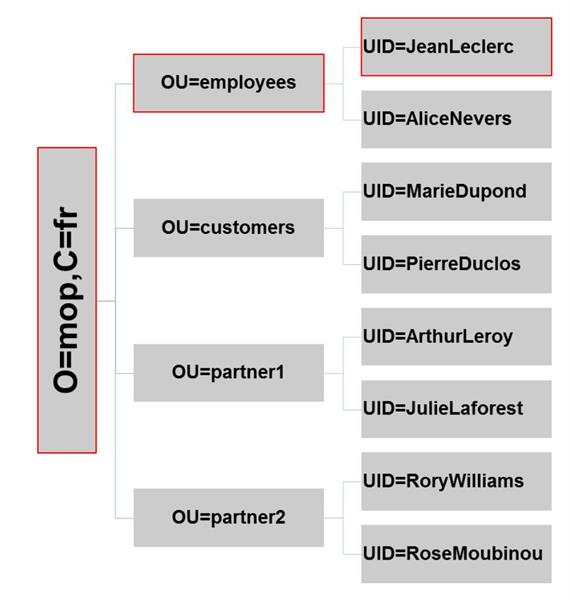
Figure 9 LDAP registry
API Connect
API Connect is user to authorize client application access to the API, and also to set rate limit on API calls.
Authorize client application access to the API
When an API is defined, you can require calling applications to identify themselves by passing a Client ID or a Client ID and a Client Secret. Requiring at least a Client ID is recommended. Figure 10 shows the security definition we defined for the managed catalog API.
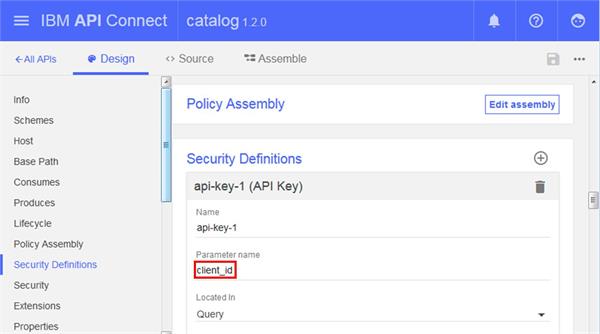
Figure 10 API Connect Security Definition for catalog API
When the IBM Cloud application is registered with the API Connect Developer portal, a client id is assigned. This client id must be specified in a query parameter on each API call. The following URI is used by the IBM Cloud application to invoke the managed catalog API:
https://ipname:port/mplicc/sb/catalogManager/items?startItemID=0&client_id=1c340b28-53a5-4b1c-839b-df50d81a27c3
Setting rate limits on API calls
An API is associated with a Product, and a Product can contain one or more APIs and Plans. Plans can be used to set rate limits. Figure 11 shows the rate limit that we defined for the managed catalog API.
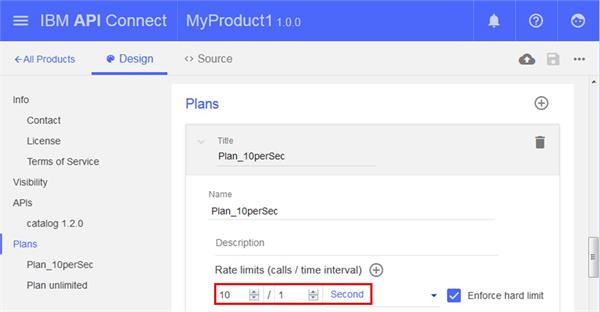
Figure 11 API Connect Rate Limit for managed catalog API
Figure 11 shows how we define a rate limit for the managed catalog API of 10 requests per second.
z/OS Connect EE
This section shows how z/OS Connect EE is configured to validate the user credentials, map the user identity to a RACF user ID, authorize the user to the system catalog API, audit the request and flow the RACF user ID to CICS.
Validating the user credentials
The user authenticates with DataPower and the authenticated distributed user ID (without password) is passed to z/OS Connect EE in an LTPA token. z/OS Connect EE is configured to validate the token.
z/OS Connect EE performs user authentication using the support that is provided in the Liberty profile. The appSecurity-2.0 and ldapRegistry-3.0 features are configured in the server.xml file. The <ldapRegistry> element is used to configure the LDAP registry with baseDN=”o=mop,c=fr” and bindDN=”uid=root,o=mop,c=fr” in order to match the entries in the LDAP registry (see Figure 9).
An LTPA keys file has been generated, and then shared with DataPower. The <ltpa> element is configured in the server.xml file with the name of the LTPA keys file, password and expiration time, as shown in Example 1.
Example 1 LTPA configuration
<ltpa expiration="120" keyFileName="ltpa.keys" keysPassword="password"/>
Mapping the user identity
The mapDistributedIdentities attribute on the <safCredentials> element is used to configure the z/OS Connect EE server to map the distributed user ID to a RACF user ID. Mappings are controlled using RACF RACMAP commands (see RACF).
Authorizing the user and auditing the request
The use of SAF (System Access Facility) for authorization is configured using the <safAuthorization> element in server.xml.
We enable the authorization and audit interceptors in order to control access to the system catalog API and to audit requests. Interceptors defined as global apply to all the APIs defined to the instance of z/OS Connect (unless the global definition is overridden). Interceptors defined as API-level apply only to that API.
The authorization interceptor works on the principle of user membership in a group. If an administrator group is defined to an API, and a user is a member of the group, that user has administrator authority for the API. If an invoke group is defined to an API, and a user is a member of the group, that user has invoke authority for the API. Similar authorization checks apply for the z/OS Connect EE Operator and Reader roles. Example 2 shows how we configure the interceptors and authorization groups in server.xml.
Example 2 z/OS Connect authorization and audit interceptors
 <zosconnect_zosConnectManager globalInterceptorsRef="interceptorList_g"
                                globalAdminGroup="GMADMIN"
                                globalInvokeGroup="GMINVOKE"/>
 <zosconnect_authorizationInterceptor id="auth"/>
 <zosconnect_auditInterceptor id="audit"/>
 <zosconnect_zosConnectInterceptors id="interceptorList_g" interceptorRef="auth"/>
 <zosconnect_zosConnectInterceptors id="interceptorList_s" interceptorRef="audit"/>
 <zosconnect_zosConnectAPIs location="">
   <zosConnectAPI name="catalog" interceptorsRef="interceptorList_s"/>
 </zosconnect_zosConnectAPIs>
In Example 2 we define the globalAdminGroup as GMADMIN which is the group access required for Admin authority, and we define the globalInvokeGroup as GMINVOKE which is the group access required for Invoke authority. Note that we could also define similar groups for Reader and Operator authority.
The globalInterceptorsRef= element is set to the value “interceptorList_g” for the global interceptors which means that the authorization interceptor will run for all API requests. This means that the mapped RACF user ID EMPLOY1 must be in the GMINVOKE RACF group in order to be able to invoke the catalog API.
In addition, the catalog API is defined with an InterceptorsRef= element set to the value “interceptorList_s” which means that the audit interceptor will also be run for catalog API invocations. You can use sample JCL provided by z/OS Connect EE to format the SMF 123 subtype 1 records written by the audit interceptor. Example 3 shows a subset of the fields found in the SMF 123.1 records.
Example 3 z/OS Connect authorization and audit interceptors
 SYSTEM JOBNAME  ARRIVAL-DATE  ARRIVAL-TIME  TARGET-URI            SERVICE-OR-API  METHOD  USER-NAME
 ZT01   MOPZCEP  2017/01/02    17:00:01      /catalogManager/items catalog         GET     JeanLeclerc
In Example 3 we see that the user JeanLeclerc invoked the catalog API on 2nd January at 17h.
Propagating the user ID to CICS
Our scenario uses the CICS Service Provider which supports the propagation of the distributed ID to CICS. The advantage of this is that the distributed id is then available in the CICS task association data. CICS maps the distributed ID to a RACF ID and runs the task with the mapped ID.
In addition to propagating the user ID to CICS, we also want to set the name of the CICS transaction that runs in CICS. This is done in the service configuration when creating the service using the z/OS Connect EE API Toolkit (see Figure 12).
Figure 12 Service configuration
In Figure 12 we set the CICS transaction ID to MZIC which allows us to control access to the transaction and monitor usage of requests.
More information on configuring security with z/OS Connect EE can be found in the IBM Knowledge Center
http://www.ibm.com/support/knowledgecenter/SS4SVW_3.0.0/com.ibm.zosconnect.doc/securing/security.html.
RACF
The following RACF profiles are used to secure the z/OS Connect EE runtime:
These are used to assign an ID to a started task for the z/OS Connect EE server.
These are used to control access to z/OS authorized services including WLM, WOLA and SAF itself.
For more information on defining RACF profiles to secure z/OS Connect EE see the
z/OS Connect EE Getting Started Guide for CICS and IMS.
We also use RACF to implement the z/OS Identity Propagation feature of z/OS. Example 6 shows how the distributed identity for user Jean Leclerc is mapped to the RACF user ID EMPLOY1.
Example 6 Identity mapping
 RACMAP ID(EMPLOY1) MAP +

 USERDIDFILTER(NAME('UID=JeanLeclerc,OU=employees,O=mop,C=fr')) +

 REGISTRY(NAME('*')) +

 WITHLABEL('Test Mapping EMPLOY1')
Note: Example 6 shows a one-to-one mapping. z/OS Identity Propagation also supports many-to-one mappings. For example, we could use a many-to-one mapping to map all identities associated with a specific partner to the same RACF user ID.
CICS
To enable the CICS task to run with the mapped RACF ID, we define an IPCONN definition in CICS configured with USERAUTH=IDENTIFY.
Testing the scenario
Figure 13 shows a successful invocation of the IBM Cloud application by the distributed user JeanLeclerc. The catalog
of items, including stock and price information, has been retrieved using the catalog API.
Figure 13 Successful invocation of catalog API
We can use the CICS Explorer to validate that the CICS transaction is run with the mapped RACF user ID EMPLOY1 (Figure 14).
Figure 14 CICS transaction
Figure 14 shows that the CICS transaction runs with the user ID EMPLOY1 and transaction ID MZIC.
But what happens if there is a security error? The following examples show some of the security errors that can occur:
- User is not authenticated
- Client application is not authorized to API
- User is not authorized to invoke API
- User is not authorized to run CICS transaction
User is not authenticated
Example 7 shows a DataPower log message that is issued when a user is not authenticated to the IBM Cloud application.
Example 7 User not authenticated to IBM Cloud application
mpgw (BasicAuth2LTPA): request BasicAuth2LTPA_MPGW_Policy_rule_2 #1 aaa: 'INPUT Basi-cAuth2LTPA_Authenticate' failed: Rejected by policy.
Client application is not authorized to managed API
Example 8 shows a DataPower log message that is issued when a client applications is not authorized to invoke the managed catalog API.
Example 8 Client application not authorized to invoke managed catalog API
 mpgw (webapi): HTTP/1.1 401 Unauthorized: Client id not registered.

 mpgw (webapi): apim.appidentity: Client id specified not registered: [1c340b28-53a5-4b1c-839b-df50d81a27c1]
User is not authorized to invoke system API
Example 9 shows a z/OS Connect EE message that is issued when a user is not authorized to invoke the system catalog API.
Example 9 Client application not authorized to invoke system catalog API
Error 403: BAQR0428W: The zosConnectAuthorization interceptor encountered an error while pro-cessing a request for API catalog under request URL https://zt01.pssc.mop.fr.ibm.com:52943/catalogManager/items. {"FailureMessage":"BAQR0409W: User EMPLOY2 is not authorized to perform the request."
User is not authorized to run CICS transaction
Example 10 shows a RACF message that is issued when a user is not authorized to run the CICS transaction.
Example 10 User not authorized to run CICS transaction
ICH408I USER(EMPLOY2 ) GROUP(DB2USR ) NAME(Alice Nevers)

        MZIC CL(TCICSTRN)

        INSUFFICIENT ACCESS AUTHORITY

        FROM MZ** (G)

        ACCESS INTENT(READ ) ACCESS ALLOWED(NONE )
Summary
This article describes an example scenario that highlights how different security controls can be put in place to secure an API.
Watch out for further articles here on securing z/OS Connect EE.