Originally posted by: Achim-Christ
The article at hand describes one possible solution for the following use case: two geographically dispersed Spectrum Scale clusters are connected through an AFM relationship. Data is solely generated in one cluster (AFM cache in single-writer mode), while centralized backup and other processing takes place in the other cluster (AFM home in read-only mode).
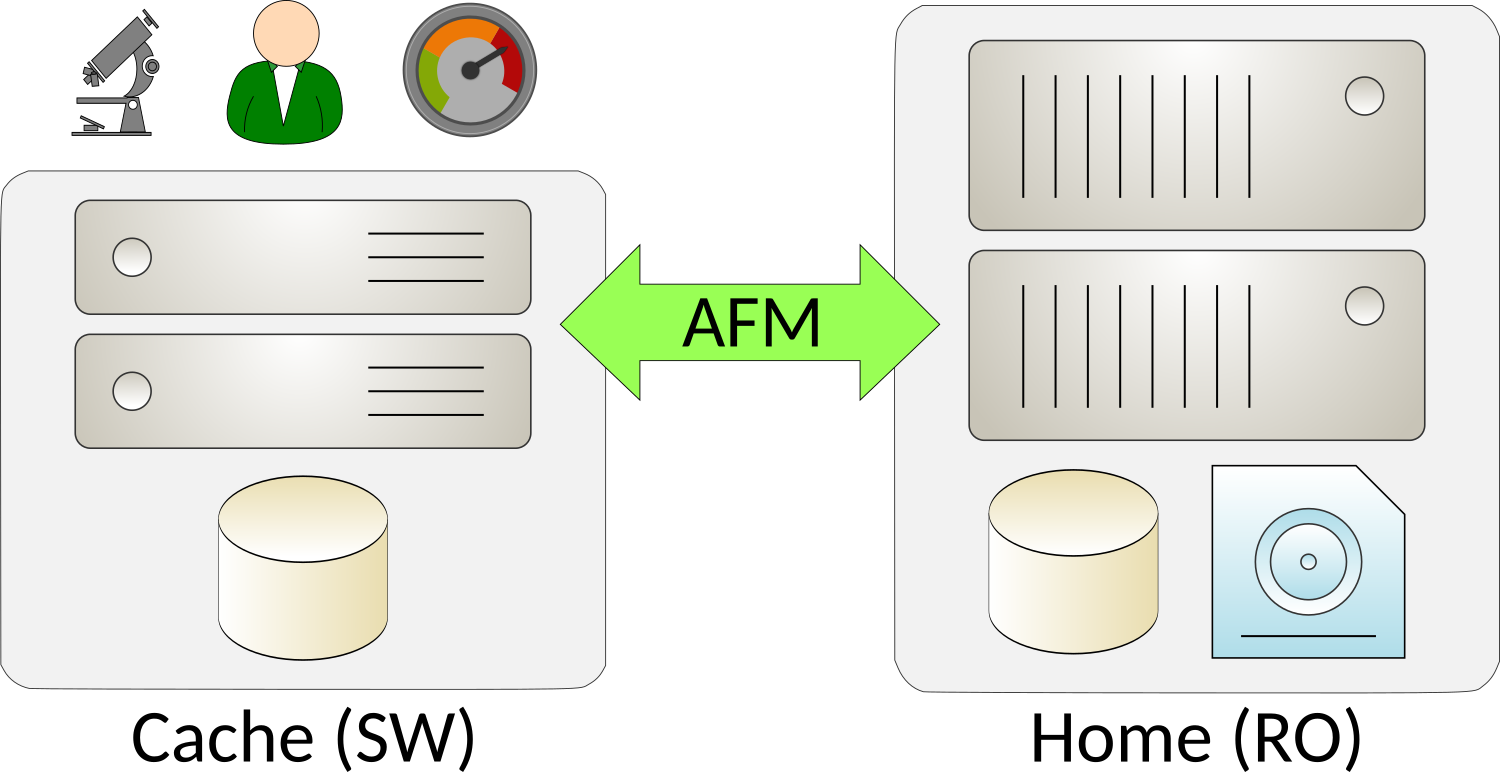
The topology implies that data is generated on cache, and that it is primarily accessed on cache while being used. New and modified data needs to be copied to home at regular intervals in order to allow for e.g. centralized backup. As data ages it is expected to “cool down” since it is no longer being accessed frequently. Such “cold” data should be deleted (evicted) from cache, in order to free up space for new “hot” data. The remaining copy on home is kept long-term and is eventually migrated off to tape storage.
Note that with Spectrum Scale AFM, such cache eviction will keep all metadata intact and available. An evicted file remains visible and accessible in the cache file system’s directory tree, without consuming actual data blocks. The file will automatically be re-populated (copied back) from home in case it is accessed on cache again.
Refer to the following article for further details on AFM cache eviction:
https://www.ibm.com/support/knowledgecenter/en/STXKQY_5.0.2/com.ibm.spectrum.scale.v5r02.doc/bl1ins_cacheevictionafm.htm
Spectrum Scale AFM supports automatic-, and manual cache eviction. Automatic eviction is based on file set (soft) quota limits. Once a file set reaches its configured quota limit, files will be evicted based on a least recently used (LRU) algorithm, or simply by size – beginning with the biggest files first.
This approach works well in scenarios in which there are fixed, predefined quota limits for each file set. But in a scenario in which certain file sets are not being used any longer (e.g. as the corresponding project has concluded) while others remain active and new file sets are created frequently, static limits for each individual file set do not provide sufficient flexibility.
Manual eviction, on the other hand, provides more flexibility as it allows for evicting files based on file lists. Such lists can be generated efficiently by using the Spectrum Scale policy engine. This allows for selecting candidates based on virtually any criteria. However, manual eviction needs to be scheduled via e.g. cron jobs. If, however, the frequency at which such cron jobs run does not keep up with the rate at which new data is being generated then administrators face the risk of cache filling up, in turn resulting in out-of-space conditions.
To work around such limitations, the following solution is based on an automatic callback which is triggered by Spectrum Scale on demand. More specifically, the event “lowDiskSpace” will be raised automatically if a file system pool fills beyond a certain level. Pool utilization is a global file system (relative) metric, as all file sets share the same file system pool. Thus, new file sets can be added dynamically without having to modify the defined threshold – this is a substantial advantage over automatic eviction, which would require administrators to frequently adjust individual file set (absolute) quotas.
List policy
The following list policy is used to identify candidates for eviction. This is a basic example which can be refined e.g. by adding custom exclude statements:
RULE EXTERNAL LIST 'evictList' EXEC ''
RULE 'evictRule' LIST 'evictList'
  FROM POOL 'system'
  THRESHOLD (90,80)
  WEIGHT (CURRENT_TIMESTAMP - ACCESS_TIME)
  WHERE REGEX (misc_attributes,'[P]')
    AND KB_ALLOCATED > 0
This list policy will identify oldest files based on their access age. Once the file system pool utilization reaches 90% the policy will identify files so that utilization can be reduced to 80%. Note that the WHERE expression ensures that only AFM-managed files are identified, and that no evicted files will be identified (which have no data blocks allocated).
After testing the list policy using mmapplypolicy it is then applied to the file system:
$ mmchpolicy <filesystem> <policy>
Callback
After the threshold-based list policy has been applied to the file system, Spectrum Scale will raise “lowDiskSpace” events whenever the threshold defined in the policy is exceeded (90% in above example). It is important to understand that by itself this list policy is never run, let alone are actions taken on the identified files.
Instead, an administrator needs to define which actions are to be taken in response to such events – this is accomplished by adding a so called callback:
$ mmaddcallback customEviction \
    --command /var/mmfs/etc/customEviction \
    --event lowDiskSpace,noDiskSpace \
    --parms "-e %eventName -f %fsName -p %storagePool"
The active Spectrum Scale file system manager will run the defined command every other minute in response to “lowDiskSpace” and “noDiskSpace” events. Note that the referenced script (/var/mmfs/etc/customEviction in above example) must be present on all manager nodes in the cluster. It is recommended to store this script in a local (non-GPFS) file system in order to avoid dependencies in case of problems with Spectrum Scale.
Callback script
The script which is started by the callback performs the following tasks once the file system utilization exceeds the threshold:
1. Run the actual list policy for the given file system, generating a list of eviction candidates:
…
mmapplypolicy <filesystem> \
  -f <list directory> \
  -I defer
…
2. Identify the eviction candidates for each of the defined AFM file sets. This is necessary as eviction in Spectrum Scale AFM must be performed in the context of an individual file set.
…
grep <fileset path> <global list> > <fileset list>
…
3. Evict the candidates from each individual file set.
…
mmafmctl <filesystem> evict \
  -j <fileset> \
  --list-file <fileset list>
…
Disable automatic eviction
Once the above callback script is in place and has been tested successfully, Spectrum Scale’s automatic eviction should be disabled in order to avoid conflicts between the two mechanisms. Automatic eviction is enabled by default and is in effect on all file sets which have (soft) quota limits defined. It can be disabled like so:
$ mmchfileset <filesystem> <fileset> -p afmEnableAutoEviction=No
Summary
The above description outlines a possible solution for the use case described at the beginning of the article. A full working example is provided in the following Git repository:
https://github.com/gpfsug/gpfsug-tools/tree/master/scripts/customeviction
Refer to the README for detailed installation instructions (you’ll need to customize the script).
It is important to note that the underlying mechanisms (list policies, eviction, callbacks) need to be well understood and that an implementation needs to be carefully tested prior to applying it to production-critical data. Any feedback to the approach outlined in this article is greatly appreciated – please use the comments section below.
#DS8000