Summary
If you are working with a hierarchical data set that has a parent column and a child column, and you place that data set on a report as a table, you will have limited slicer capabilities. To provide users with the maximum flexibility using slicers, flatten the data set using the Flatten Hierarchy feature. The feature adds columns to the data set transform, one column for each level in the hierarchy. You can then create slicers for each of the columns.
Applies To
Apptio 11.0 and Higher
Symptoms
For example, the data set shown below is based on a geographic hierarchy.
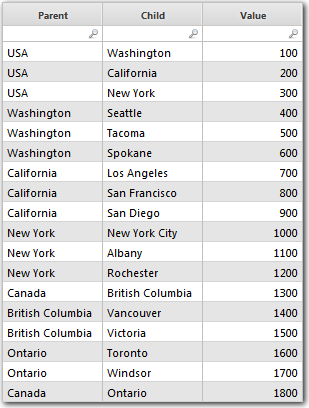
If you create a report from the data set, and add slicers for the Parent and Child columns, you get the report shown below.

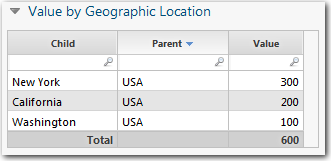
Suppose you want to see all of the entries in the USA. When you select USA from the Parent Slicer, you get the result shown below.
Solution
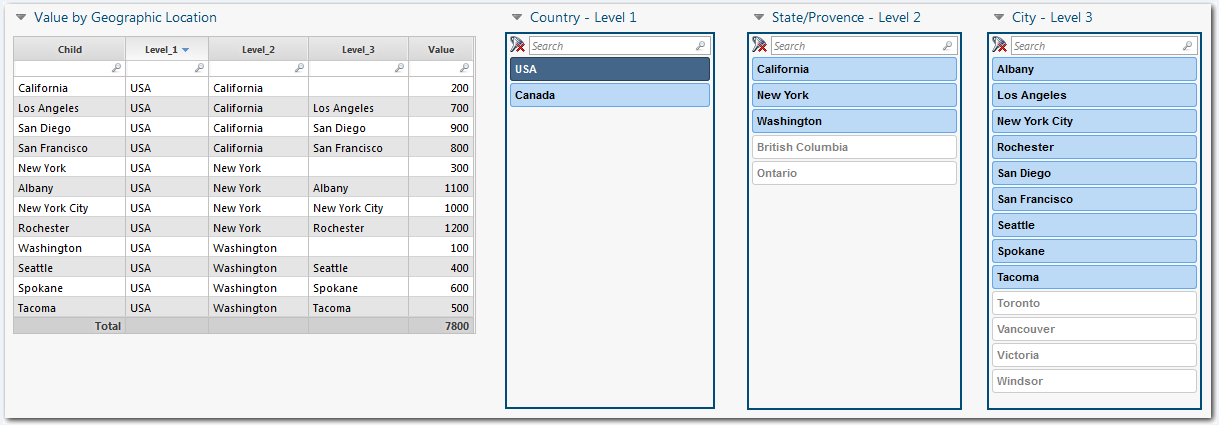
But what if you want the users to be able to see all of the entries associated with USA? You can achieve this by "flattening" the hierarchy using the Flatten Hierarchy feature. The Flatten Hierarchy feature takes the information in a parent column and a child column and adds "level" columns that can be used with slicers. The result is shown below. By flattening the hierarchy, you provide users with the maximum flexibility when using slicers.