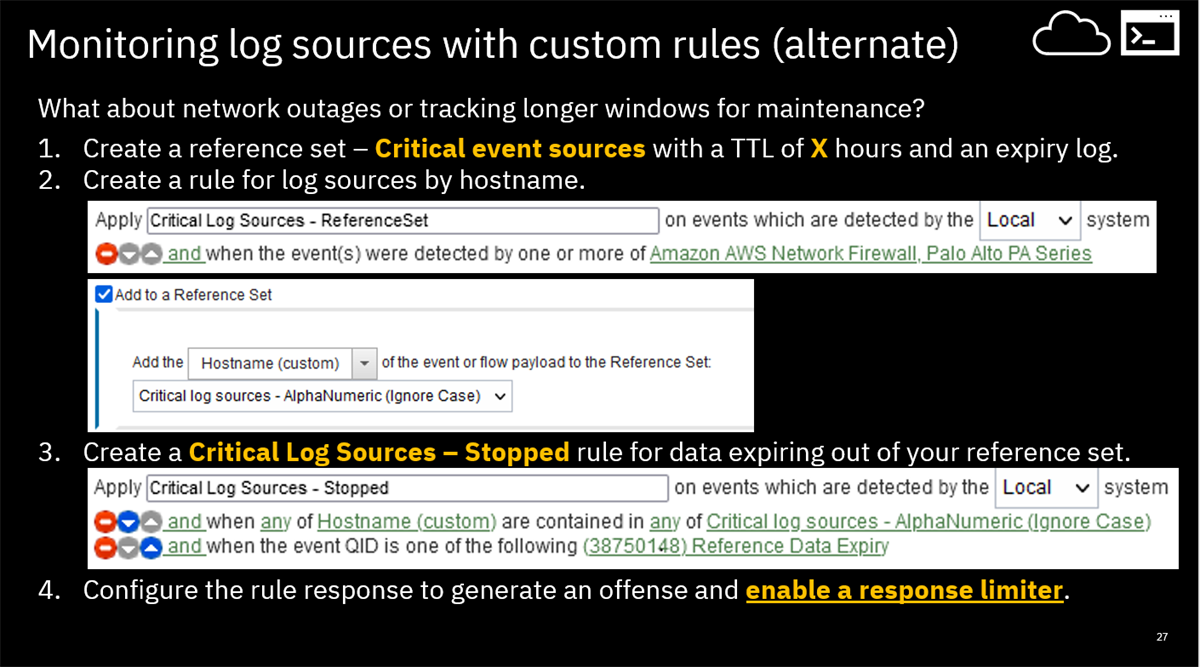
Have you tried creating reference sets for timing and then using that to expire out when a log source stopped sending? You could create reference sets with different timing and then just have log source add to the reference set when they are sending. When a date source stops populating the reference set and expires out, then a notification/offense is generated. This allows you to create reference sets with different TTLs that can be used as expiration windows. You can then bucket how aggressive the TTL will drop data from the reference set. For example,
- Critical log source = shortest TTL for your reference set. You want critical log sources or groups updating this ref set.
- Medium value log sources = Longer TTL. Important, but not critical log sources can populate this list.
- Longest TTL would be used for a catch all for log sources that are not heavily tracked.
Here is an example I've talked about with users in the past that you might find helpful.
Here is another slide about how the Lack of Device rules work. Be aware, you cannot add other rules tests, which is why I prefer the reference set method.
------------------------------
Jonathan Pechta
QRadar Support Content Lead
Support forums: ibm.biz/qradarforums
jonathan.pechta1@ibm.com------------------------------
Original Message:
Sent: Wed January 18, 2023 03:52 AM
From: Roberto Bianchi
Subject: Stopped sending events not working correctly
Hi all,
i'm running on Qradar 7.5.0.1 and I need to apply more "Stopped sending events" rules by assigned groups and different timing. If I duplicate default rules by assigned groups and different timining it seems some stopped log sources will not notified.
I ask in a case to IBM Support about this thing and aswer to me that device stopper trigger is the same for all rules; can anyone help me to understand how I can solve my problem?
Thanks
------------------------------
Roberto Bianchi
------------------------------