One of the CSMs we work with (
@Jamie Maffeo) provided the following for a client recently. Some of these were already touched on by
@Guillermo Cuadrado, but just copying/pasting everything in from my notes:
TIPS FOR BETTER PERFORMANCE
Top 5 Tips:
- Always set your Object Identifiers
- Optimize your Object Identifiers
- Improve Allocation Relationships
- Top Formula “Fixes”
- Optimize your Calculation Time Periods
Common Performance Impacting Items:
- Allocation row count above 100,000 rows
- Missing object identifier
- No data relationship for allocations
- High object granularity with low relationship granularity
- Nested formulas
- Same step Formula dependencies
- 20+ columns selected for object identifier
- Branch with bad config
- Inference in R12
- Multiple lookupex/splitex in same formula step
- Inefficient lookups
- “Send only remaining values”
- Excessive Report Granularity
- “All in One“ reports rather than “Purpose Built” reports
- Transform Pipeline with excessive steps and/or data manipulation
- Project with over 3 years open
- Specific object causing entire model to slow down
- Nested double sumif() formulas
- Multiple tablematch() formulas in same formula step
- Modeled Tables with excessive data manipulation
- Cost Source object above 10k row count
- Very high cell count tables (rows x columns)
- Excessive amount of modeled metrics
- Excessive unused allocations
- Validation reports in PROD
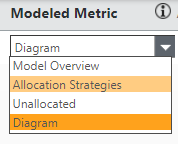
Also, go to your '
Allocation Strategies' dropdown from the
Cost Diagram view to see allocation row counts:
Also, work with your CSM to get a
THA (
Technical Health Assessment) - those are
super helpful because they are also able to see on the backend with their system management tools what reports are taking up a lot of resources.
#ApptioforAll