Platform

 View Only

 Loaded data using Datalink Classic to TBM Studio table

Jump to  Best Answer
  • TBMStudio
Venkateswara Rao Veerapaneni's profile image
Venkateswara Rao Veerapaneni posted 09/20/22 12:30 PM
Hi All,

Loaded data using Datalink Classic to TBM Studio CT table, my data link was shows status as success and loaded data. but not able to see the updated information from my file in the CT table. What would be the general issue. What i missing here. Here the data load through data link do i have to do any checkouts or any changes.
#TBMStudio
Guillermo Cuadrado's profile image
Guillermo Cuadrado  Best Answer

Hello @Venkateswara Rao Veerapaneni. When you say "in the CT table", is it in PRD?
As @Renee Daignault wrote, once the connector has finished you should see in your Calculation Queue something like this:
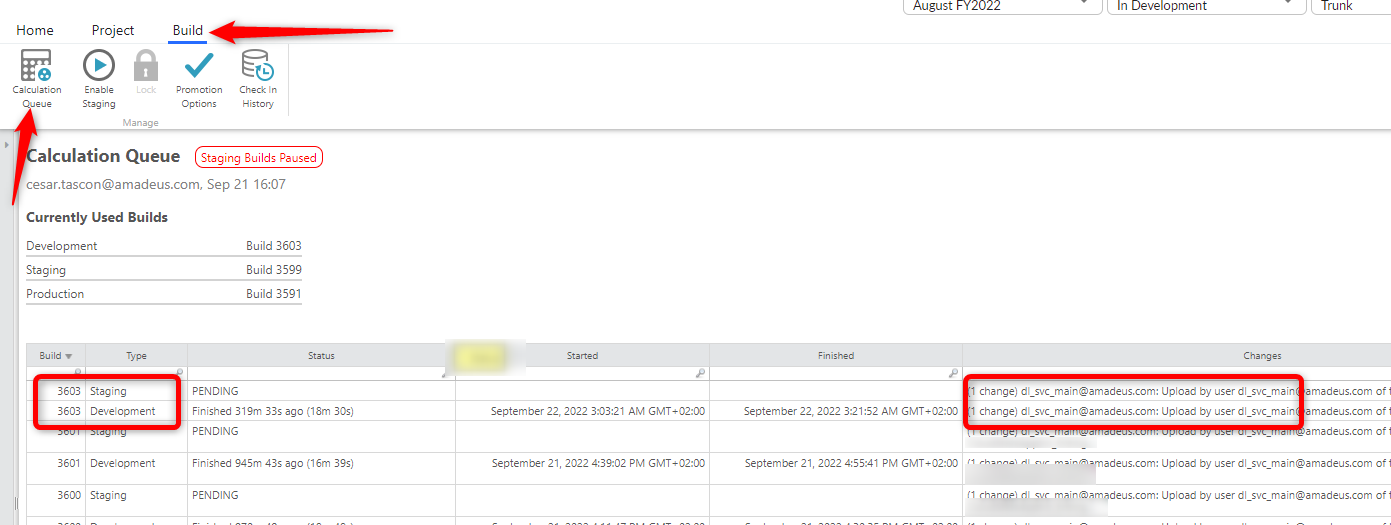

If the connector run was successful, there will be a pair of calculation jobs, one for DEV and one for STG. You should also see that it was triggered by your Datalink userid. The calculations don't start immediately and they take a while.​​ See that for us, it is about 20', plus the few minutes the job takes to start.
Also, once finished the calculations, you'll have to click on the Update Workspace in the Home menu:
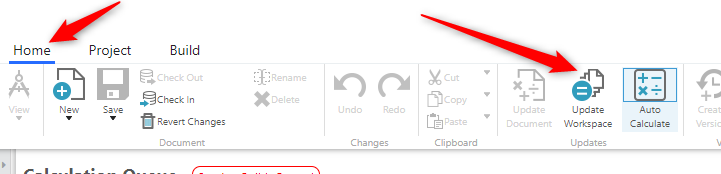

After that, you'll see the new data on your table in DEV. 
To see it in Staging, you'll have to wait until the corresponding build finishes.
For Production, you'll have to promote it.

If this doesn't happen, you might have to open a Support ticket.

I hope this helps.


#TBMStudio
Renee Daignault's profile image
Renee Daignault
Hello - My first few questions are: Did a build kick off? Or did an environment open for Uploader Service? I imagine there might be a timing issue so the data is going to the wrong time period/table or the datalink failed validation and is in the uploader service dev environment. 

Lets start with these questions and then we will go from here.
#TBMStudio