Platform

 View Only

 How to systematically remove values

Jump to  Best Answer
  • TBMStudio
Travis Cole's profile image
Travis Cole posted Wed January 17, 2024 10:20 AM

I am trying to bring my forecast and use it in future time periods. To be exact i want all future time periods for Cost to be Forecast and only have actuals in months we have them.

For Example: when we get Jan Actuals, i want Jan to be actuals and Feb-Dec to be forecast, the only way i can accomplish this right now is manually export the forecast, remove values for January and then upload the doc and load each data set for actuals as monthly versions, upload every month - this stops the actuals from going into future periods and i use forecast for those months...this is a manual step in an otherwise automated process (we pull in forecast from planning, so each time we update forecast i have to do this manual step.

Anyone know if there is a way to automate removing the column?


#TBMStudio
Kristine Klein's profile image
Kristine Klein  Best Answer

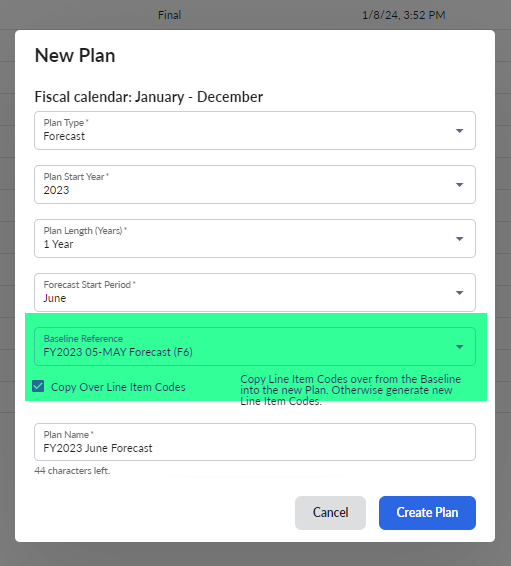
After you use Spend Management to bring in your new month's actuals. Create a new plan for the forecast. When you create your new plan,  select the previous forecast plan as your baseline reference.  In the picture. The plan will have actuals from Jan to May. Jun to Dec would be forecast.

#TBMStudio