Platform

 View Only

 Highlight Column with Time Period not working

Jump to  Best Answer
  • TBMStudio
Jemyla Nicole Velilla's profile image
Jemyla Nicole Velilla posted 05/15/24 01:00 AM

Hi everyone,

I would like to get some insights about the "Highlight" data column feature.

My goal is to highlight my column based on a condition. In my case, we would like to highlight column "Overall Capex%" in each quarter if it is greater than 80% . 

When I configure the Highlight formula without any time period column, it works perfectly as below:

Highlight formula: =IF({Overall Capex%} > Value("0.8","en_US"),"#FFBF00","")

But when I add the time period (Quarter) column, the Highlight no longer works.

Tried some work around to set formatting using formula instead by inserting a new column, but the data gets all BLANK once quarters column is added. Same behavior when using NumberFormat posColor formula.

Without the time period:

With time period: 

Is there any other way to highlight a cell or even just a number format while showing data per quarter and allows me to filter in the column search bar (using >0.8 mathematical operator for example) ? 

Thanks in advance!

Jemyla


#TBMStudio
Pam Mercier's profile image
Pam Mercier  Best Answer

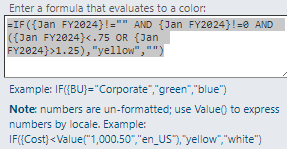
We  ran in to this a couple of years ago and were told that what you are trying to do is not possible due to a bug.  (Apptio Support ticket- 00316269 opened 9/19/2022) I thought I could set the column formatting and then add in time and it would work- but it does not work that way.  Instead, you have to add in time and then set each of the columns with a highlighting formula specific to the time column.   

I am only using one value so my columns are just Month/ Year.   I have to go in each column and do a specific highlight formula for each with the month/year.  And each new year that i  open i have to go in and configure the report.   It is a workaround but not ideal.  I'm not sure how I would do it with two values in the report....may have to play around with the name of the column heading format in the rule.  
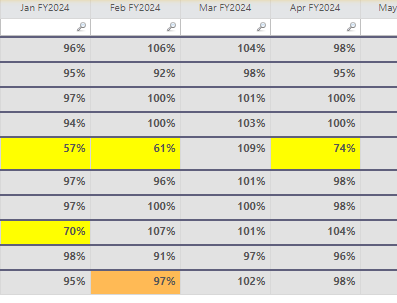
Each column has to have its own highlight formula entered after time is added in.  

#TBMStudio
Varad Rajeev Muthal's profile image
Varad Rajeev Muthal

Hello @Jemyla Nicole Velilla, I acknowledged your query, will get back to you as soon as get the expert guidance on this.

Regrads,
Varad


#TBMStudio
Jemyla Nicole Velilla's profile image
Jemyla Nicole Velilla

Hi @Pam Mercier,

Thanks for sharing your inputs.

I have tried to have one value for my columns and add the highlight formula for each column and it works just like yours. However, when it comes to multiple columns, it is no longer working. I cannot find any other work around to make it work, seems like this bug really needs fixing else highlight function won't be helpful at all for slightly complex tables.


#TBMStudio