Platform

 View Only

 Exporting a table/report without 'Total' row using Apptio connector

Jump to  Best Answer
  • TBMStudio
Apptio Community Member's profile image
Apptio Community Member posted 07/23/21 07:25 AM
Hi,

I have a requirement where I need to export a table to a Local drive using an Apptio connector. However, because the user is going to run additional scripts on the report and doesn't want the total row, I am checking if there is a way to remove this while exporting the file.
#TBMStudio
Guillermo Cuadrado's profile image
Guillermo Cuadrado  Best Answer

When editing the report, in the Data tab click on the Sum icon and uncheck the Show Total Row option. It is checked by default on every table:
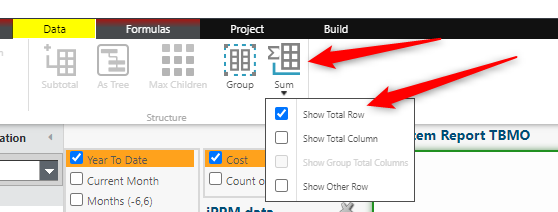
 
If you need the total row for online viewing, you can create a different version of the report just for Datalink, and have it invisible for regular users. Do this only if absolutely necessary, as Apptio will take time calculating both versions of the report in every promotion!
 
I believe this will do what you want.
Good luck, @Saaraunsh Rege.


#TBMStudio
Jenny Franklin's profile image
Jenny Franklin
Commenting for additional visibility - hoping someone who has done this can share! 😊
#TBMStudio
Apptio Community Member's profile image
Apptio Community Member
Hi @Guillermo Cuadrado Thank you for the response.
​However, I believe this option is for the table in the report and not for a TBM Studio table.

PS: Reason I am exporting the table and not the report is because reports don't provide the option of exporting as an .xlsx 


#TBMStudio