Platform

 View Only

 Different currencies for different users?

Jump to  Best Answer
  • TBMStudio
Guillermo Cuadrado's profile image
Guillermo Cuadrado posted 08/26/21 03:24 AM

I have a report that displays like this:

Our locale is European, so it should display EUR values. We have not customized the prefix, format or suffix.

Yesterday, one user reported that they see it as USD. Indeed, if I impersonate this user, I see this instead:

I checked the user preferences, and it displays the same locale as me—the default of our installation:


The role—Amadeus View Only—is the same everybody else has. I impersonated a different user, and I could see the numbers in the right format (EUR).

What else could be in play and how to fix it? Maybe this person's Windows or browser settings??

P.S.
I am considering changing the settings in the report, but before I'd like to know what's going on.


#TBMStudio
Guillermo Cuadrado's profile image
Guillermo Cuadrado  Best Answer

The issue is still there, even after last weekend's upgrade, @Renee Daignault, @Debbie Hagen.
Our config is as follows:

Client Version 1.6.0+r12-released-7791
Client Component Version 0.5.0+141785.78cafa50
Server Version 12.9.10.1-174
Shared Components Version 1.9.2+1.9.2.1663b2c5
Application Template 7470

I just impersonated the user that reported it and still see the USD sign isntead of EUR.

The user settings are identical to mine (except that I'm an Admin, of course):
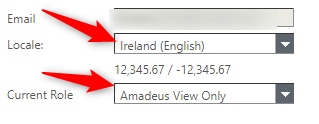
Also, it doesn't have to do with this person's browser settings, as I see the problem on my own machine. In the previous iteration I tried an Incognito window in Chrome and even MS-Edge.​​

Also, in the Project settings, the locale is set to Ireland (English).

This happens in different reports, so it must be something else (not the report itself). I just checked it and it has just the BU Name and the Cost metric, nothing fancy about it:
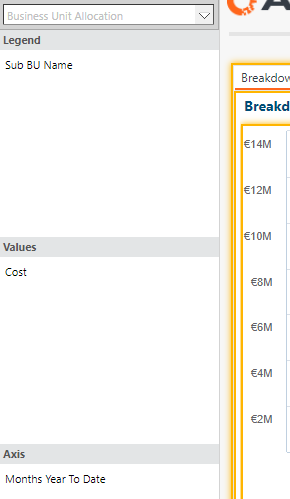
As you can see, in TBM Studio it displays correctly (for me).

I tried changing the user's role to Power User, but I could still see the Dollar signs (after logging off and impersonating them again).

I was trying to see if someone out there in the community had seen something like this, but I guess I'll open a ticket with Support.

Thanks for reaching out, anyway!


#TBMStudio
Harshal Singhvi's profile image
Harshal Singhvi
Hi Guillermo, thanks for posting this.

Please try resetting cache of this user and check windows or browser setting. Please let me know if this works.

Meanwhile, I will check and see if I can find something more on this. Thanks!

#TBMStudio
Guillermo Cuadrado's profile image
Guillermo Cuadrado
I have tried in another, clean browser and in a Chrome incognito window and I get the same behavior.
#TBMStudio
Harshal Singhvi's profile image
Harshal Singhvi
Thanks for writing back to us. I have attached a link below on how to setup multicurrency, please let me know if this helps.

https://community.ibm.com/community/user/viewdocument/how-to-configure-multicurrency?CommunityKey=7a610da7-1c62-4ccf-81e0-01925811038c&tab=librarydocuments
#TBMStudio
Guillermo Cuadrado's profile image
Guillermo Cuadrado

Interesting. I think it is not related to multi-currency, as I don't want to do any kind of conversion from EUR to USD.
The comments in the article mentioned by @Harshal Singhvi made me check our Project settings and I see the following:


I have selected Single Currency instead of Euro. Might this be the cause? Would every user see EUR, no matter what?


#TBMStudio
Renee Daignault's profile image
Renee Daignault
Hello @Guillermo Cuadrado have you resolved your issues?

I have a few thoughts. If you change the settings in project settings to EUR it would change everything to EUR. I would be hesitant to do so for only one person having an issue.

I have a couple of questions:
Did the user try changing the Locale location? ​
Do you have row level security? 
What is on the report setting?
#TBMStudio
Debbie Hagen's profile image
Debbie Hagen
Hi @Guillermo Cuadrado,

Were you able to get this resolved?  I see that @Renee Daignault posted some follow up questions.  If you were able to resolve it, please let us know the solution here and 'I'll close it out. 

if you've not yet got it sorted, please respond to Renee's questions and we'll see if we can make some progress on it for you.

Cheers,
Deb​​
#TBMStudio
Renee Daignault's profile image
Renee Daignault
@Guillermo Cuadrado A support ticket does sound like the best path forward! I would be curious to hear what happens! ​
#TBMStudio
Debbie Hagen's profile image
Debbie Hagen
Hi @Guillermo Cuadrado,
A support ticket does sound like the best option at this point.  Hopefully it's something easy, and if it turns out to be a bug, that way we'll get it in the system so we can work toward getting it fixed.

Let us know how it turns out.  I'm following this thread. ​​​
#TBMStudio