More background information and your goals on the first 2 questions would allow for a more specific answer and suggestions.
Short answer: Yes, it can be done.
It really depends on what you are trying to compare and your goal. For example, this formula is a simple comparison: =IF(Column1 = Column2, "TRUE", "FALSE"). Keep in mind performance impacts as well and avoid nested IFs.
----------------
The row filter operator INTERSECTS will return the records that exist in both Dataset1 and Dataset2. Think of the middle portion of a Venn Diagram.These row filter operators work with the data type of a string.
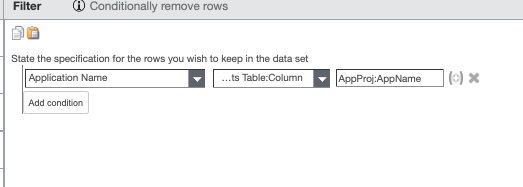
Example: Project is dataset1; Project Application is dataset 2. My goal is to keep all the project records that have an application associated to them in Project Application (dataset 2). I could use "Intersects Table:Column" to accomplish this. If the application "FAKE-001" was in both datasets, it would be included in the end result. If "APP-999" was only in dataset 1 and does not exist in dataset 2, it would be removed.
NOT INTERSECT is the opposite of INTERSECT. I didn't have this option in my row filter operators. This can be thought of like a FULL [OUTER] JOIN or the 2 outside circles of a Venn Diagram (Not the middle portion).
Below is a screenshot of the formula in use.
 #ApptioforAll