Platform

 View Only

 Component Configuration not displaying when you click on a table

Jump to  Best Answer
  • TBMStudio
Kristine Klein's profile image
Kristine Klein posted 04/04/23 10:23 AM

I have one table where when you click on it, the Component Configuration does not display. It just stays grey like you didn't click on an object. All other tables work fine and I do not get an error. Does anyone know how to fix this?


#TBMStudio
George _'s profile image
George _  Best Answer

This sounds like you may be working with a Legacy Report Table. Legacy Report Tables do not use the Ad Hoc Component Configuration panel.
To find out if this is a Legacy Report Table, right-click on the Table border to view the options menu. If you see "Edit Data Path...", it's a Legacy Report Table.
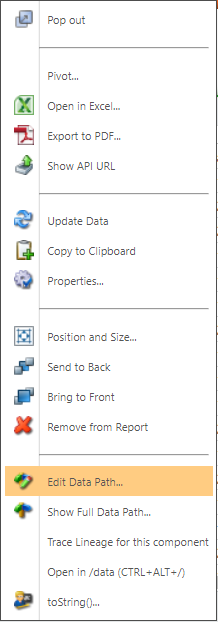

#TBMStudio
Abekan Koffi's profile image
Abekan Koffi

Hi @Kristine Klein have you tried to reload that table or recreate it ?


#TBMStudio
Kristine Klein's profile image
Kristine Klein

I am trying to avoid recreating it because it has a detailed filter that I don't have a copy of.  If I have no other choice, I might have to start over with a new report. I created it a year ago as an exceptions report. It worked up to a month ago. 


#TBMStudio
Kristine Klein's profile image
Kristine Klein

Here is a picture of it


#TBMStudio
George _'s profile image
George _

Kristine Klein, I recommend filing a case with Apptio Support to assist you with any configuration questions for this component. 


#TBMStudio