Skip main navigation (Press Enter).
Log in
Toggle navigation
Community
Topic Groups
Champions
Meet the Champions
Program overview
Rising Champions
IBM Champions group
User Groups
Find your User Group
Program overview
Events
TechXchange Conference
Community events
All IBM events
Participate
IBM Community Hub
Welcome Corner
Blogging Guidelines
Member directory
Community leaders
Resources
Badge Program
IBM Support Customer Day
Log in
IBM Cloudability
×
Group Home
Threads
767
Blogs
56
Upcoming Events
2
Library
108
Members
1.3K
View Only
Back to {0}
Cloudability api access using windows - status":401
Jump to
Best Answer
Thread closed by the administrator, not accepting new replies.
Add a tag
Cloudability
x
User Tags may not contain the following characters: @ # $ & :
Apptio Community Member
posted 10/19/22 03:16 AM
Hi All,
Trying to access cloudability api's using api keys but getting authorization error using curl, though i can do the same by fetching bearer token from browser.
OS - windows
Referred Doc -
Getting started with Cloudability API V3 (apptio.com)
Command - curl https://api.cloudability.com/v3/rightsizing/aws/recommendations/ec2?filters=resourceIdentifier==id -u "<publickey>:"
Tried - Public key , secret keys, raw and encoded, still getting the below error
{"error":{"status":401,"code":"unauthorized","messages":["Unauthorized"],"uniqueid":"c548ac04-4f75-11ed-80a3-fe4bc0627e68","typeid":"0a0ce74595fb8950c4bc83545a2145e0","traceid":"c54767cc-4f75-11ed-80a3-fe4bc0627e68"}}
#Cloudability
Andrew Midgley
posted 10/19/22 05:52 PM
Best Answer
Hi @Ashwani Singh,
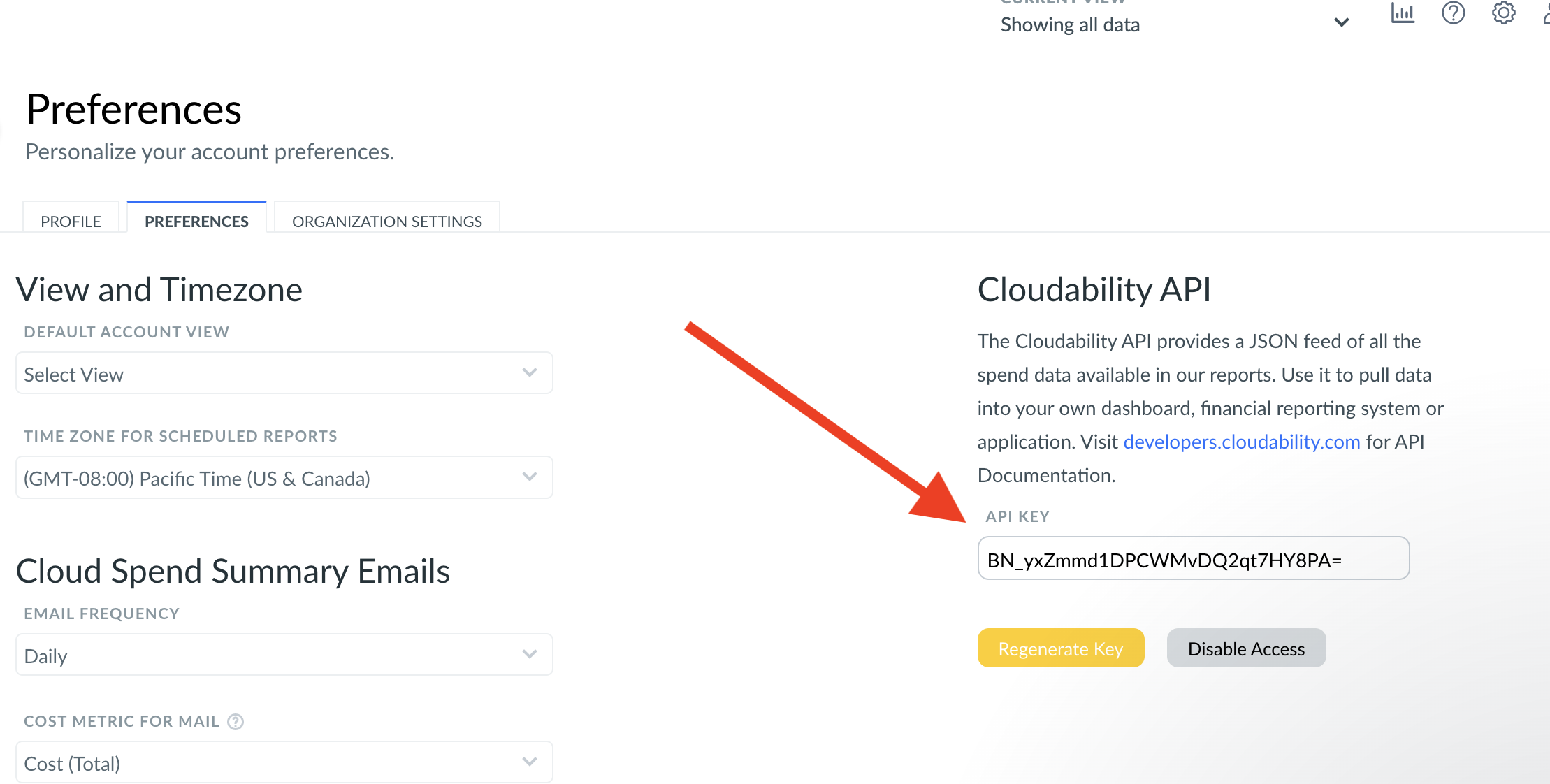
Looks like it's just an API key issue. What you need to do is replace <publickey> with the API key found in Cloudability at https://app.apptio.com/cloudability#/settings/preferences
Obviously replace with your key.
#Cloudability
Jeff Hyatt
posted 10/19/22 11:08 AM
Hi Ashwani - are you using the key provided in your Cloudability account profile (not the Apptio key pair)? It's in Cloudability under Manage Profile / Preferences. That one works for me.
#Cloudability
Related Content
Utilization Endpoint Launch on v3 API
Andrew Midgley
Added 09/12/22
Library Entry
Cost Reports Endpoint Launch on v3 API
Andrew Midgley
Added 07/28/22
Library Entry
Users Endpoint Launch on v3 API
Andrew Midgley
Added 10/27/22
Library Entry
Account Groups Endpoint Launch on v3 API
Andrew Midgley
Added 09/16/22
Library Entry
Quick Starter: Migrating from v1 to v3 of the Cloudability API
Andrew Midgley
Added 10/10/22
Library Entry
Copyright � 2026 IBM Community. All rights reserved.
Powered by Higher Logic