With PowerVC 1.3.2.1, support was added for Hitachi storage providers. Communication between the PowerVC management server and the Hitachi storage provider is handled by the Hitachi Command Controller Interface (CCI). The CCI uses a configuration file (horcm.conf) on the PowerVC management server, which points to a command device on the storage controller. To increase availability on the G600 array, the array can have two IP addresses. These dual command devices allow the CCI to communicate with either IP address on the array. In this blog, I will discuss how PowerVC sets up the configuration files and how you can modify them if you want to use a dual command device configuration for your Hitachi storage environment.
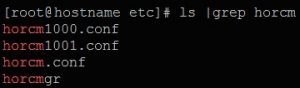
Fortunately, everything required for the single command device is handled by PowerVC during the registration process of your storage provider. When a Hitachi provider is registered successfully, PowerVC generates two horcm.conf files. The actual file names are dependent on the registration values used. The files will be placed in your /etc directory and the names will be of the format horcm####.conf. The 4 digit number is derived from the HORCM port numbers that are used for registration.
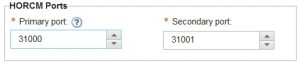
The leading 3 is dropped from the port number and the remaining four numbers are used. For example, a HORCM port number 31001 would have a configuration file name of horcm1001.conf.
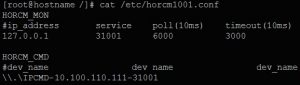
Taking a look at the contents of the PowerVC generated horcm1001.conf file, we can see there are two sections: HORCM_MON and HORCM_CMD. The first section refers to the PowerVC management server and specifies four configuration options. The only option that differs in the files is the service option. This option specifies the HORCM port that this command device will listen on. PowerVC will always default to the values shown for the other three properties. The second section is where the command device is specified. The format here is \\.\IPCMD--31001. The only variable here is the command device address. It is important to notice that the 31001 here is not the same as the HORCM port number in the previous section. This value is a default port number that the storage node will listen on. This value is constant and will never change. In order to add a second command device, you just need to include the new command device in this line. Keep the first command device as-is and make sure to separate them with a few spaces (at least one). So if the new command device has an address of 10.100.110.112, our new configuration file would look like this::
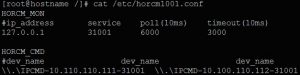
Once you restart the Cinder service on the PowerVC management node, communication will be enabled for both command devices. If you have any questions, please ask them below. And don't forget to follow us on
LinkedIn,
Facebook, and
Twitter!
By
David Rosales
IBM Openstack on Power Advisory Engineer
#Storage#Storage#PowerVC